Nissan Sentra B18 (2020-2025) Owner's Manual: Cruise control
Precautions on cruise control
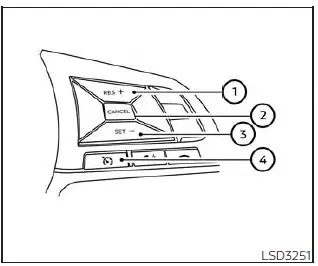
- RES + switch
- CANCEL switch
- SET- switch
- Cruise control switch
- If the cruise control system in the Nissan Sentra malfunctions, it will
cancel automatically. The
 indicator in the instrument panel will blink to warn the driver.
 - If the indicator blinks, switch the Cruise control off and have the system inspected. It is recommended that you visit an authorized NISSAN dealer for this service.
- The
 indicator may blink when the Cruise control switch is pressed while simultaneously
pressing the RES +, SET-, or CANCEL switch. To correctly set the cruise control
system on the Nissan Sentra, follow the procedures described below.
indicator may blink when the Cruise control switch is pressed while simultaneously
pressing the RES +, SET-, or CANCEL switch. To correctly set the cruise control
system on the Nissan Sentra, follow the procedures described below.
WARNING
Do not use the cruise control when driving under the following conditions:
- When it is not possible to maintain a constant vehicle speed.
- In heavy traffic or traffic with frequent speed changes.
- On winding, curvy, or steep hilly roads.
- On slippery road surfaces such as rain, snow, or ice.
- In very windy conditions.
Using cruise control in these situations could lead to loss of vehicle control and result in an accident.
Cruise control operations
The cruise control system in the Nissan Sentra allows the vehicle to maintain a constant speed between approximately 25 and 89 mph (40 to 144 km/h) without the driver needing to keep a foot on the accelerator pedal.
To activate cruise control, press the Cruise control switch. The
 indicator in the instrument panel will illuminate.
To set a cruising speed, accelerate the Nissan Sentra to the desired speed, press the SET- switch, and release it. Remove your foot from the accelerator pedal; the vehicle will maintain the selected speed.
- To pass another vehicle, depress the accelerator pedal. Once released, the Nissan Sentra will return to the previously set cruising speed.
- The vehicle may not maintain the selected speed on steep inclines or declines. If this occurs, drive without using cruise control.
To cancel the preset cruising speed, use one of the following methods:
- Press the CANCEL switch.
- Tap the brake pedal.
- Turn the Cruise control switch off. The
 indicator in the instrument panel will turn off.
The cruise control system will automatically cancel if:
- The brake pedal or clutch pedal (Manual Transmission models) is depressed while pressing the RES+ or SET- switch, which clears the preset speed from memory.
- The Nissan Sentra slows by more than approximately 8 mph (13 km/h) below the set speed.
- The clutch pedal is depressed (Manual Transmission models) or the shift lever is moved to N (Neutral) (Continuously Variable Transmission models).
To reset to a higher cruising speed, use one of the following methods:
- Depress the accelerator pedal to the desired speed, then press and release the SET- switch.
- Press and hold the RES+ switch until the desired speed is reached, then release it.
- Press and release the RES+ switch repeatedly; each press increases the set speed by approximately 1 mph (1.6 km/h).
To reset to a lower cruising speed, use one of the following methods:
- Lightly tap the brake pedal until the desired speed is reached, then press and release the SET- switch.
- Press and hold the SET- switch and release it once the Nissan Sentra slows to the desired speed.
- Press and release the SET- switch repeatedly; each press decreases the set speed by approximately 1 mph (1.6 km/h).
To resume the previously set cruising speed, press and release the RES+ switch. The Nissan Sentra will return to the last stored cruising speed once vehicle speed exceeds approximately 25 mph (40 km/h).
- How to select the cruise control mode
- Vehicle-to-vehicle distance control mode switches
- Vehicle-to-vehicle distance control mode limitations
- System temporarily unavailable
- Nissan Sentra System Maintenance: Intelligent Cruise Control & Safety
Other materials:
Types of tires
WARNING
When changing or replacing tires on your Nissan Sentra, always ensure
that all four tires are of the same type (Summer, All Season, or Snow) and the
same construction. A NISSAN dealer can assist you in selecting the correct tire
type, size, speed rating, and availability suitabl ...
Basic Inspection. Diagnosis and Repair Work Flow
Diagnosis and Repair Work Flow
Work Flow
Work Flow
OVERALL SEQUENCE
DETAILED FLOW
GET INFORMATION FOR SYMPTOM
Get the detailed information from the customer
about the symptom (the condition and the environment when
the incident/malfunction occurred) usi ...
Preparation. Preparation
Preparation
Special Service Tools
Special Service Tools
The actual shape of the tools may differ from
those illustrated here.
Tool number
(TechMate No.)
Tool name
...