Nissan Sentra B18 (2020-2025) Owner's Manual: Vehicle-to-vehicle distance control mode switches
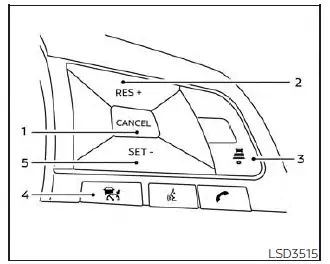
The Intelligent Cruise Control (ICC) system in the Nissan Sentra is operated using the ICC master switch together with four dedicated control switches, all conveniently mounted on the steering wheel for intuitive access while driving.
- CANCEL switch: Deactivates the ICC system without erasing the previously set cruising speed, allowing quick manual control when needed.
- RES+ switch: Resumes the previously set speed or increases the cruising speed incrementally when pressed repeatedly.
- DISTANCE
 switch: Allows the driver to change the following distance to the vehicle
ahead. Available distance settings include:
switch: Allows the driver to change the following distance to the vehicle
ahead. Available distance settings include:
- Long
- Middle
- Short
- ICC Switch: The master switch used to activate or deactivate the Intelligent Cruise Control system in the Nissan Sentra.
- SET- switch: Sets the desired cruise speed or reduces the set speed incrementally when pressed.
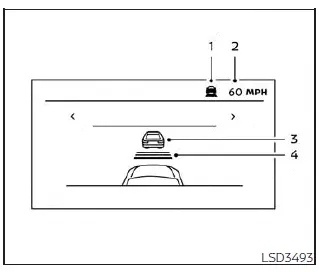
Vehicle-to-vehicle distance control mode display and indicators
The ICC system display is located between the speedometer and tachometer in the Nissan Sentra instrument cluster, providing clear real-time feedback to the driver.
- This indicator shows the current ICC system status using different colors:
- ICC system ON indicator (gray): Indicates that the ICC system is turned on and ready.
- ICC system SET indicator (green): Indicates that the cruising speed has been successfully set.
- ICC system warning (orange): Indicates a malfunction or system condition requiring driver attention.
- Set vehicle speed indicator: Displays the selected cruising speed.
For Canadian Nissan Sentra models, the speed is displayed in km/h.
- Vehicle ahead detection indicator: Shows whether the system has detected a vehicle traveling ahead in the same lane.
- Set distance indicator: Displays the currently selected following distance, as chosen using the distance switch.
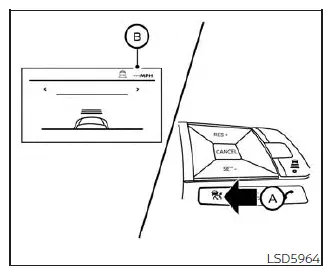
Operating vehicle-to-vehicle distance control mode
To turn on the Intelligent Cruise Control system, briefly push and release the ICC switch A. The ICC system ON indicator (gray), set distance indicator, and set vehicle speed indicator B will illuminate, indicating that the Nissan Sentra is in standby mode and ready for speed setting.
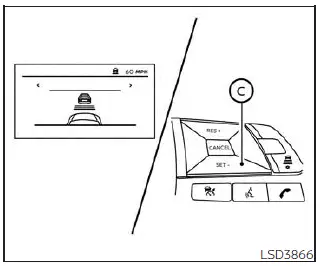
To set the cruising speed, accelerate the Nissan Sentra to the desired speed, then push and release the SET- switch C. The ICC system SET indicator (green), vehicle ahead detection indicator, set distance indicator, and set vehicle speed indicator B will illuminate.
Remove your foot from the accelerator pedal.
The Nissan Sentra will maintain the selected cruising speed or adjust it automatically when following a vehicle ahead.
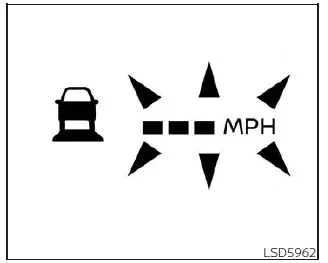
When the SET- switch is pressed under the following conditions, the ICC system cannot be set and the ICC indicators will blink for approximately 2 seconds:
- When traveling below approximately 20 mph (32 km/h) and no vehicle ahead is detected
- When the shift lever is not in D (Drive) or Manual mode
- When the parking brake is applied
- When the driver is actively applying the brakes
When the SET- switch is pressed under the following conditions, the system cannot be set and a warning chime will sound, accompanied by a message display:
- When the Vehicle Dynamic Control (VDC) system is turned off (to use the ICC system, the VDC system must be enabled; turn the ICC system off and on again after enabling VDC)
- When the VDC system is actively operating
- When a wheel is slipping (ICC operation is possible only after wheel slip has stopped)
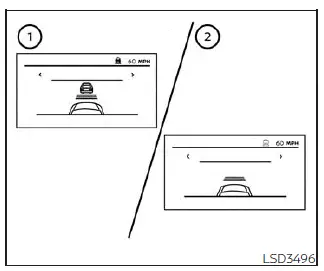
- System set display with a vehicle detected ahead
- System set display without a vehicle detected ahead
The driver sets the desired cruising speed according to road and traffic conditions. When no vehicle is detected ahead, the ICC system in the Nissan Sentra maintains the selected speed similarly to a conventional cruise control system and displays the set speed in the instrument cluster.
Vehicle detected ahead
When a vehicle is detected traveling ahead in the same lane, the ICC system automatically decelerates the Nissan Sentra by controlling the throttle and applying the brakes to match the speed of the slower vehicle. The system then continuously adjusts vehicle speed to maintain the driver-selected following distance.
NOTE:
- The brake lights of the Nissan Sentra illuminate when braking is applied automatically by the ICC system.
- A mechanical or hydraulic noise may be heard during braking operation. This is a normal operating characteristic and does not indicate a malfunction.
When a vehicle ahead is detected, the vehicle ahead detection indicator remains illuminated to inform the driver that adaptive distance control is active.
The ICC system will also display the currently set cruising speed and the selected following distance, providing clear visual feedback to the driver in the Nissan Sentra instrument cluster.
Vehicle ahead not detected
When a vehicle is no longer detected ahead, the Intelligent Cruise Control (ICC) system in the Nissan Sentra gradually accelerates the vehicle to return to the previously set cruising speed. Once this speed is reached, the system maintains it automatically.
When no vehicle is detected ahead, the vehicle-ahead detection indicator turns off, confirming that the lane ahead is clear.
If a vehicle appears ahead during acceleration toward the set speed, or at any time while the ICC system is operating, the system immediately adjusts speed to control and maintain a safe distance to that vehicle.
When a vehicle is no longer detected and vehicle speed falls below approximately 15 mph (24 km/h), the ICC system will cancel automatically.
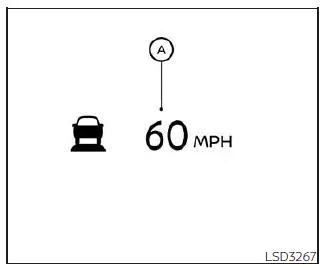
When passing another vehicle, the set speed indicator A will flash if the Nissan Sentra exceeds the preset cruising speed. The vehicle-ahead detection indicator will turn off once the road ahead is clear. When the accelerator pedal is released, the vehicle smoothly returns to the previously set speed.
Even when the Nissan Sentra speed is set using the ICC system, the driver may depress the accelerator pedal at any time to accelerate more quickly when required by traffic conditions.
How to change the set vehicle speed
To cancel the preset cruising speed, use one of the following methods:
- Press the CANCEL switch. The set vehicle speed indicator will turn off.
- Tap the brake pedal. The set vehicle speed indicator will turn off.
- Turn the ICC
 switch off. The ICC indicators will turn off.
To reset to a faster cruising speed, use one of the following methods:
- Depress the accelerator pedal. Once the Nissan Sentra reaches the desired speed, press and release the SET- switch.
- Press and hold the RES+ switch. The set vehicle speed will increase by approximately 5 mph (5 km/h for Canada).
- Press and quickly release the RES+ switch. Each press increases the set speed by approximately 1 mph (1 km/h for Canada).
To reset to a slower cruising speed, use one of the following methods:
- Lightly tap the brake pedal. When the vehicle reaches the desired speed, press and release the SET- switch.
- Press and hold the SET- switch. The set vehicle speed will decrease by approximately 5 mph (5 km/h for Canada).
- Press and quickly release the SET- switch. Each press decreases the set speed by approximately 1 mph (1 km/h for Canada).
To resume the previously set cruising speed, press and release the RES+ switch. The Nissan Sentra will resume the last stored cruising speed once vehicle speed exceeds approximately 20 mph (32 km/h).
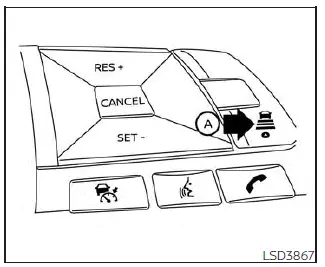
How to change the set distance to the vehicle ahead
The following distance to the vehicle ahead can be adjusted at any time based on traffic conditions while using the ICC system in the Nissan Sentra.
Each time the distance
 switch A is pressed, the selected distance cycles through long, middle, and short,
then returns to long in sequence.
switch A is pressed, the selected distance cycles through long, middle, and short,
then returns to long in sequence.
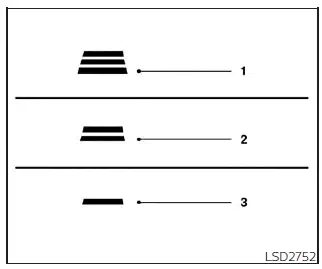
Distance / Approximate distance at 60 mph (100 km/h) [ft (m)]
- Long: 200 (60)
- Middle: 150 (45)
- Short: 90 (30)
- The following distance automatically adjusts based on vehicle speed.
Higher vehicle speeds result in longer following distances.
- The selected distance setting is retained even if the Nissan Sentra engine is turned off and restarted.
Approach warning
If the Nissan Sentra approaches a vehicle ahead too quickly due to sudden deceleration of that vehicle or if another vehicle cuts into the lane, the ICC system alerts the driver using an audible chime and a visual warning on the ICC display. Apply the brake pedal to maintain a safe following distance if:
- The warning chime sounds.
- The vehicle-ahead detection indicator blinks.
The warning chime may not sound in certain situations where the distance between vehicles changes only slightly, including:
- When both vehicles are traveling at the same speed and the distance remains constant.
- When the vehicle ahead accelerates and the distance increases.
- When a vehicle cuts in very close to your Nissan Sentra.
The warning chime will not sound when:
- The vehicle approaches parked vehicles or vehicles moving very slowly.
- The accelerator pedal is depressed, temporarily overriding the ICC system.
NOTE:
The approach warning chime may sound and the system display may blink when the ICC sensor detects objects near the side of the Nissan Sentra or along the edge of the roadway. In such situations, the Intelligent Cruise Control (ICC) system may temporarily decelerate or accelerate the vehicle. The ICC sensor can detect these objects when driving on winding roads, narrow lanes, hilly terrain, or when entering or exiting curves. In these conditions, the driver must manually control the vehicle speed and maintain a safe following distance ahead of the Nissan Sentra.
In addition, sensor sensitivity may be influenced by vehicle operation, such as steering input or lane position, as well as by traffic conditions or the condition of surrounding vehicles. For example, the presence of a damaged vehicle nearby may affect how the ICC system in the Nissan Sentra interprets sensor data.
Automatic cancellation
An audible warning chime will sound and the Intelligent Cruise Control system will be canceled automatically under the following conditions:
- When a vehicle ahead is not detected and the Nissan Sentra is traveling below approximately 15 mph (24 km/h)
- When the system determines that the vehicle has come to a complete standstill
- When the shift lever is not in the D (Drive) position or L (Low) mode
- When the parking brake system is applied
- When the Vehicle Dynamic Control (VDC) system is turned off
- When the VDC system is actively operating
- When distance measurement is impaired due to dirt, snow, or other obstructions on the ICC sensor
- When wheel slip is detected
- When the radar signal is temporarily interrupted
Other materials:
Removal and Installation
Av Control Unit
Exploded View
Exploded View
1.
AV control unit bracket
(LH)
2.
AV control unit
...
Diagnosis System (distance Sensor)
Consult Function (laser/radar)
CONSULT Function (LASER/RADAR)
APPLICATION ITEMS
CONSULT performs the following functions via CAN communication
with ADAS control unit 2 and the communication with distance sensor.
...
U2141 Can Comm Err (tcm)
Dtc Description
DTC Description
DTC DETECTION LOGIC
DTC No.
CONSULT screen
terms
(Trouble
diagnosis content)
DTC detection condition
...