Nissan Sentra B18 (2020-2025) Owner's Manual: Rear Cross Traffic Alert (RCTA)
WARNING
Failure to follow the warnings and instructions for proper use of the Rear Cross Traffic Alert (RCTA) system in the Nissan Sentra may result in serious injury or death.
- The RCTA system is a driver assistance feature only and does not replace proper driving procedures. It is not designed to prevent contact with vehicles or objects. When backing out of a parking space in the Nissan Sentra, always use the side and rearview mirrors and physically turn to look in the direction the vehicle will move. Never rely solely on the RCTA system.
The RCTA system is designed to assist the driver of the Nissan Sentra when backing out of a parking space. When the vehicle is placed in reverse, the system monitors cross traffic approaching from the right or left side of the vehicle. If approaching traffic is detected, the system provides a visual and audible warning.
RCTA system operation
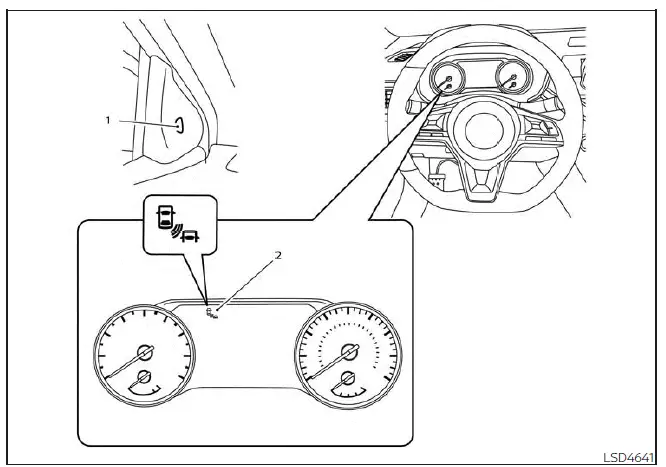
For vehicles with the 7 inch meter display
- Side BSW/RCTA indicator light
- BSW/RCTA indicator on the meter display
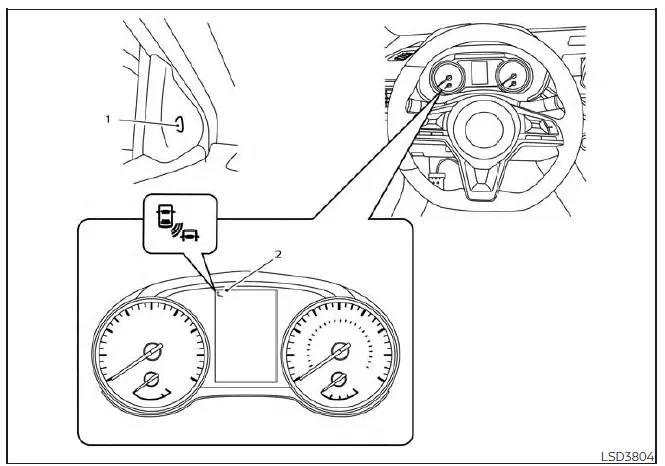
For vehicles with the 4.2 inch meter display
The RCTA system can help alert the driver of the Nissan Sentra to an approaching vehicle while backing out of a parking space.
When the shift lever is in the R (Reverse) position and vehicle speed is below approximately 5 mph (8 km/h), the RCTA system becomes operational.
If the radar sensors detect an approaching vehicle from either side, the system emits a single audible chime and the side BSW/RCTA indicator light flashes on the side from which the vehicle is approaching.
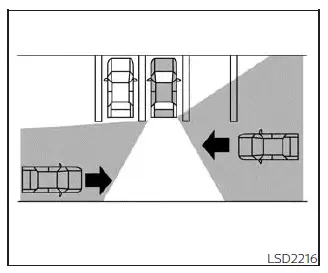
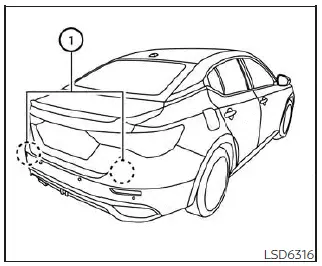
The RCTA system uses radar sensors (1) installed on both sides near the rear bumper of the Nissan Sentra to detect approaching vehicles.
The radar sensors can detect approaching vehicles from a distance of up to approximately 66 ft (20 m), depending on conditions.
How to enable/disable the RCTA system
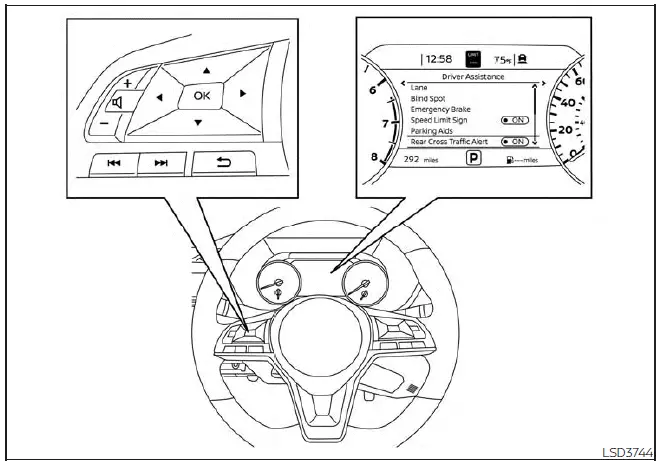
For vehicles with the 7 inch meter display
Follow the steps below to enable or disable the Rear Cross Traffic Alert (RCTA) system on the Nissan Sentra.
1. Press the
 button repeatedly until "Settings" appears in the vehicle information display.
Use the
 button to select "Driver Assistance," then press the OK button.
2. Select "Rear Cross Traffic Alert" and press the OK button to turn the system on or off.
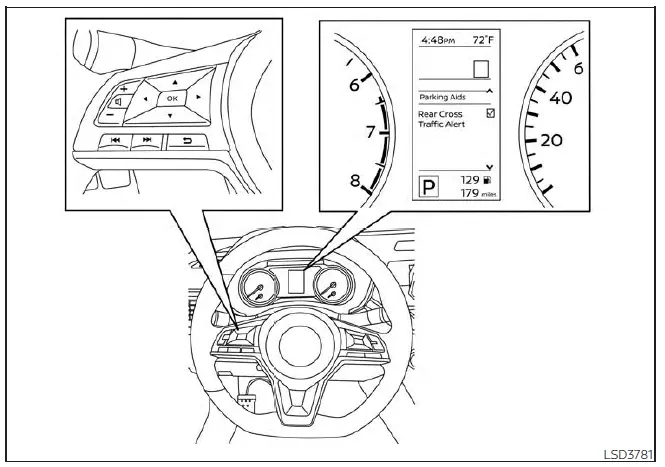
For vehicles with the 4.2 inch meter display
When the RCTA system is enabled, the BSW/RCTA indicator (white) illuminates in the vehicle information display.
NOTE:
- Once enabled or disabled, the RCTA system setting will be retained even if the engine of the Nissan Sentra is restarted.
RCTA system limitations
WARNING
Listed below are the operational limitations of the RCTA system. Failure to operate the Nissan Sentra in accordance with these limitations may result in serious injury or death.
- Always check your surroundings and visually confirm what is behind you
before reversing. The radar sensors detect approaching moving vehicles only
and cannot detect every object, including:
- Pedestrians, bicycles, motorcycles, animals, or child-operated toy vehicles.
- Vehicles passing at speeds greater than approximately 19 mph (30 km/h).
- Vehicles passing at speeds lower than approximately 5 mph (8 km/h).
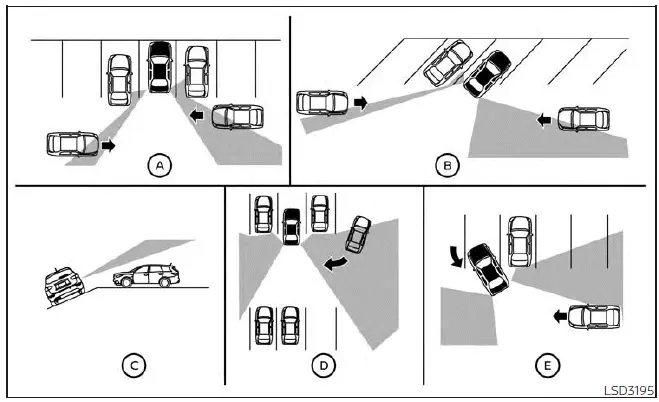
- The radar sensors may not detect approaching vehicles in certain situations:
- Illustration A: When a vehicle parked next to your Nissan Sentra obstructs the radar sensor beam.
- Illustration B: When the Nissan Sentra is parked in an angled parking space.
- Illustration C: When the vehicle is parked on an incline.
- Illustration D: When an approaching vehicle turns into the same parking aisle.
- Illustration E: When the angle between your Nissan Sentra and the approaching vehicle is very small.
- The following conditions may reduce the radar sensors’ ability to detect
other vehicles:
- Severe weather conditions.
- Road spray from surrounding traffic.
- Ice, frost, snow, or dirt accumulation on the vehicle.
- Do not attach stickers (including transparent materials), install accessories, or apply additional paint near the radar sensor areas, as these actions may reduce detection capability.
- Excessive noise, such as high audio system volume or open windows, may interfere with the audible chime and prevent it from being heard.
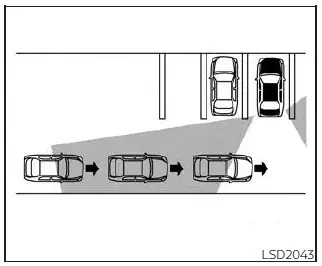
Illustration 1
NOTE:
In situations where several vehicles approach consecutively (Illustration 1) or when vehicles approach from the opposite direction (Illustration 2), the Rear Cross Traffic Alert (RCTA) system in the Nissan Sentra may not sound an audible chime after the first vehicle has passed the radar sensors. This is a normal characteristic of system operation.
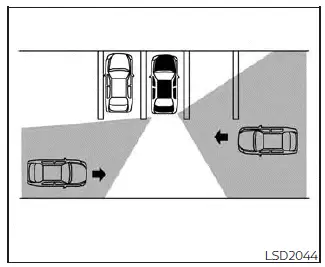
Illustration 2
System temporarily unavailable
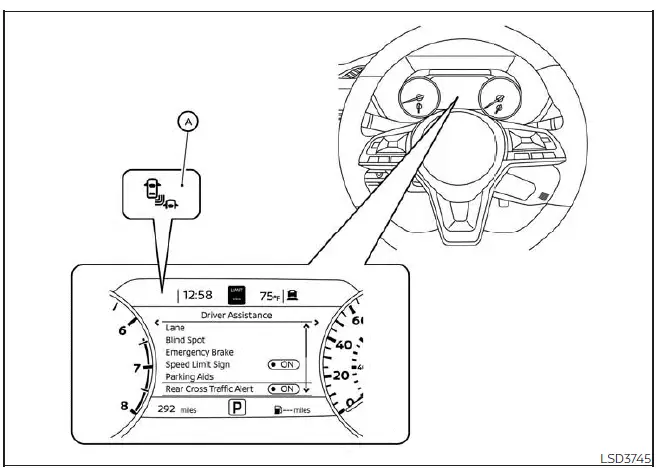
For vehicles with the 7 inch meter display
When side radar blockage is detected, the RCTA system on the Nissan Sentra will be deactivated automatically. A warning message such as "Side Radar Obstruction" or "Unavailable: Side Radar Obstruction" will appear, and the BSW/RCTA indicator (white), if equipped, will blink (A) in the vehicle information display.
The RCTA and BSW systems will remain unavailable until the blocking conditions are resolved.
The radar sensors may be temporarily blocked by ambient conditions such as splashing water, mist, or fog.
Blockage may also occur due to ice, snow, frost, or dirt accumulating on or near the radar sensor surfaces.
NOTE:
If the Blind Spot Warning (BSW) system stops operating, the Rear Cross Traffic Alert (RCTA) system will also stop operating.
Action to take
Once the above conditions no longer exist, the RCTA system on the Nissan Sentra will automatically resume normal operation.
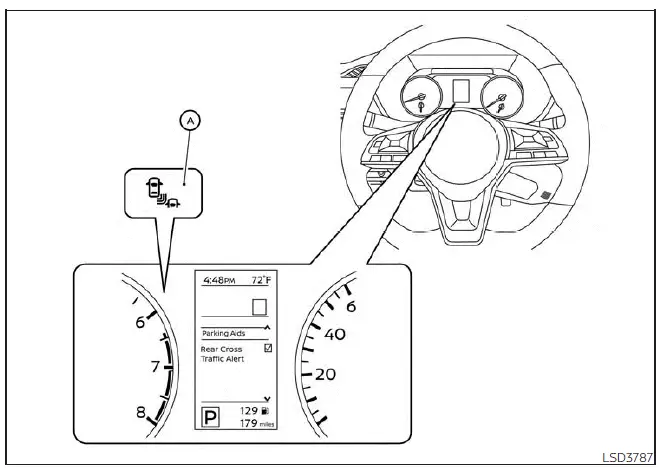
For vehicles with the 4.2 inch meter display
Malfunction
If the Rear Cross Traffic Alert system malfunctions, it will automatically turn off. A system malfunction warning message along with the BSW/RCTA indicator (orange) will appear in the vehicle information display of the Nissan Sentra.
NOTE:
If the BSW system stops operating due to a malfunction, the RCTA system will also stop operating.
Action to take
Safely stop the Nissan Sentra in a secure location, turn the engine off, and restart it. If the warning message continues to appear, have the system inspected. It is recommended that you visit an authorized NISSAN dealer for diagnosis and service.
System maintenance
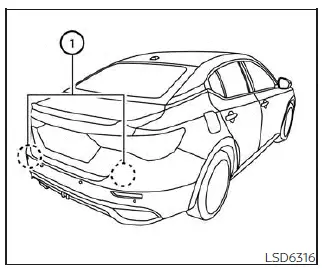
The two radar sensors (1) used by the BSW and RCTA systems on the Nissan Sentra are located near the rear bumper. Always keep the area around the radar sensors clean and free of obstructions.
The radar sensors may be temporarily blocked by environmental conditions such as splashing water, mist, or fog.
Blockage may also be caused by ice, frost, snow, or dirt accumulating on the radar sensor surfaces.
Inspect the rear bumper area regularly and remove any objects or contaminants that may obstruct radar operation.
Do not attach stickers (including transparent materials), install accessories, or apply additional paint near the radar sensor areas.
Do not strike or damage the area around the radar sensors. If the rear bumper or radar sensor area is damaged due to a collision, it is recommended that the Nissan Sentra be inspected by an authorized NISSAN dealer.
Radio frequency statement (Type A) (if so equipped)
For USA
This device installed in the Nissan Sentra complies with Part 15 of the FCC Rules. Operation is subject to the following two conditions:
(1) This device may not cause harmful interference, and (2) this device must accept any interference received, including interference that may cause undesired operation.
FCC Warning
Changes or modifications not expressly approved by the party responsible for compliance could void the user's authority to operate this equipment.
For Canada
This device complies with Industry Canada licence-exempt RSS standard(s).
Operation is subject to the following two conditions: (1) this device may not cause interference, and (2) this device must accept any interference received, including interference that may cause undesired operation of the device.
Frequency bands: 24.05 GHz – 24.25 GHz
Output power: less than 20 milliwatts
Radio frequency statement (Type B) (if so equipped)
For USA
This device installed in the Nissan Sentra complies with Part 15 of the FCC Rules. Operation is subject to the following two conditions:
(1) This device may not cause harmful interference, and (2) this device must accept any interference received, including interference that may cause undesired operation.
FCC Warning
Any changes or modifications not expressly approved by the party responsible for compliance may void the user’s authority to operate this equipment installed in the Nissan Sentra.
For Canada
This device contains licence-exempt transmitter(s) and receiver(s) that comply with Innovation, Science and Economic Development Canada’s licence-exempt RSS standards. Operation is subject to the following two conditions:
1. This device may not cause interference.
2. This device must accept any interference received, including interference that may cause undesired operation of the device.
Radio frequency radiation exposure information:
This equipment installed in the Nissan Sentra complies with radiation exposure limits for an uncontrolled environment. The equipment should be installed and operated with a minimum separation distance of 20 cm between the radiator and the human body to ensure safe operation.
Other materials:
Front Passenger Air Bag Module
Exploded View
Exploded View
1.
Instrument panel
assembly
2.
Front passenger air bag
module
...
Decel G Sensor Calibration
Description
Description
TCM stores calibration data (inherent characteristic value) of
decel G sensor to provide accurate control.
Therefore, it is required to perform calibration of decel G sensor
after the following work is performed.
Removing/ installing ABS actuator ...
P0078 Evt Control Solenoid Valve
Dtc Description
DTC Description
DTC DETECTION LOGIC
DTC
CONSULT screen terms
(Trouble diagnosis
content)
DTC detection
condition
...