Nissan Sentra B18 (2020-2025) Owner's Manual: Nissan Sentra System Maintenance: Intelligent Cruise Control & Safety
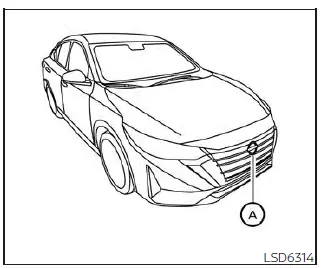
To ensure the long-term reliability of your Nissan Sentra, proper care of the Intelligent Cruise Control (ICC) sensor is essential. The high-precision radar sensor for the Nissan Sentra ICC system is strategically located on the front of the vehicle, typically integrated behind the front emblem or bumper fascia.
To keep the advanced driver assistance systems in your Nissan Sentra operating at peak performance, please strictly observe the following maintenance guidelines:
- Regularly clean the front bumper and emblem area of your Nissan Sentra to remove dirt, mud, or snow that might obstruct the sensor's field of view.
- Exercise caution to avoid striking or damaging the areas surrounding the sensor during parking or low-speed maneuvers.
- Never attach stickers, vinyl wraps, or any transparent films near the sensor area, as these materials can interfere with radar waves and lead to system malfunctions in your Nissan Sentra.
- Avoid installing aftermarket accessories such as brush guards or metallic license plate frames near the sensor, which could cause a total system failure.
- Do not modify, remove, or repaint the front bumper of the Nissan Sentra. If your vehicle requires bodywork or restoration near the front end, it is highly recommended that you consult a certified NISSAN dealer to ensure the ICC sensor remains properly calibrated.
Radio frequency statement
FCC Notice
For USA
This electronic component of the Nissan Sentra complies with Part 15 of the FCC Rules.
Operation of this Nissan Sentra system is subject to the following two conditions:
1. This device may not cause harmful interference, and
2. This device must accept any interference received, including interference that may cause undesired operation.
FCC Warning
Any changes or modifications to the Nissan Sentra communication systems not expressly approved by the party responsible for compliance could void the user's authority to operate the equipment.
This equipment has been rigorously tested and found to comply with the limits for a Class A digital device, pursuant to Part 15 of the FCC Rules. These standards are designed to provide reasonable protection against harmful interference when the equipment is operated in a commercial environment. This Nissan Sentra equipment generates and can radiate radio frequency energy. If not installed and used in accordance with the official Nissan Sentra instruction manual, it may cause interference to radio communications. Operation in a residential area may require the user to correct any interference at their own expense.
Radio frequency radiation exposure information:
This equipment complies with FCC radiation exposure limits set forth for an uncontrolled environment.
This equipment should be installed and operated with a minimum distance of 20 cm between the radiator and your body to ensure safety within the Nissan Sentra cabin.
The transmitter must not be co-located or operating in conjunction with any other antenna or transmitter installed in the Nissan Sentra.
For Canada
This Nissan Sentra device complies with Industry Canada licence-exempt RSS standard(s). Operation is subject to the following two conditions:
1. This device may not cause interference,
2. This device must accept any interference, including interference that may cause undesired operation of the device.
Conventional (fixed speed) cruise control mode
In addition to the intelligent mode, the Nissan Sentra offers a conventional (fixed speed) cruise control. This mode allows you to maintain a steady cruising speed between 25 to 90 mph (40 to 144 km/h) on the highway without constant pressure on the accelerator pedal.
WARNING
- In the conventional (fixed speed) cruise control mode of the Nissan Sentra, a warning chime will NOT sound to alert you if you are approaching the vehicle ahead too quickly, as the system does not detect vehicle-to-vehicle distance in this mode.
- Always maintain a safe following distance between your Nissan Sentra and the traffic ahead to prevent potential collisions.
- Verify the current system status by checking the ICC display on the Nissan Sentra instrument cluster.
- Do not engage the conventional cruise control of your Nissan Sentra under
the following hazardous conditions:
- When traffic density prevents maintaining a constant speed.
- In heavy, stop-and-go traffic or varying speed flows.
- On winding, twisty, or steeply hilly roads.
- On slippery surfaces, including rain-soaked roads, snow, or ice.
- In areas with high crosswinds.
- Failure to follow these precautions could lead to a loss of vehicle control and a serious accident.
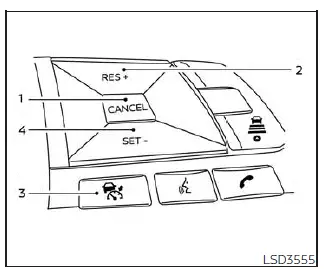
Conventional (fixed speed) cruise control switches
The steering wheel of the Nissan Sentra features intuitive controls for managing your cruise speed:
- CANCEL switch: Immediately deactivates the cruise control system while retaining the previously set speed in the Nissan Sentra memory.
- RES+ switch: Resumes the previously set speed or allows for incremental increases in cruising speed.
- ICC switch: The primary master switch used to power the cruise control system on and off in your Nissan Sentra.
- SET- switch: Sets the current driving speed as the cruise speed or allows for incremental speed reductions.
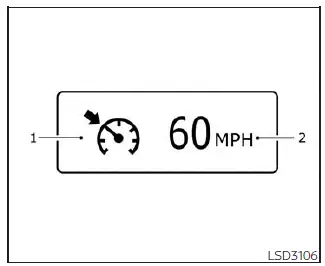
Conventional (fixed speed) cruise control mode display and indicators
Status information is clearly projected on the Nissan Sentra vehicle information display, located between the main gauges.
- Cruise indicator: This icon tracks the status of the Nissan Sentra ICC system
using specific colors:
- Cruise control ON (gray): Indicates the system is powered on and ready.
- Cruise control SET (green): Confirms that a cruising speed has been successfully set.
- Cruise control warning (yellow): Notifies the driver of a potential malfunction within the Nissan Sentra ICC system.
- Set vehicle speed indicator: Displays the exact speed the Nissan Sentra is programmed to maintain. For Canadian models, this value is shown in km/h.
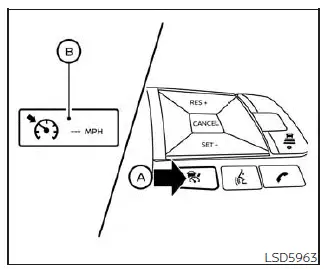
Operating conventional (fixed speed) cruise control mode
To activate the conventional (fixed speed) cruise control mode on the Nissan Sentra, push and hold the ICC switch A for longer than approximately 1.5 seconds.
When the ICC switch is pressed, the conventional (fixed speed) cruise control mode display and indicators B appear in the vehicle information display. After holding the ICC switch for more than about 1.5 seconds, the ICC system display turns off and the cruise indicator appears. At this point, the Nissan Sentra is ready for you to set the desired cruising speed. Pressing the ICC switch again will turn the cruise control system completely off. The system also turns off automatically when the ignition switch is placed in the OFF position.
To use the ICC system again, quickly push and release the ICC switch to select the vehicle-to-vehicle distance control mode, or push and hold the switch to re-enable the conventional cruise control mode.
CAUTION
To prevent accidental engagement of cruise control, always ensure that the ICC switch is turned off when the Nissan Sentra cruise control system is not in use.
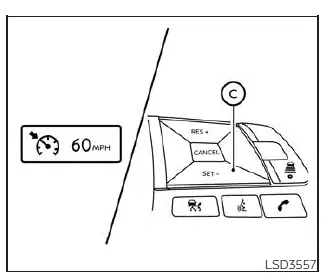
To set the cruising speed, accelerate the Nissan Sentra to the desired speed, then push the SET- switch C and release it. The cruise indicator changes color to green and the set vehicle speed indicator illuminates. Release the accelerator pedal and the vehicle will maintain the selected speed.
- To pass another vehicle, depress the accelerator pedal. Once the pedal is released, the Nissan Sentra will automatically return to the previously set cruising speed.
- The vehicle may not maintain the set speed when traveling uphill or downhill
on steep grades.
If this occurs, manually control the vehicle speed as necessary.
To cancel the preset cruising speed, use any of the following methods:
1. Push the CANCEL switch. The vehicle speed indicator turns off.
2. Tap the brake pedal. The vehicle speed indicator turns off.
3. Turn the ICC switch off. Both the cruise indicator and vehicle speed indicator turn off.
To reset to a faster cruising speed, use one of the following methods:
1. Depress the accelerator pedal. When the Nissan Sentra reaches the desired speed, push and release the SET- switch.
2. Push and hold the RES+ switch. Release the switch once the vehicle reaches the desired speed.
3. Push and quickly release the RES+ switch. Each press increases the set speed by approximately 1 mph (1 km/h).
To reset to a slower cruising speed, use one of the following methods:
1. Lightly tap the brake pedal. When the vehicle reaches the desired speed, push and release the SET- switch.
2. Push and hold the SET- switch. Release it when the Nissan Sentra slows to the desired speed.
3. Push and quickly release the SET- switch. Each press decreases the set speed by approximately 1 mph (1 km/h).
To resume the previously set cruising speed, push and release the RES+ switch. The Nissan Sentra will resume the last set cruising speed once the vehicle speed exceeds 25 mph (40 km/h).
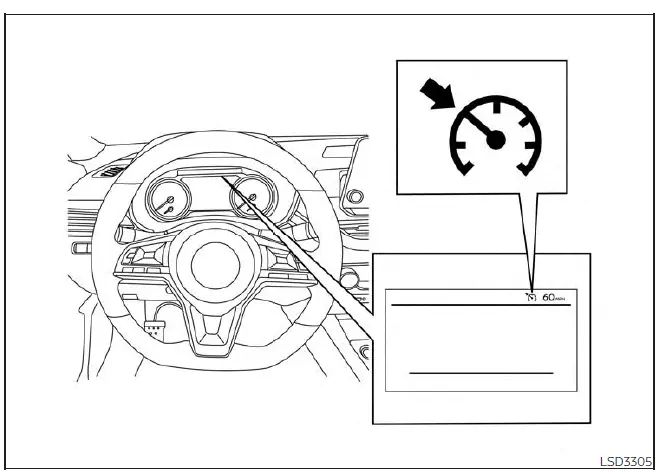
System temporarily unavailable
A warning chime will sound and the cruise control operation will be automatically canceled under the following conditions:
- When the vehicle slows down more than 8 mph (13 km/h) below the set cruising speed
- When the shift lever is not in the D (Drive) position
- When the parking brake is applied
- When the Vehicle Dynamic Control (VDC) system operates, including traction control activation
- When a wheel slips
When the cruise control system is not operating correctly, a warning chime sounds and the cruise indicator color changes to orange.
Action to take
If the cruise indicator changes to orange, safely stop the Nissan Sentra and place the shift lever in the P (Park) position.
Turn the engine off, restart it, resume driving, and then attempt to set the cruise control again.
If the system cannot be set or the indicator remains illuminated, this may indicate a malfunction. Although the Nissan Sentra can still be driven under normal conditions, the system should be inspected. It is recommended that you visit an authorized NISSAN dealer for service.
Other materials:
Shift Position Indicator Circuit
Component Parts Function Inspection
Component Parts Function Inspection
CHECK SHIFT POSITION INDICATOR
Start the engine.
Shift selector lever.
Check that the shift position and the
shift po ...
B2720 Corner Sensor [rl]
Dtc Description
DTC Description
DTC DETECTION LOGIC
DTC No.
CONSULT screen terms
(Trouble diagnosis content)
DTC detection condition
...
Road Wheels & Tires. Service Data and Specifications (sds). Service Data and Specifications (sds)
Service Data and Specifications (sds)
Wheel
Wheel
ALUMINUM WHEEL
Runout
Maximum lateral runout
limit
0.3 mm (0.012 in) or
less
...