Nissan Sentra B18 (2020-2025) Owner's Manual: Bluetooth Hands-Free Phone System
WARNING
- Use a phone only after stopping your Nissan Sentra in a safe location. If it is absolutely necessary to use a phone while driving, exercise extreme caution at all times so that full attention can remain on vehicle operation.
- If you are unable to devote complete attention to driving while talking on the phone, pull off the road to a safe location and stop your Nissan Sentra before continuing the call.
CAUTION
To help prevent unnecessary battery discharge, operate the phone only after starting the engine of your Nissan Sentra.
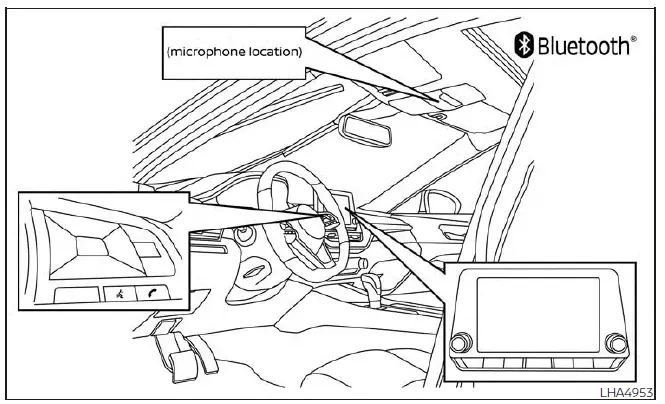
Your Nissan Sentra is equipped with an integrated Bluetooth Hands-Free Phone System. When using a compatible Bluetooth-enabled cellular phone, a secure wireless connection can be established between your phone and the in-vehicle phone module. This Bluetooth technology allows you to make and receive hands-free telephone calls through the Nissan Sentra audio system while keeping both hands on the steering wheel.
Once your cellular phone has been successfully paired with the in-vehicle phone module, no additional connection procedure is normally required.
Your phone will automatically reconnect to the Nissan Sentra Bluetooth Hands-Free Phone System whenever the ignition switch is placed in the ACC or ON position, provided that the previously paired phone is powered on and inside the vehicle.
NOTE:
Some Bluetooth devices require user confirmation before allowing connections to other Bluetooth-enabled systems.
If your phone does not connect automatically to the Nissan Sentra system, refer to the phone owner’s manual for detailed instructions on device operation and Bluetooth settings.
You can register up to six different Bluetooth cellular phones with the in-vehicle phone module of the Nissan Sentra. However, only one cellular phone can be actively used for calls at any given time.
Before operating the Bluetooth Hands-Free Phone System, carefully review the following important notes.
- Always complete the wireless pairing process between a compatible cellular phone and the in-vehicle phone module before attempting to use the hands-free phone system in your Nissan Sentra.
- Some Bluetooth-enabled cellular phones may not be fully recognized or may
not function correctly with the system.
For an up-to-date list of recommended phones and detailed connection instructions, visit www.nissanusa.com/bluetooth or www.nissan.ca/bluetooth.
- You will not be able to use the hands-free phone system under the following
conditions:
- The Nissan Sentra is outside the cellular service coverage area.
- The vehicle is located in an area with poor signal reception, such as tunnels, underground parking garages, areas near tall buildings, or mountainous regions.
- The cellular phone is locked or otherwise restricted from dialing.
- When radio wave conditions are poor or when ambient cabin noise is excessive, it may be difficult to clearly hear the other party during a call.
- Do not place the cellular phone in areas surrounded by metal objects or far from the in-vehicle phone module, as this may degrade sound quality or disrupt the wireless connection.
- While a cellular phone is connected via the Bluetooth wireless connection,
its battery may discharge faster than usual.
The Nissan Sentra Bluetooth Hands-Free Phone System does not provide charging capability for cellular phones.
- Some cellular phones or electronic devices may cause interference or a buzzing noise through the audio system speakers. Relocating the device within the vehicle may reduce or eliminate this noise.
- For additional details regarding call charges, antenna placement, or phone handling, refer to the cellular phone manufacturer’s owner information.
- Regulatory information
- Bluetooth connecting procedure
- Phone display screen
- Text messaging
- Bluetooth connections screen
Other materials:
Diagnosis System (ipdm E/r)
Consult Function (ipdm E/r)
CONSULT Function
(IPDM E/R)
APPLICATION ITEM
CONSULT performs the following functions via CAN
communication with IPDM E/R:
Diagnosis mode
CGW Status
...
P0222 Tp Sensor
Dtc Description
DTC Description
DTC DETECTION LOGIC
DTC
CONSULT screen terms
(Trouble diagnosis
content)
DTC detection
condition
...
B24a4-11 Intake Sensor
Dtc Description
DTC Description
DTC DETECTION LOGIC
DTC No.
CONSULT screen terms
(Trouble diagnosis content)
DTC detection condition
...