Nissan Sentra B18 (2020-2025) Owner's Manual: Phone display screen
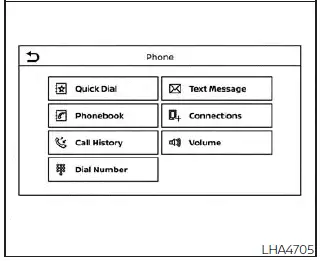
The Phone display screen in the Nissan Sentra can be accessed by pressing the
 button on the control panel, allowing quick and convenient access to all phone-related
functions.
button on the control panel, allowing quick and convenient access to all phone-related
functions.
The following options are available on the Nissan Sentra Phone screen:
- Quick Dial
Displays the Quick Dial screen, providing fast access to frequently used contacts. - Phonebook
Displays the Phonebook screen with contacts downloaded from the connected phone. - Call History
Displays the Call History screen showing incoming, outgoing, and missed calls. - Dial Number
Displays the Dial Number screen for manual number entry. - Text Message
Displays the received text message screen (if supported). - Connections
Displays the Connections screen for managing paired Bluetooth devices. - Volume
Displays the volume adjustment screen for call audio.
Making a call
1. Press the
 button on the Launch Bar.
The Phone screen will appear on the Nissan Sentra display.
2. Select one of the available options to place a call.
Phonebook
To place a call using the phonebook:
1. Press the
 button on the steering wheel or touch the "
 "
key on the Launch Bar.
"
key on the Launch Bar.
2. Touch the "Phonebook" key.
3. Select the desired contact from the displayed list to initiate the call.
Call History
1. Select a contact name or phone number from the recent incoming, outgoing, or missed calls list.
2. Touch the selected entry to start the call.
Dial Number
1. Enter the phone number manually using the on-screen keypad.
2. Touch the "OK" key to place the call from the Nissan Sentra system.
During a call
While a call is active, the following options are available on the Nissan Sentra control panel display:
- Mute
Touch to mute or unmute the microphone. - Dial Number
Touch to enter digits during an active call, such as for menu navigation. - Switch to Handset
Touch the "Use Handset" key to transfer the call to the cellular phone. To return the call to the Nissan Sentra Bluetooth Hands-Free Phone System, press the button on the control panel and select "Transfer Hands-free" on the screen.
NOTE:
Some jurisdictions restrict or prohibit the use of cellular phones while driving. Always follow local laws and regulations.
- Switch Call
This option becomes available only when a second call is active.
If supported by the connected phone, the Nissan Sentra Bluetooth Hands-Free Phone
System supports call waiting. When a second call is received during an active call,
a notification appears on the screen. Press the
 button on the steering wheel or touch the "
 Answer"
key on the screen to accept the call. Touch the "
Answer"
key on the screen to accept the call. Touch the "
 Decline"
key to reject it.
Decline"
key to reject it.
During an active call, press the
 button on the steering wheel to access additional voice options. Speak one of the
following commands:
button on the steering wheel to access additional voice options. Speak one of the
following commands:
- "Send Digits"
Say this command followed by numbers to send digits during the call. - "Switch Call"
Say this command to place the current call on hold and return to the previous call.
Receiving/Ending a call
When an incoming call is received through the Nissan Sentra Bluetooth Hands-Free Phone System, caller information is shown on the display.
To answer the call, either:
- Press the
 button on the steering wheel, or
 - Touch the "
 Answer"
key on the screen.
Answer"
key on the screen.
To end or reject a call, either:
- Press and hold the
 button on the steering wheel, or
 - Touch the "
 Decline"
key on the screen.
Decline"
key on the screen.
If you are unable to answer immediately, touch the "Hold Call" key on the screen. The caller will hear the message, "I'm not able to take a call right now." You can later accept or reject the call when it is convenient.
Other materials:
Seat Belt. Removal and Installation
Front Seat Belt
Exploded View
Exploded View
1.
Seat belt height
adjuster
2.
Seat belt height adjuster
...
B2f06-15 Back Door/trunk Opener Switch
Dtc Description
DTC Description
DTC DETECTION LOGIC
DTC No.
CONSULT screen items (Trouble
diagnosis content)
DTC detecting condition
...
P161f Immobilizer
Dtc Description
DTC Description
DTC DETECTION LOGIC
DTC No.
CONSULT screen items
(Trouble diagnosis
content)
DTC detecting condition
...