Nissan Sentra B18 (2020-2025) Owner's Manual: Regulatory information
FCC Regulatory Information
- CAUTION: To maintain full compliance with FCC RF exposure guidelines, only the supplied antenna must be used. The use of unauthorized antennas, modifications, or attachments could damage the transmitter and may result in non-compliance with FCC regulations applicable to the Nissan Sentra.
- Operation of this device is subject to the following two conditions:
- This device may not cause harmful interference, and
- This device must accept any interference received, including interference that may cause undesired operation of the device.
IC Regulatory Information
- Operation is subject to the following two conditions: (1) this device may not cause interference, and (2) this device must accept any interference, including interference that may cause undesired operation of the device when installed in the Nissan Sentra.
- This Class B digital apparatus complies with all requirements of the Canadian Interference-Causing Equipment Regulations.
 BLUETOOTH is a trademark owned by Bluetooth SIG, Inc. and licensed to Panasonic.
Using the system
This system enables convenient hands-free operation of the Bluetooth Hands-Free Phone System in the Nissan Sentra, allowing drivers to place and receive calls while keeping their hands on the steering wheel.
When the vehicle is in motion, certain voice commands or functions may be limited or unavailable so that full attention can remain focused on safe vehicle operation.
Initialization
When the ignition switch is placed in the ON position, the NISSAN Voice Recognition
system begins initializing. This process takes a few seconds. If the
 button is pressed before initialization is complete, the system will announce, “There
is no phone connected,� and will not respond to voice commands.
button is pressed before initialization is complete, the system will announce, “There
is no phone connected,� and will not respond to voice commands.
Operating tips
For optimal performance of the NISSAN Voice Recognition System in your Nissan Sentra, observe the following recommendations:
- Keep the vehicle interior as quiet as possible. Direct all air vents away from the microphone and close the windows to reduce external noises such as traffic, wind, or vibration sounds, which may interfere with accurate voice recognition.
- Wait until the audible tone is heard before speaking a command. Speaking too early may prevent the system from recognizing the command correctly.
- Begin speaking within five seconds after the tone sounds to ensure the command is accepted.
- Speak naturally and clearly without unnecessary pauses between words.
- When placing calls by contact name, say both the first and last name of the contact to improve recognition accuracy.
Giving voice commands
To operate the NISSAN Voice Recognition system, briefly press the
 button on the steering wheel for less than 1.5 seconds. After the tone sounds, clearly
speak the desired command.
button on the steering wheel for less than 1.5 seconds. After the tone sounds, clearly
speak the desired command.
The spoken command is detected by the microphone, and the system provides audible feedback once the command has been successfully recognized.
- If a command is not recognized, the system announces, “Please say or select a command from the displayed list.� Repeat the command exactly as prompted, using a clear and steady voice.
- If you wish to return to the previous command level, say “Go back� or “Correction� at any time while the system is awaiting input.
- You may cancel the current command by saying “Cancel� or “Quit.� The system
will announce “Exit� and terminate the Voice Recognition session. You can also
press and hold the
 button on the steering wheel for more than 1.5 seconds to end the session at
any time. When the session ends, a double beep confirms that you have exited
the system.
button on the steering wheel for more than 1.5 seconds to end the session at
any time. When the session ends, a double beep confirms that you have exited
the system. - To adjust the volume of voice feedback, use the (+) or (–) volume control switches on the steering wheel while feedback is playing, or adjust the radio volume control knob.
Voice Prompt Interrupt
In most situations, you can interrupt voice feedback to issue the next command
by pressing the
 button on the steering wheel. After interrupting, wait for the confirmation beep
before speaking your next command.
button on the steering wheel. After interrupting, wait for the confirmation beep
before speaking your next command.
One Shot Call (if so equipped)
To speed up operation, second-level commands may be spoken directly after the
main menu command. For example, press the
 button and, after the tone, say “Call Redial� to quickly redial the last number.
Indicators
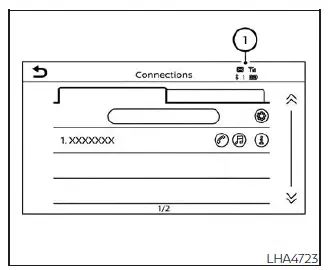
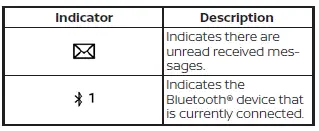
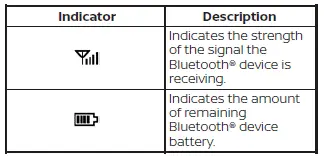
When a cellular phone is connected to the Nissan Sentra through the Bluetooth wireless connection, indicator icons for phone calls and text messaging are displayed at the top of the screen, allowing the driver to quickly confirm connection status and message availability.
Control buttons
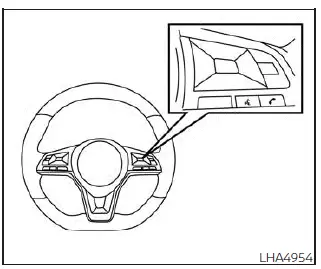
The control buttons for the Bluetooth Hands-Free Phone System in the Nissan Sentra are conveniently integrated into the steering wheel, allowing safe operation without removing your hands from the wheel.
 VOICE COMMAND BUTTON
Press and hold the
 button for more than 1.5 seconds to start a Voice Recognition session, enabling
hands-free control of phone and system functions.
button for more than 1.5 seconds to start a Voice Recognition session, enabling
hands-free control of phone and system functions.
To exit the Voice Recognition session, press and hold the
 button for more than 1.5 seconds.
You can use the
 button to interrupt system voice feedback and immediately issue a new command, which
helps streamline operation while driving.
button to interrupt system voice feedback and immediately issue a new command, which
helps streamline operation while driving.
If an iPhone is connected to the Nissan Sentra, Siri can be accessed by pressing
the
 button for less than 1.5 seconds, allowing quick access to Siri Eyes Free features.
 PHONE BUTTON
To answer an incoming call or to end an active call, briefly press the
 button.
To reject an incoming call, press and hold the
 button.
Other materials:
Engine cooling system
The engine cooling system of the Nissan Sentra is factory-filled with a pre-diluted
mixture consisting of 50% Genuine NISSAN Long Life Antifreeze/Coolant (blue) and
50% water. This formulation is designed to provide reliable, year-round antifreeze
protection and effective engine cooling perfor ...
U0131 Can Communication
Dtc Description
DTC Description
DTC DETECTION LOGIC
DTC
CONSULT screen terms
(Trouble diagnosis
content)
DTC detection
condition
...
U2141 Can Comm Err (tcm)
Dtc Description
DTC Description
DTC DETECTION LOGIC
DTC No.
CONSULT screen
terms
(Trouble
diagnosis content)
DTC detection condition
...