Nissan Sentra B18 (2020-2025) Owner's Manual: Intelligent Around View Monitor system limitations
WARNING
The following information describes important system limitations of the Intelligent Around View Monitor on the Nissan Sentra.
Failure to operate the Nissan Sentra in accordance with these limitations could result in serious injury or death.
- Do not use the Intelligent Around View Monitor when the outside mirrors are folded or in the stored position, and always ensure the trunk is completely closed before maneuvering the Nissan Sentra using this system.
- The apparent distance between objects shown on the Intelligent Around View Monitor may differ from the actual distance to those objects.
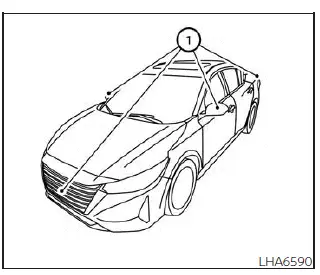
- The cameras are installed in the front grille, the outside mirrors, and above the rear license plate. Do not install accessories such as license plate frames or coverings that may block or interfere with the camera views.
- When washing the Nissan Sentra with high-pressure water, avoid spraying directly around the cameras. Water intrusion may cause condensation on the lens, system malfunction, fire, or electric shock.
- Do not strike or impact the cameras. They are precision instruments, and damage may result in malfunction, fire, or electric shock.
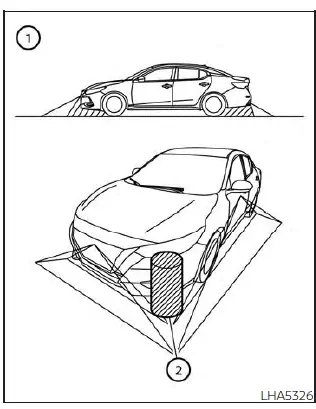
There are certain areas where the system cannot display objects, and the system does not provide warnings for moving objects in all situations. In front or rear view modes, objects located below the bumper or directly on the ground may not be visible 1. In the bird’s-eye view, tall objects located near the seam 2 between camera viewing areas may not appear on the display.
The following operating characteristics are considered normal and do not indicate a malfunction:
- A slight delay may occur when switching between camera views.
- At extremely high or low ambient temperatures, the display may not clearly show objects.
- Strong direct light shining into a camera may reduce image clarity.
- The screen may flicker when viewed under fluorescent lighting.
- Object colors shown on the Intelligent Around View Monitor may differ slightly from actual colors.
- In dark environments, objects may appear less clear and color accuracy may be reduced.
- Sharpness may vary between individual camera views in the bird’s-eye display.
- Do not apply wax to the camera lenses. If wax is present, remove it using a clean cloth lightly dampened with a diluted mild cleaning agent, then wipe dry.
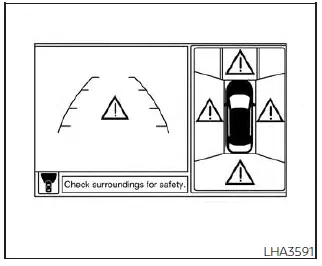
System temporarily unavailable
When the “!� icon appears on the display, the Intelligent Around View Monitor has detected an abnormal condition. Although this does not affect normal driving of the Nissan Sentra, the system should be inspected. It is recommended that you visit a NISSAN dealer for diagnosis and service.
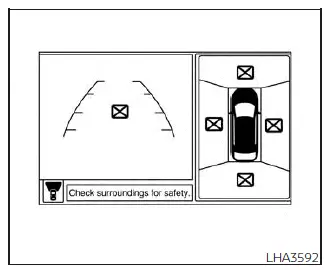
When the “[X]� icon appears, the camera image may be experiencing temporary electronic interference from surrounding devices. Normal driving is not affected; however, if this condition occurs frequently, have the system inspected by a NISSAN dealer.
System maintenance
CAUTION
- Do not use alcohol, benzine, or thinner to clean the cameras, as these chemicals may cause discoloration or damage.
- Do not damage or tamper with the cameras, as this may adversely affect monitor performance.
If dirt, rain, or snow accumulates on any of the cameras 1, the Intelligent Around View Monitor on the Nissan Sentra may not display objects clearly. Clean each camera by wiping it gently with a cloth dampened with a diluted mild cleaning agent, then wipe with a dry cloth.
Other materials:
Front Suspension. Removal and Installation
Front Coil Spring and Strut
Exploded View
Exploded View
1.
Steering knuckle
2.
Strut
3.
...
Knock Sensor
Component Inspection
Component Inspection
CHECK KNOCK SENSOR
Turn ignition switch OFF.
Disconnect knock sensor harness
connector.
Check resistance between knock sensor
terminals ...
Trunk Lid Opener Actuator
Component Function Check
Component Function Check
CHECK FUNCTION
CONSULT
Select "Trunk/back door" in "Active Test" mode of
"BCM(TRUNK)".
Select “On� to check tha ...