Nissan Sentra B18 (2020-2025) Owner's Manual: Intelligent Around View Monitor
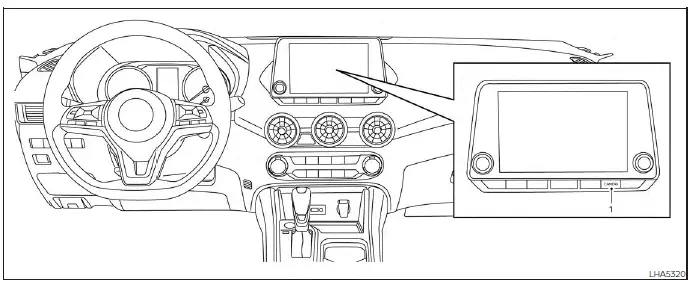
- CAMERA button
WARNING
Failure to follow all warnings and operating instructions for the Intelligent Around View Monitor system may result in serious injury or death.
- The Intelligent Around View Monitor on the Nissan Sentra is a driver assistance feature only and is not a substitute for attentive driving. Due to camera limitations, certain areas—especially around the four corners of the vehicle—may not be visible in the bird’s-eye, front, or rear views. Always visually check your surroundings before moving the vehicle and operate at low speeds.
- The driver remains fully responsible for vehicle safety during parking, maneuvering, and low-speed driving situations.
CAUTION
Do not scratch or apply excessive force to the camera lenses when removing dirt, ice, or snow, as lens damage may impair system performance.
The Intelligent Around View Monitor system is designed to assist the driver of the Nissan Sentra during maneuvers such as parallel parking, slot parking, and navigating tight spaces.
The system displays multiple camera views simultaneously using a split-screen layout, helping provide enhanced situational awareness around the vehicle.
Not all views are available under every driving condition, depending on vehicle speed, gear position, and system status.
Available views:
- Front View
An approximately 150-degree wide-angle view of the area directly in front of the Nissan Sentra. - Rear View
An approximately 150-degree wide-angle view behind the vehicle to assist during reversing. - Bird's-Eye View
A composite overhead image showing the surrounding area around the Nissan Sentra from above. - Front-Side View
A focused view of the area around and ahead of the front passenger-side wheel to assist with curb or obstacle detection. - Full Screen Rear View
A wider rear-facing image compared to the standard RearView Monitor, displayed in full screen.
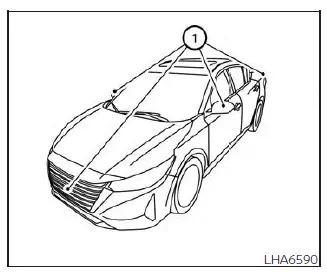
To generate these multiple views, the Intelligent Around View Monitor system on the Nissan Sentra uses several cameras: one mounted in the front grille, cameras integrated into both outside mirrors, and an additional camera positioned just above the vehicle’s license plate 1.
- Intelligent Around View Monitor system operation
- Difference between predicted and actual distances
- How to park with predicted course lines
- Intelligent Around View Monitor system limitations
Other materials:
Precaution. Precautions
Precautions
Precaution for Supplemental Restraint System (srs) "air Bag" and "seat Belt Pre-Tensioner"
Precaution for Supplemental Restraint System (SRS) "AIR BAG" and "SEAT BELT PRE-TENSIONER"
The Supplemental Restraint System such as
“AIR BAG� and “SEAT BELT PRE-TENSIONER�,
u ...
Symptom Diagnosis. Rear View Monitor System
Rear View Monitor System
Symptom Table
Symptom Table
REAR VIEW MONITOR SYSTEM
Symptoms
Check items
Probable malfunction
location
...
Knock Sensor
Component Inspection
Component Inspection
CHECK KNOCK SENSOR
Turn ignition switch OFF.
Disconnect knock sensor harness
connector.
Check resistance between knock sensor
terminals ...