Nissan Sentra B18 (2020-2025) Owner's Manual: Intelligent Around View Monitor system operation
With the ignition switch in the ON position, move the shift lever to the R (Reverse) position or press the CAMERA button to activate the Intelligent Around View Monitor system on the Nissan Sentra. This system is designed to support low-speed maneuvers and parking situations by providing multiple visual perspectives around the vehicle.
When the CAMERA button is pressed while the shift lever is in a position other than R (Reverse), the screen displayed by the Intelligent Around View Monitor on the Nissan Sentra will automatically return to the previously shown screen after approximately 3 minutes, helping reduce driver distraction.
Available views
WARNING
- The distance guide lines and vehicle width lines should be used for reference only and only when the Nissan Sentra is parked on a paved, level surface. The distance shown on the monitor may differ from the actual distance between the vehicle and surrounding objects.
- Use the displayed guide lines and the bird’s-eye view as visual aids only. These displays are significantly affected by passenger load, cargo weight, fuel level, vehicle angle, road conditions, and road slope.
- If the tires on the Nissan Sentra are replaced with a different size than specified, the predicted course lines and bird’s-eye view may be displayed inaccurately.
- When driving uphill, objects shown in the monitor may appear farther away than they actually are. When driving downhill, objects may appear closer than their true distance.
- Objects shown in the rear view may appear visually reversed compared to their appearance in the inside and outside mirrors.
- Always use the mirrors and visually check your surroundings to accurately judge distances to other objects.
- On snow-covered, icy, or slippery roads, differences may occur between the predicted course lines and the actual vehicle path.
- The vehicle width lines and predicted course lines are wider than the actual width and driving path of the Nissan Sentra.
- The displayed guide lines may appear slightly offset to the right because the rearview camera is not mounted at the exact center of the vehicle.
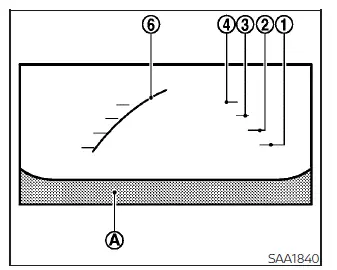
Front view
Front and rear view
Guiding lines indicating the approximate vehicle width and distance to objects—measured from the vehicle body reference line A—are displayed on the monitor to assist with precise maneuvering of the Nissan Sentra.
Distance guide lines:
These lines indicate approximate distances from the vehicle body:
- Red line 1 : approximately 1.5 ft (0.5 m)
- Yellow line 2 : approximately 3 ft (1 m)
- Green line 3 : approximately 7 ft (2 m)
- Green line 4 : approximately 10 ft (3 m) (if so equipped)
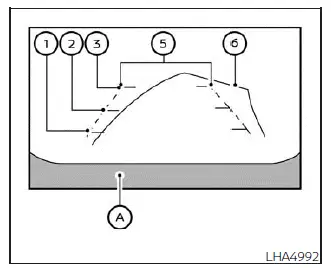
Rear view
Vehicle width guide lines 5 :
These lines indicate the approximate width of the Nissan Sentra when reversing, helping the driver maintain proper clearance from obstacles.
Predicted course lines 6 :
The predicted course lines indicate the estimated path of the vehicle based on steering wheel input. These lines appear on the monitor when the steering wheel is turned and move dynamically as the steering angle changes. When the steering wheel is centered in the straight-ahead position, the predicted course lines are not displayed.
The front view is automatically disabled when the vehicle speed exceeds approximately 6 mph (10 km/h) to help maintain driving focus.
NOTE:
When the monitor displays the front view and the steering wheel is turned approximately 90 degrees or less from the straight-ahead position, both the right and left predicted course lines 6 are displayed.
When the steering wheel is turned approximately 90 degrees or more, only the predicted course line on the opposite side of the steering direction will be shown.
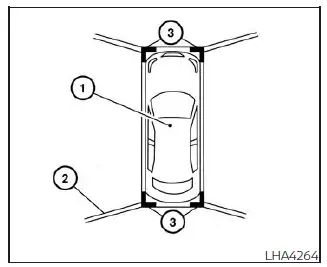
Bird's-eye view
The bird’s-eye view provides a simulated overhead image of the Nissan Sentra, helping the driver confirm vehicle positioning and predicted movement when entering or exiting a parking space.
The vehicle icon 1 represents the current position of the vehicle. Be aware that distances shown in the bird’s-eye view may appear slightly different from the actual distances to surrounding objects.
Areas that cannot be covered by the cameras 2 are shown in black.
After the ignition switch is turned to the ON position, the non-viewable areas 2 are highlighted in yellow for approximately 3 seconds when the bird’s-eye view first appears.
In addition, the non-viewable corner areas are displayed in red and blink for the first 3 seconds 3 to alert the driver to exercise additional caution.
WARNING
- Objects shown in the bird’s-eye view may appear farther away than they actually are.
- Tall objects such as curbs, walls, or other vehicles may appear misaligned or may not be displayed accurately at the seam between camera views.
- Objects that extend above the camera mounting height cannot be displayed.
- The bird’s-eye view image may become misaligned if the camera position changes due to impact or modification.
- Lines on the ground may appear bent or misaligned at the seam between views, and this effect becomes more noticeable as the distance from the Nissan Sentra increases.
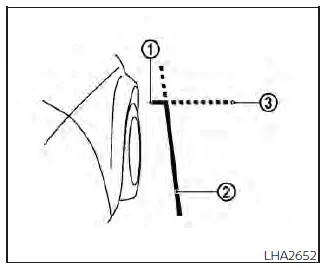
Front-side view
Guiding lines
The guiding lines displayed on the monitor indicate the approximate width of the Nissan Sentra and the position of the front end of the vehicle, helping the driver judge clearance when maneuvering in tight spaces.
The front-of-vehicle line 1 represents the foremost edge of the Nissan Sentra and helps estimate how close the front bumper is to surrounding objects.
The side-of-vehicle line 2 shows the approximate overall width of the vehicle, including the outside mirrors, which is especially useful when navigating near curbs, walls, or parked vehicles.
The extensions 3 of both the front line 1 and the side line 2 are displayed using a green dotted line, providing additional visual guidance for projecting the vehicle’s footprint during slow-speed maneuvers.
Other materials:
U1321-55 Configuration Unfinished
Dtc Description
DTC Description
DTC DETECTION LOGIC
DTC No.
CONSULT screen terms
(Trouble diagnosis
content)
DTC detection condition
...
Door Switch
Component Function Check
Component Function
Check
CHECK FUNCTION
CONSULT
Select "Door switch AS", "Door switch DR", "Door
switch RL" or "Door switch RR" in "Data Monitor" mode of "BCM(DOOR
...
Oil Filter
Removal and Installation
Removal and Installation
REMOVAL
Remove the
front under cover. Refer to Removal and Installation.
Using
suitable tool (A), remove the oil filter (1).
CAUTION:
Oil filter is provided with relief valve.
Be ...