Nissan Sentra B18 (2020-2025) Owner's Manual: Difference between predicted and actual distances
The guidelines shown on the Intelligent Around View Monitor are intended for approximate reference only. Actual object distances may vary, particularly on uphill or downhill surfaces or when objects protrude into the driving path. In such cases, objects may appear closer or farther away on the display than they truly are. If there is any uncertainty while reversing the Nissan Sentra, always turn and look directly, or stop the vehicle and exit to visually confirm object positions.
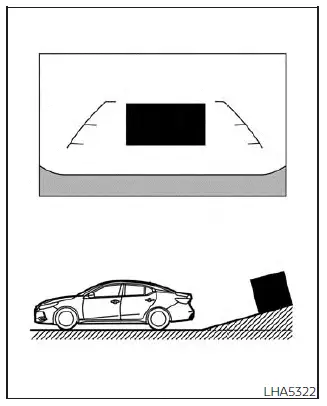
Backing up on a steep uphill
When reversing the Nissan Sentra on a steep uphill incline, the distance guide lines and vehicle width guide lines appear closer than the actual distance. This means that objects on the slope are farther away than they seem on the monitor.
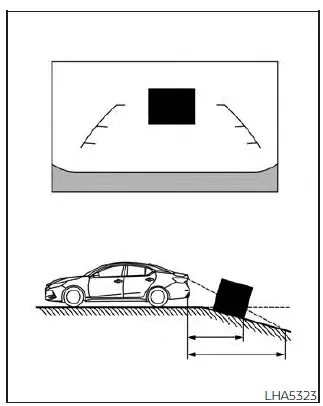
Backing up on a steep downhill
When backing down a steep hill, the distance guide lines and vehicle width guide lines are displayed farther than the true distance. As a result, objects on the downhill surface are closer to the Nissan Sentra than they appear on the screen.
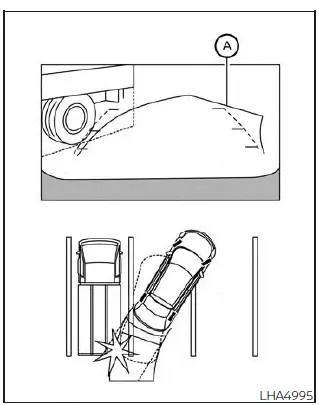
Backing up near a projecting object
The predicted course lines A shown on the display do not touch the projecting object. However, if the object extends into the actual backing path, the Nissan Sentra may still contact it despite what appears on the monitor.
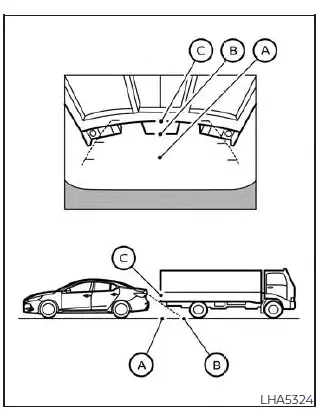
Backing up behind a projecting object
The display shows position C as being farther away than position B. In reality, position C is at the same distance as position A. When backing the Nissan Sentra toward position A, the vehicle may strike the object if it projects into the actual reversing path, even though the monitor display suggests sufficient clearance.
Other materials:
Basic Inspection
Diagnosis and Repair Workflow
Work Flow
Work Flow
OVERALL SEQUENCE
DETAILED FLOW
GET INFORMATION FOR SYMPTOM
Get detailed information from the customer about
the symptom (the condition and the environment when the
incident/ma ...
Dtc/circuit Diagnosis
C1b80-54 Control Module
Dtc Description
DTC Description
DTC DETECTION LOGIC
DTC No.
CONSULT screen terms
(Trouble diagnosis
content)
...
Headlight and turn signal switch
Headlight control switch
Type A (if so equipped)
Type B (if so equipped)
Lighting
Rotate the switch to the
position to turn on the front parking lights, tail lights, license plate lights,
and instrument panel illumination. The
indicator will illuminate in the meter.
R ...