Nissan Sentra B18 (2020-2025) Owner's Manual: How to park with predicted course lines
WARNING
- If the tires on the Nissan Sentra are replaced with tires of a different size, the predicted course lines may not be displayed accurately, which can affect parking guidance.
- On snow-covered, icy, or slippery roads, there may be a noticeable difference between the predicted course lines shown on the display and the actual path of the vehicle.
- If the vehicle battery is disconnected or becomes discharged, the predicted
course lines may be displayed incorrectly.
If this occurs, perform the following procedures to restore normal operation:
- With the engine running, turn the steering wheel fully from lock to lock.
- Drive the Nissan Sentra straight ahead on a level road for more than 5 minutes.
- When the steering wheel is turned while the ignition switch is in the ACC position, the predicted course lines may not display correctly.
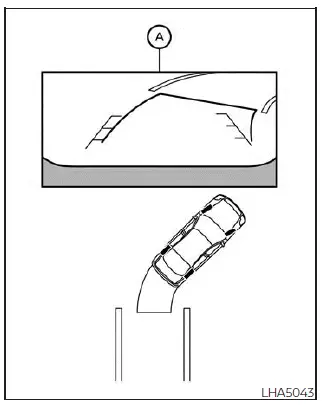
1. Before parking the Nissan Sentra, visually confirm that the parking space is clear and safe.
2. When the shift lever is moved to the R (Reverse) position, the rear view of the vehicle is displayed on the screen A.
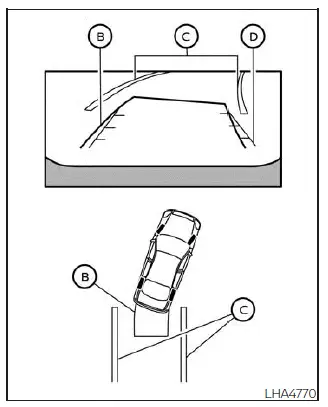
3. Slowly reverse the vehicle while adjusting the steering wheel so that the predicted course lines B guide the Nissan Sentra smoothly into the parking space C.
4. Continue maneuvering the steering wheel to align the vehicle width guide lines D parallel to the parking space C, using the predicted course lines as a reference.
5. Once the Nissan Sentra is fully positioned within the parking space, move the shift lever to the P (Park) position and firmly apply the parking brake.
How to switch the display
With the ignition switch in the ON position, press the CAMERA button or move the shift lever to the R (Reverse) position to activate the Intelligent Around View Monitor on the Nissan Sentra.
The Intelligent Around View Monitor provides multiple split-screen views depending on the position of the shift lever. Press the CAMERA button to cycle through the available display modes.
When the shift lever is in the R (Reverse) position, the following views are available:
- Rear view / bird's-eye view split screen
- Rear view / front-side view split screen
- Full screen rear view
If the shift lever is in the P (Park) or D (Drive) position, the available views are:
- Front view / bird's-eye view split screen
- Front view / front-side view split screen
The display will automatically switch away from the Intelligent Around View Monitor screen when:
- The shift lever is placed in the D (Drive) position and vehicle speed exceeds approximately 6 mph (10 km/h).
- A different system screen is manually selected.
Adjusting the screen
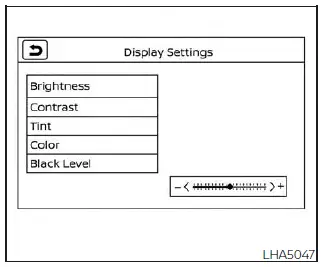
1. While on the main menu screen, touch the "Settings" key.
2. Use the arrow control to move to the next screen, then touch the "Camera" key.
3. Select the "Display Settings" key.
4. Touch the desired option such as "Brightness", "Contrast", "Tint", "Color", or "Black Level".
5. Adjust the selected item by touching the "+" or "-" key on the touch-screen display.
NOTE:
Do not adjust any display settings of the Intelligent Around View Monitor while the Nissan Sentra is moving. Always ensure the vehicle is stationary and the parking brake is firmly applied before making adjustments.
Other materials:
Trip Reset Switch Signal Circuit
Diagnosis Procedure
Diagnosis Procedure
CHECK TRIP RESET SWITCH SIGNAL
Ignition switch ON.
Check voltage between the following terminals of
the trip reset switch harness con ...
Brake System. Precaution. Precautions
Precautions
Precaution for Supplemental Restraint System (srs) "air Bag" and "seat Belt Pre-Tensioner"
Precaution for Supplemental Restraint System (SRS) "AIR BAG" and "SEAT BELT PRE-TENSIONER"
The Supplemental Restraint System such as
“AIR BAG� and “SEAT BELT PRE-T ...
Power Supply and Ground Circuit. Diagnosis Procedure
Diagnosis Procedure
Diagnosis Procedure
CHECK FUSE
Check that the following fuse is not blown:
Signal name
...