Nissan Sentra B18 (2020-2025) Owner's Manual: How to use the remote keyless entry function
The remote keyless entry function on the Nissan Sentra allows you to control all door locks using the Intelligent Key. This convenient system enables locking and unlocking of the doors from a distance of up to approximately 33 ft (10 m) away from the vehicle, depending on surrounding conditions.
The actual operating distance may vary based on environmental factors around the Nissan Sentra, such as obstacles, radio interference, or the condition of the Intelligent Key battery.
The remote keyless entry function will not operate under the following conditions:
- The Intelligent Key is outside the operational range.
- Any door or the trunk lid is open or not fully closed.
- The Intelligent Key battery is discharged.
CAUTION
When locking the doors using the Intelligent Key, always make sure the key is not left inside the Nissan Sentra.
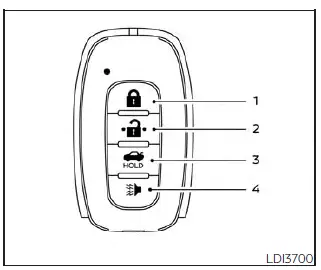
Type A (if so equipped)
 (lock) button
 (unlock) button
 (trunk) button
 (panic) button
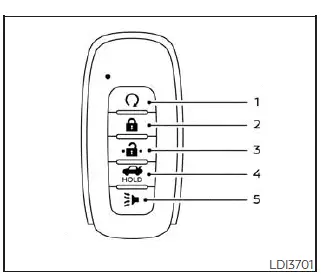
Type B (if so equipped)
 (remote engine
start) button
(remote engine
start) button (lock) button
 (unlock) button
 (trunk) button
 (panic) button
Locking doors
1. Place the ignition switch in the LOCK position.
2. Close all doors securely.
3. Press the  button
on the Intelligent Key.
button
on the Intelligent Key.
4. The hazard warning lights will flash twice and the horn will beep once, confirming the locking operation.
5. All doors and the trunk of the Nissan Sentra will be locked.
WARNING
After locking the doors using the Intelligent Key, always verify that the doors are securely locked by pulling the door handles. Failure to confirm proper locking may result in unintentional unlocking, reducing the safety and security of your Nissan Sentra.
Unlocking doors
1. Press the  button
on the Intelligent Key to unlock the driver’s door.
button
on the Intelligent Key to unlock the driver’s door.
2. The hazard warning lights will flash once.
3. Press the  button
again within 60 seconds to unlock all doors and the trunk lid.
button
again within 60 seconds to unlock all doors and the trunk lid.
All doors and the trunk lid will automatically relock unless one of the following
actions is taken within 60 seconds after pressing the
 button:
- Opening any door or the trunk lid.
- Pressing the ignition switch.
Using the interior lights
The interior lights of the Nissan Sentra illuminate for a short period when a door is unlocked, provided the interior light switch is not set to the OFF position.
The interior lights can be turned off immediately without waiting by performing one of the following actions:
- Placing the ignition switch in the ON position.
- Locking the doors using the request switch (if so equipped) or the Intelligent Key.
- Switching the interior light switch to the OFF position.
Releasing the trunk lid
Press the  button
for approximately 0.5 seconds to open the trunk lid. The trunk release function
will not operate when the ignition switch is in the ON position.
button
for approximately 0.5 seconds to open the trunk lid. The trunk release function
will not operate when the ignition switch is in the ON position.
Using the panic alarm
If you are near your Nissan Sentra and feel threatened, activate the panic alarm
by pressing and holding the
 button on the Intelligent
Key for longer than 0.5 seconds.
button on the Intelligent
Key for longer than 0.5 seconds.
The panic alarm and headlights will remain on for a short period to attract attention.
The panic alarm will stop when:
- The preset time has elapsed.
 (unlock) button
is pressed on the Intelligent Key.
(unlock) button
is pressed on the Intelligent Key.
Silencing the horn beep feature
If preferred, the horn beep confirmation feature can be disabled using the Intelligent Key.
To deactivate this feature, press and hold the
 and
and
 buttons simultaneously
for at least 4 seconds.
buttons simultaneously
for at least 4 seconds.
The hazard warning lights will flash three times to confirm that the horn beep feature on the Nissan Sentra has been successfully deactivated.
To activate the horn beep feature again, press and hold the
 and
and
 buttons for at least 4 seconds once more.
When the horn beep feature is reactivated, the hazard warning lights will flash once and the horn will sound once, confirming that the setting has been restored.
Disabling the horn beep feature does not silence the horn if the vehicle alarm system is triggered. The security alarm of the Nissan Sentra will continue to function normally.
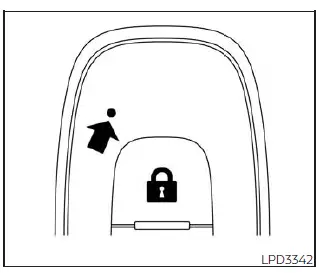
Intelligent Key button operation light
The indicator light blinks only when you press any button on the Intelligent Key. This illumination simply indicates that the Intelligent Key has transmitted a signal to the Nissan Sentra.
Always visually confirm or listen for the corresponding response from the vehicle to ensure that the intended operation, such as locking or unlocking, has been successfully completed.
If the indicator light does not blink when a button is pressed, the Intelligent Key battery may be too weak to communicate with the vehicle.
In this case, replacing the Intelligent Key battery is recommended to restore proper operation.
Warning signals
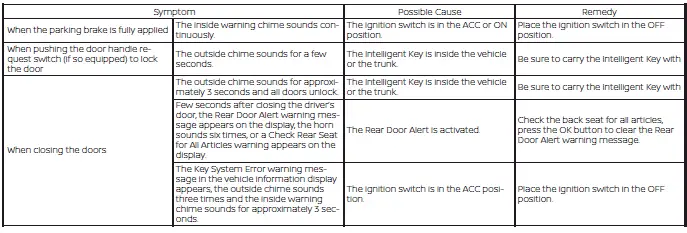
To help prevent the Nissan Sentra from moving unexpectedly due to incorrect Intelligent Key operation, or to help deter vehicle theft, warning signals are provided.
A chime or buzzer may sound from inside or outside the vehicle, and a corresponding warning message may be displayed in the instrument panel.
Whenever a chime sounds or a warning message appears, carefully check the vehicle status and confirm the location and condition of the Intelligent Key.
Troubleshooting guide (Continuously Variable Transmission only)
Verify the location of all Intelligent Keys that are programmed for the Nissan Sentra. If another Intelligent Key is inside the vehicle or within operating range, the system may respond in an unexpected manner.
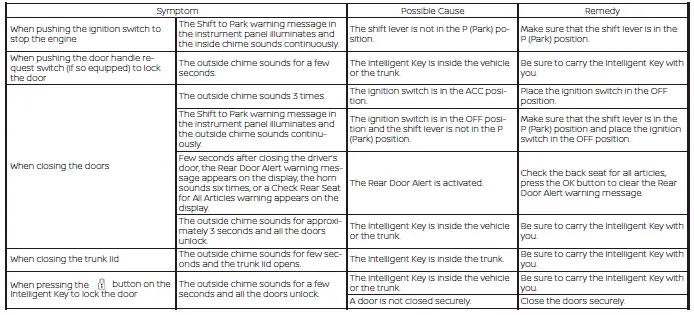
Troubleshooting guide (Manual Transmission only)
Verify the location of all Intelligent Keys that are programmed for the Nissan Sentra. If an additional Intelligent Key is detected inside the vehicle or nearby, the system behavior may differ from normal operation.
Other materials:
Decel G Sensor Calibration
Description
Description
TCM stores calibration data (inherent characteristic value) of
decel G sensor to provide accurate control.
Therefore, it is required to perform calibration of decel G sensor
after the following work is performed.
Removing/ installing ABS actuator ...
P34c8 Electric Intake Valve Timing Control Module
Dtc Description
DTC Description
DTC DETECTION LOGIC
DTC
CONSULT screen terms
(Trouble diagnosis
content)
DTC detection
condition
...
Torque Converter Clutch Solenoid Circuit
Diagnosis Procedure
Diagnosis Procedure
CHECK HARNESS CONNECTOR
Ignition switch OFF.
Check the mating condition of TCM
harness connector and CVT unit harness
connector.
Is the inspect ...