Nissan Sentra B18 (2020-2025) Owner's Manual: RearView Monitor
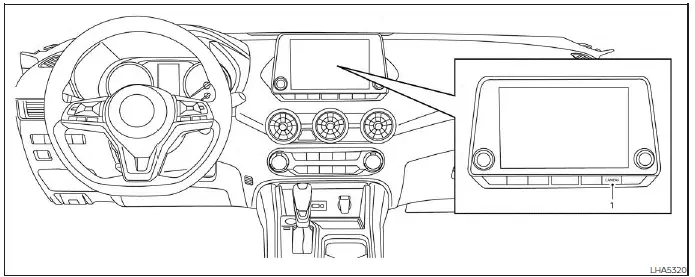
- CAMERA or DISP button
WARNING
- Failure to carefully follow all warnings and operating instructions for the RearView Monitor system may result in serious injury or even death.
- The RearView Monitor on the Nissan Sentra is a driver-assist convenience feature and must not replace proper backing procedures. Always turn your head, look through the windows, and check all mirrors to confirm it is safe before moving the vehicle. Always reverse slowly.
- This system is intended to assist the driver by displaying large stationary objects directly behind the Nissan Sentra to help reduce the risk of vehicle damage.
- The distance guide lines and vehicle width lines are reference aids only and should be used when the vehicle is on a level, paved surface. The distances shown on the monitor may differ from the actual distance to objects behind the vehicle.
CAUTION
When cleaning dirt, dust, or snow from the camera lens, do not scratch or damage the lens surface.
The RearView Monitor system automatically displays a rear-facing image when the shift lever of the Nissan Sentra is moved into the R (Reverse) position. While the RearView Monitor is active, audio playback such as the radio or media system will continue to operate.
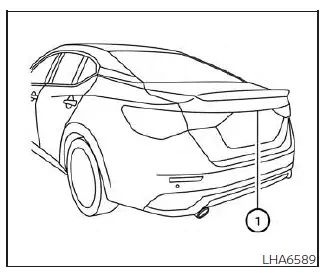
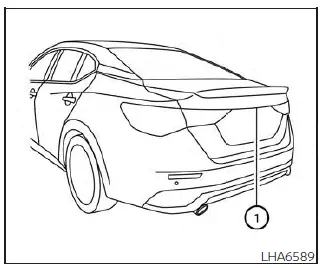
To generate the rear view image, the RearView Monitor system uses a camera mounted just above the Nissan Sentra’s rear license plate 1.
RearView Monitor system operation
With the ignition switch in the ON position, shift the transmission into R (Reverse) to activate the RearView Monitor system on your Nissan Sentra.
How to read the displayed lines
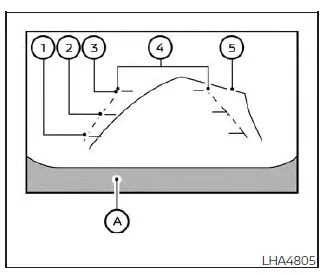
Guide lines are displayed on the monitor to indicate vehicle width and approximate distances to objects behind the vehicle, using the vehicle body line A as a reference.
Distance guide lines
These lines indicate approximate distances measured from the rear of the Nissan Sentra.
- Red line 1: approximately 1.5 ft (0.5 m)
- Yellow line 2: approximately 3 ft (1 m)
- Green line 3: approximately 7 ft (2 m)
Vehicle width guide lines 4
These lines show the approximate width of the Nissan Sentra to help guide the driver while reversing.
Predicted course lines 5 (if so equipped)
The predicted course lines illustrate the anticipated path of the Nissan Sentra while backing up. These lines appear when the shift lever is in R (Reverse) and the steering wheel is turned. As the steering wheel angle changes, the predicted path lines move accordingly. When the steering wheel is centered, the predicted course lines are not displayed.
Note that both the vehicle width guide lines and the predicted course lines are displayed wider than the actual vehicle width and driving path.
Difference between predicted and actual distances
The guidelines shown on the RearView Monitor are intended for approximate reference only. Objects on sloped surfaces, such as hills, or objects that project outward may be positioned at distances that differ from what appears on the display. If you are uncertain, visually confirm the area by turning around or stopping the Nissan Sentra and exiting the vehicle to inspect the surroundings.
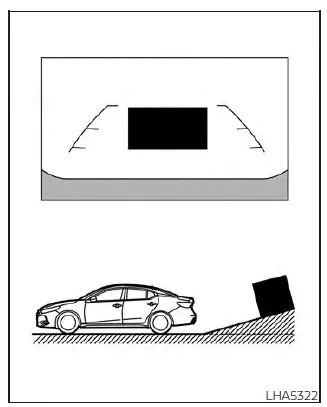
Backing up on a steep uphill
When reversing uphill, the distance and vehicle width guide lines appear closer than the actual distance. Objects located on the incline are farther away than they appear on the Nissan Sentra RearView Monitor.
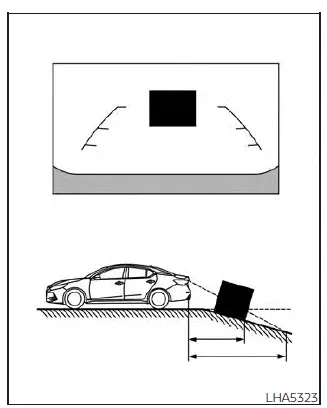
Backing up on a steep downhill
When reversing downhill, the distance and width guide lines appear farther away than the actual distance. Objects on a downward slope are closer than they appear on the RearView Monitor display.
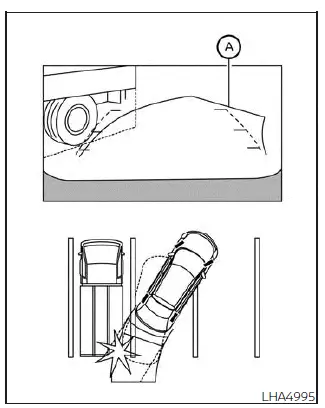
Backing up near a projecting object
The predicted course lines A (if so equipped) may not contact a projecting object on the screen. However, the Nissan Sentra may still strike the object if it extends into the actual backing path.
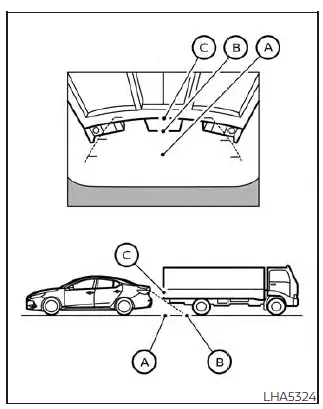
Backing up behind a projecting object
Always be aware that objects extending outward behind the Nissan Sentra may not be accurately represented by the guide lines. Use the RearView Monitor as a supplemental aid only and visually confirm clearance whenever possible.
The position C appears farther away than position B on the display. However, position C is actually at the same distance as position A. When backing up the Nissan Sentra, the vehicle may contact the object at position A if the object extends into the actual backing path beyond what is visually indicated on the monitor.
How to park with predicted course lines
WARNING
- If tires of a different size than originally specified are installed, the predicted course lines on the Nissan Sentra RearView Monitor may be displayed inaccurately.
- On snow-covered, icy, or slippery road surfaces, the predicted course lines may not accurately reflect the actual vehicle path.
- If the battery is disconnected or becomes discharged, the predicted course lines may be displayed incorrectly.
- Turn the steering wheel fully from lock to lock while the engine is running.
- Drive the Nissan Sentra straight ahead on a level road for more than 5 minutes.
- When the steering wheel is turned with the ignition switch in the ACC position, the predicted course lines may also display inaccurately.
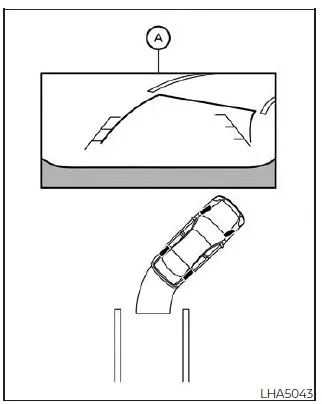
1. Before parking, visually confirm that the selected parking space is safe and free of obstacles.
2. When the shift lever is moved to the R (Reverse) position, the rear view image of the Nissan Sentra is displayed on the screen A.
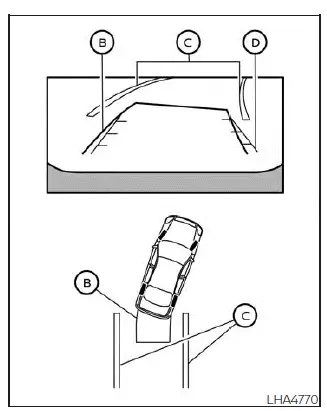
3. Slowly reverse the vehicle while turning the steering wheel so that the predicted course lines B guide the vehicle into the parking space C.
4. Continue adjusting the steering wheel to align the vehicle width guide lines D parallel with the parking space C, using the predicted course lines as a reference.
5. Once the Nissan Sentra is fully positioned within the parking space, move the shift lever to the P (Park) position and apply the parking brake.
Adjusting the screen
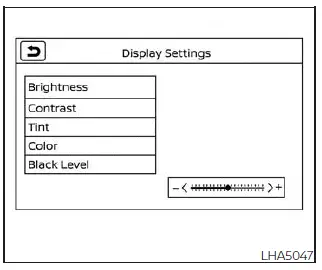
1. From the main menu screen, touch the "Settings" key.
2. Touch the "Camera" key.
3. Select "Brightness", "Contrast", "Tint", "Color", or "Black Level".
4. Adjust the selected setting by touching the "+" or "-" key on the touch-screen display.
NOTE:
Never attempt to adjust RearView Monitor display settings while the Nissan Sentra is in motion.
How to turn on and off predicted course lines
To enable or disable the predicted course lines while the shift lever is in the P (Park) position:
1. Touch the "Settings" key.
2. Touch the "Camera" key.
3. Touch the "Predicted Course Lines" key to toggle the feature ON or OFF.
RearView Monitor system limitations
WARNING
The following limitations apply to the Nissan Sentra RearView Monitor system. Failure to operate the vehicle while considering these limitations may result in serious injury or death.
- The system cannot completely eliminate blind spots and may not display all objects.
- Areas directly underneath the rear bumper and the outer corners of the bumper are outside the camera’s field of view.
- Small objects below the bumper or objects very close to the vehicle may not appear on the display.
- Due to the wide-angle lens, objects shown on the RearView Monitor may appear farther away or closer than their actual distance.
- Objects displayed on the monitor may appear reversed compared to their appearance in the rearview or outside mirrors.
- Use the displayed guide lines only as a reference.
- The accuracy of the lines may vary depending on passenger load, fuel level, vehicle position, road conditions, and incline.
- Ensure the trunk lid is securely closed before reversing.
- Do not attach or place objects on or near the rearview camera mounted above the license plate.
- When washing the Nissan Sentra with high-pressure water, avoid directing water toward the camera. Water intrusion may cause condensation, malfunction, fire, or electric shock.
- Do not strike or impact the camera, as it is a precision component and damage may lead to malfunction, fire, or electric shock.
The following conditions are normal characteristics of the system and do not indicate a malfunction:
- Extremely high or low temperatures may reduce display clarity.
- Strong direct sunlight on the camera may obscure the image.
- Vertical lines may appear due to intense light reflection from the bumper.
- The display may flicker under fluorescent lighting.
- Displayed colors may vary slightly from the actual object colors.
- Objects may be difficult to see in very dark environments.
- A slight delay may occur when switching display views.
- Dirt, rain, or snow on the camera lens may degrade image quality; clean the lens as needed.
- Do not apply wax to the camera lens. If wax is present, remove it using a soft cloth lightly dampened with a diluted mild cleaning solution, then wipe dry.
System maintenance
CAUTION
- Do not use alcohol, benzine, thinner, or other harsh solvents to clean the camera lens, as this may cause permanent discoloration or surface damage.
- Do not strike or damage the camera, as impact may negatively affect the image quality shown on the monitor screen.
If dirt, rain, mud, or snow accumulates on the camera 1, the RearView Monitor on the Nissan Sentra may not display objects clearly or accurately. Clean the camera carefully by wiping it with a soft cloth lightly dampened with a diluted mild cleaning agent, then finish by wiping the lens with a clean, dry cloth to restore proper visibility.
Other materials:
Preparation. Preparation
Preparation
Special Service Tool
Special Service Tool
The actual shape of the tools may differ from those
illustrated here.
Tool number
(TechMate No.)
Tool name
...
B1041-82 Vehicle Speed Signal
Dtc Description
DTC Description
DTC DETECTION LOGIC
DTC No.
CONSULT screen items
(Trouble diagnosis
content)
DTC Detection Condition
...
Diagnosis System (bcm)
Common Item
Consult Function (bcm - Common Item)
CONSULT Function (BCM - COMMON ITEM)
BCM
Refer to CONSULT Function (BCM - COMMON ITEM).
Intelligent Key
Consult Function (bcm - In ...