Nissan Sentra B18 (2020-2025) Owner's Manual: Control panel buttons
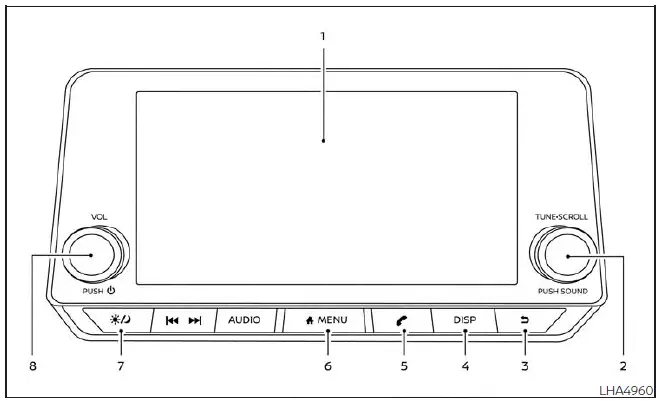
- Display screen
- TUNE·SCROLL knob / PUSH SOUND button
-
 BACK
button
BACK
button - DISP button
-
 button*
 -
 MENU
button
MENU
button -
 (brightness
control) button
(brightness
control) button - VOL (volume) knob / PUSH
 (power)
button
(power)
button
* For additional information regarding the Bluetooth® Hands-Free Phone System control button, refer to the corresponding Bluetooth Hands-Free Phone System section in the Nissan Sentra Owner’s Manual.
When operating this system in your Nissan Sentra, always ensure that the engine is running.
If the system is used for an extended period with the engine turned off, the vehicle battery may discharge and the engine may not start.
Reference symbols: “Example� – Words shown in quotation marks indicate on-screen keys that appear only on the display. These keys can be selected by directly touching the screen.
How to use the touch-screen
CAUTION
- The glass display screen may crack or shatter if struck by a hard or sharp object. If the screen is damaged, do not touch it, as this could result in personal injury.
- When cleaning the display, never use abrasive cloths, alcohol, benzine, thinner, solvents, or chemically treated paper towels. These materials can scratch or damage the screen surface.
- Do not spill or spray liquids such as water or air freshener onto the display.
Contact with liquids may cause the Nissan Sentra multimedia system to malfunction.
For safety reasons, certain functions of the Nissan Sentra infotainment system are disabled while driving.
Functions that are unavailable during vehicle operation will appear “grayed out� or muted on the screen.
WARNING
- Always keep your full attention on driving when operating your Nissan Sentra.
- Avoid using vehicle features that may distract you. Driver distraction can lead to loss of vehicle control and serious accidents.
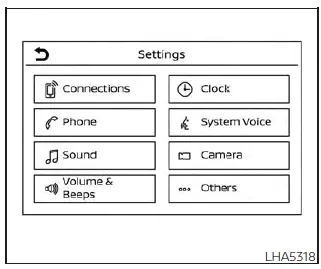
Touch-screen operation

Touch-screen maintenance
To clean the Nissan Sentra display screen, use a dry, soft cloth. If further cleaning is required, apply a small amount of neutral detergent to the cloth. Never spray water or detergent directly onto the screen. Lightly dampen the cloth first, then gently wipe the display.
How to use the
 MENU
button
MENU
button
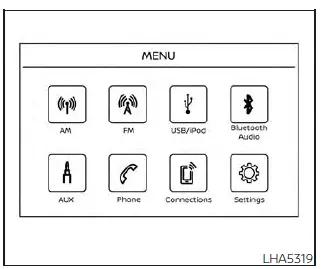
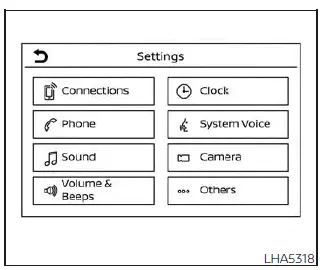
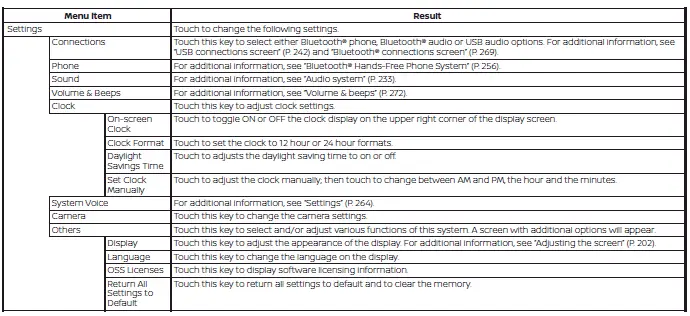
To select or adjust various functions, features, and modes available in your Nissan Sentra:
1. Press the
 MENU button.
2. Touch the “Settings� key on the screen.
3. Select the desired item to customize system behavior.
 (brightness
control) button
(brightness
control) button
To adjust display brightness, press the
 button. Pressing the button again toggles between day and night display
modes.
button. Pressing the button again toggles between day and night display
modes.
Press and hold the
 button for more than two seconds to turn the display off. Press and hold
it again to turn the display back on.
button for more than two seconds to turn the display off. Press and hold
it again to turn the display back on.
How to use the VOL (volume) knob / PUSH (power)
 button
Press the PUSH
 (power)
button to switch the audio system on or off. Rotate the VOL (volume) knob to adjust
the sound level to your preference.
(power)
button to switch the audio system on or off. Rotate the VOL (volume) knob to adjust
the sound level to your preference.
Selecting menu from launch bar
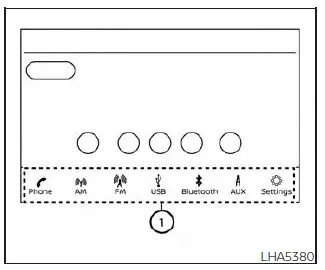
Multiple system functions in the Nissan Sentra can be accessed by touching the icons on the Launch Bar 1. The Launch Bar is displayed on most main menu screens, but it does not appear on certain screens such as settings or camera views.
Touch any icon on the Launch Bar to open the corresponding menu screen.
The following menu items are available from the Launch Bar:
- Phone
- AM
- FM
- USB/iPod
- Bluetooth
- AUX
- Settings
Other materials:
P27f0-00 Transmission Range Control B Position Sensor/switch
Dtc Description
DTC Description
DTC DETECTION LOGIC
DTC
CONSULT screen terms
(Trouble diagnosis
content)
DTC detection
...
B2202-11 Fuel Sender
Dtc Description
DTC Description
DTC DETECTION LOGIC
DTC No.
CONSULT screen terms
(Trouble diagnosis
content)
DTC detected condition
...
Trunk lid
Trunk lid release switch
Instrument panel
WARNING
Do not drive the Nissan Sentra with the trunk lid open.
This can allow hazardous exhaust gases to be drawn into the passenger
compartment, increasing the risk of carbon monoxide exposure.
Always closely supervise children when the ...