Nissan Sentra B18 (2020-2025) Owner's Manual: Moving Object Detection (MOD)
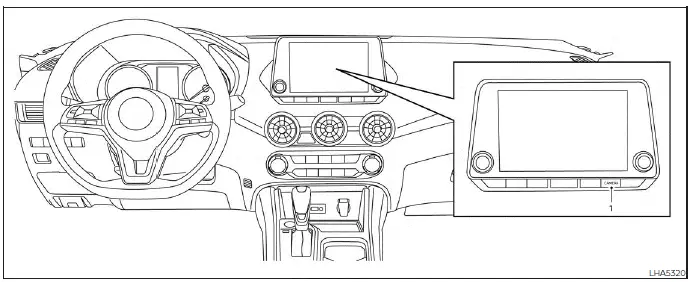
- CAMERA button
WARNING
Failure to follow the warnings and instructions for proper use of the Moving Object Detection (MOD) system could result in serious injury or death.
- The MOD system is not a substitute for proper vehicle operation and is
not designed to prevent contact with surrounding objects.
Always use the outside mirrors, rearview mirror, and visually check your surroundings when maneuvering the Nissan Sentra.
- The MOD system is automatically deactivated at speeds above 5 mph (8 km/h) and will reactivate when vehicle speed is reduced.
- The MOD system is not designed to detect stationary objects.
The MOD system helps inform the driver of moving objects near the Nissan Sentra when backing out of garages, maneuvering in parking lots, or performing similar low-speed operations.
The system detects movement by applying image-processing technology to the camera images displayed on the screen, providing an additional layer of awareness during low-speed maneuvers.
MOD system operation
The Moving Object Detection (MOD) system on the Nissan Sentra is designed to activate automatically in specific low-speed driving situations to enhance driver awareness during parking and maneuvering.
The MOD system will turn on automatically under the following conditions:
- When the shift lever of the Nissan Sentra is placed in the R (Reverse) position.
- When the CAMERA button is pressed to activate a camera view on the display.
- When vehicle speed decreases below approximately 6 mph (10 km/h) and a camera screen is shown.
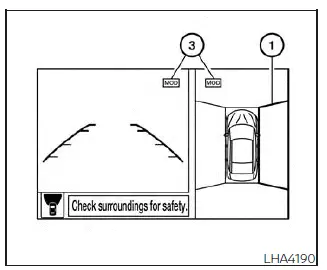
Front and bird's-eye views
The MOD system on the Nissan Sentra operates under the following conditions when a camera view is displayed:
- When the shift lever is in the P (Park) or N (Neutral) position and the vehicle is stopped, the MOD system detects moving objects in the bird's-eye view. The system will not operate if the outside mirrors are folding or unfolding, are in the stowed position, or if either front door is open.
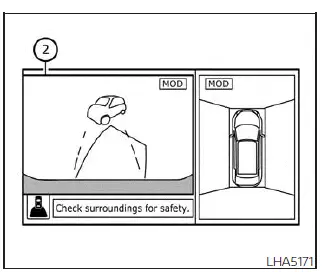
Rear and bird's-eye views
- When the shift lever is in the D (Drive) position and vehicle speed is below approximately 6 mph (10 km/h), the MOD system detects moving objects in the front view.
- When the shift lever is in the R (Reverse) position and vehicle speed is below approximately 6 mph (10 km/h), the MOD system detects moving objects in the rear view. The MOD system will not operate if the trunk lid of the Nissan Sentra is open.
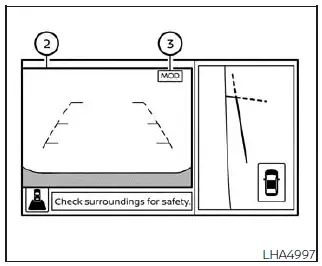
Rear and front-side views
The MOD system does not detect moving objects in the front-side view. In this mode, the MOD icon is not displayed on the screen.
When the MOD system detects moving objects near the Nissan Sentra, an audible chime sounds in the front or rear view, and a yellow frame appears around the area where motion is detected. As long as movement continues to be detected, the yellow frame remains visible.
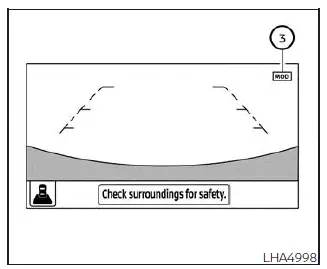
Full screen rear view
NOTE:
While the Rear Cross Traffic Alert (RCTA) chime is sounding, the MOD system will not emit an additional chime.
In the bird’s-eye view, the yellow frame 1 is displayed on each camera image (front, rear, right, or left) depending on where moving objects are detected around the Nissan Sentra.
The yellow frame 2 appears in the front view and rear view modes to highlight detected motion.
A blue MOD icon 3 is shown in views where the MOD system is actively operating. A gray MOD icon is displayed in views where the MOD system is not active. If the MOD system is switched off, the MOD icon 3 is not displayed.
Turning MOD on and off
Some Nissan Sentra vehicles allow the driver to manually enable or disable the MOD system based on personal preference.
To turn the MOD system on or off:
1. Touch the "Setting" key on the display.
2. Touch the "Camera" key.
3. Touch the "Moving Object Detection" key to switch the system between ON and OFF.
MOD system limitations
WARNING
The following section describes the operational limitations of the Moving Object Detection (MOD) system on the Nissan Sentra. Failure to use the Nissan Sentra in accordance with these limitations may result in serious injury or death.
- Do not use the MOD system while towing a trailer. Under towing conditions, the Nissan Sentra MOD system may not function as intended.
- Excessive ambient noise, such as high audio system volume or open windows, can interfere with the audible warning chime, and the alert may not be heard.
- MOD system performance may be reduced depending on environmental conditions
and surrounding objects, including:
- Situations with low contrast between the background and moving objects.
- The presence of blinking or flashing light sources.
- Strong light conditions, such as direct sunlight or headlights from another vehicle.
- Camera misalignment caused by folded mirrors or an abnormal camera position.
- Dirt, water droplets, ice, or snow accumulation on the camera lens.
- Scenarios where the position of a moving object does not change on the display.
- The MOD system may mistakenly detect flowing water, exhaust vapor, moving shadows, or similar visual disturbances.
- Detection accuracy may vary depending on the speed, direction, distance, or shape of moving objects around the Nissan Sentra.
- If the vehicle sustains damage near the camera mounting areas, causing misalignment or bending, the sensing zone may be altered and the MOD system may not properly detect objects.
- In extremely high or low temperatures, display clarity may be reduced. This condition does not indicate a malfunction.
NOTE:
The blue MOD icon will change to orange under the following conditions:
- When the MOD system detects a malfunction.
- When internal component temperature becomes excessively high (the icon will blink).
- When the rearview camera detects a blockage (the icon will blink).
If the MOD icon remains orange, have the Nissan Sentra MOD system inspected. It is recommended that you visit a NISSAN dealer for professional service.
System maintenance
CAUTION
- Do not clean the camera using alcohol, benzine, or thinner, as these substances may cause discoloration.
- Do not damage the camera. Any impact may adversely affect the monitor display and system performance.
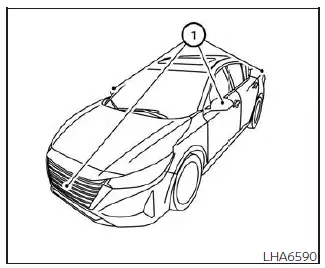
If dirt, rain, or snow accumulates on any camera 1, the Nissan Sentra MOD system may not operate correctly. Clean the camera using a soft cloth lightly dampened with a diluted mild cleaning agent, then wipe dry with a clean cloth.
Other materials:
Diagnostic Can Communication Circuit
Diagnosis Procedure
Diagnosis Procedure
CONNECTOR INSPECTION
Turn the ignition switch OFF.
Disconnect the battery cable from the
negative terminal.
Check the following terminals and
...
Seat. Preparation
Preparation
Special Service Tool
Special Service Tool
The actual shape of the tools may differ from those
illustrated here.
Tool number
(TechMate No.)
Tool name
...
Front Regulator
Exploded View
Exploded View
1.
Door glass rubber
run
2.
Front door glass
front run
...