Nissan Sentra B18 (2020-2025) Service Manual: B2090-14 Nats Antenna Amp.
Dtc Description
DTC Description
DTC DETECTION LOGIC
|
DTC No. |
CONSULT screen items (Trouble diagnosis content) |
DTC detecting condition |
|
|---|---|---|---|
|
B2090–14 |
NATS antenna amp. (Nissan anti-theft system antenna amplifier) |
Diagnosis condition |
Work support ‟INSIDE/OUTSIDE ANT DIAGNOSIS�: activated |
|
Signal (terminal) |
NATS antenna signal |
||
|
Threshold |
Inactive communication between NATS antenna and Intelligent Key unit |
||
|
Diagnosis delay time |
1 second or less |
||
POSSIBLE CAUSE
-
Harness or connectors
(NATS antenna circuit is open or shorted.)
-
Push-button ignition switch (NATS antenna)
-
Intelligent Key unit
FAIL-SAFE
—
Confirmation Procedure
Confirmation Procedure
-
PERFORM DTC CONFIRMATION PROCEDURE
-
 CONSULT
-
Select “INSIDE/OUTSIDE ANT DIAGNOSIS� in “Work support� mode of “HANDS FREE MODULE�.
-
Select “Self Diagnostic Result� mode of “HANDS FREE MODULE�.
-
Is the DTC detected?
YES >>Refer to DTC Diagnosis Procedure.
NO >>To check malfunction symptom before repair: Refer to Intermittent Incident.
NO >>Confirmation after repair: Inspection End.
-
Dtc Diagnosis Procedure
DTC Diagnosis Procedure
-
CHECK NATS ANTENNA COMMUNICATION SIGNAL
-
Check signal between push-button ignition switch harness connector and ground using an oscilloscope.
(+)
(–)
Condition
Signal
(Reference value)
Push-button ignition switch
Connector
Terminal
M25
2
Ground
Intelligent Key battery is removed and brake pedal is depressed
When a registered Intelligent Key backside is contacted to push-button ignition switch
0 V
Other than above
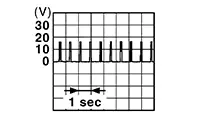
3
When a registered Intelligent Key backside is contacted to push-button ignition switch
0 V
Other than above
Is the inspection result normal?
YES >>GO TO 3.
NO >>GO TO 2.
-
-
CHECK NATS ANTENNA COMMUNICATION SIGNAL CIRCUIT
-
-
Ignition switch OFF.
-
Disconnect Intelligent Key unit connector and push-button ignition switch connector.
-
Check continuity between push-button ignition switch harness connector and Intelligent Key unit harness connector.
Push-button ignition switch
Intelligent Key unit
Continuity
Connector
Terminal
Connector
Terminal
M25
2
M155
19
Yes
3
20
-
Check continuity between push-button ignition switch harness connector and ground.
Push-button ignition switch
—
Continuity
Connector
Terminal
M25
2
Ground
No
3
-
Is the inspection result normal?
YES >>GO TO 3.
NO >>Repair or replace harness.
-
-
REPLACE PUSH-BUTTON IGNITION SWITCH
-
Replace push-button ignition switch. Refer to Removal and Installation.
Is the inspection result normal?
YES >>Inspection End.
NO >>GO TO 4.
-
-
REPLACE INTELLIGENT KEY UNIT
-
Replace Intelligent Key unit. Refer to Removal and Installation.
Inspection End.
-
Other materials:
Adas Control Unit 2
List of Ecu Reference
List of ECU Reference
ECU
Reference
ADAS control unit 2
Values On The Diagnosis Tool
...
U1300 Av Communication Circuit
Dtc Description
DTC Description
DTC DETECTION LOGIC
DTC No.
CONSULT screen terms
(Trouble diagnosis
content)
DTC detection condition
...
U215b-87 Can Comm Err (ipdm E/r)
Dtc Description
DTC Description
DESCRIPTION
CAN (Controller Area Network) is a serial communication
line for real time applications. It is an on-Nissan Sentra vehicle multiplex communication
line with high data communication speed and excellent error detection
ability. Modern Nissan ...