Nissan Sentra B18 (2020-2025) Owner's Manual: Trip computer
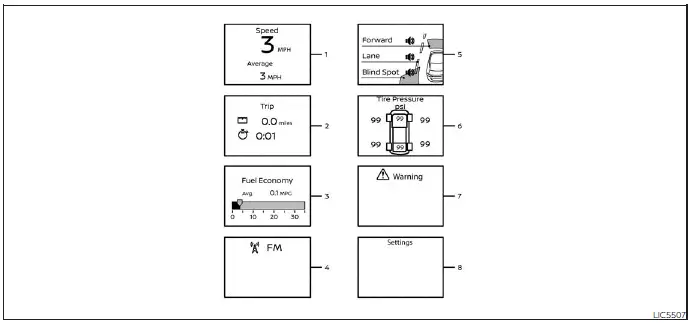
1. Vehicle speed
The vehicle speed screen shows the current speed of the Nissan Sentra as well as the average vehicle speed calculated since the last reset.
Average vehicle speed:
Press the OK button on the steering wheel to open the drive computer Reset menu, then follow the on-screen instructions to reset the average speed data.
For more details, see "Resetting the drive computer".
The average speed display updates every 30 seconds. During the first 30 seconds after a reset, the display shows "- - -".
2. Elapsed time and trip odometer
Elapsed time:
This screen displays the time elapsed since the last reset. Press the OK button to open the drive computer Reset menu and follow the instructions to reset the elapsed time.
Trip odometer:
The trip odometer displays the total distance the Nissan Sentra has traveled since the last reset. Press the OK button on the steering wheel to access the Reset menu and reset the trip distance as needed.
3. Fuel economy display
Current fuel consumption:
This mode shows the current fuel consumption based on real-time driving conditions.
Average fuel consumption:
The average fuel consumption screen displays the average fuel usage since the last reset. Press the OK button to access the Reset menu and follow the instructions to reset the value.
For additional guidance, see "Resetting the drive computer".
Fuel economy values are updated every 30 seconds.
For approximately the first 1/3 mile (500 m) after a reset, the display shows "- -".
4. Audio
The audio screen displays the current status of the audio system, including source and playback information.
5. Driving Aids
This screen shows the operational status of driver assistance systems available on the Nissan Sentra (if so equipped):
- Forward
- Automatic Emergency Braking (AEB) with Pedestrian Detection system
- Intelligent Forward Collision Warning (I-FCW)
- Lane:
- Lane Departure Warning (LDW)
- Blind Spot:
- Blind Spot Warning (BSW)
6. Tire Pressures
This screen displays the tire pressure values for all four tires while the Nissan Sentra is being driven.
When the "Tire Pressure Low - Add Air" warning appears, press the OK button to switch directly to the tire pressure screen and view detailed information related to the warning.
7. Warnings
The warnings screen allows the driver to review any active warning messages.
NOTE:
The warnings screen will only appear when one or more warnings are present.
8. Settings
The settings screen allows the driver to view, adjust, and customize various vehicle settings according to personal preferences.
Other materials:
Cannot Set Automatic Speed Control Device (ascd)
Diagnosis Procedure
Diagnosis Procedure
PERFORM SELF-DIAGNOSIS
With CONSULT
Perform ECM self-diagnosis.
Is DTC detected?
YES >>
Perform diagnosis of applicable.
NO >>
GO TO 2.
CHECK BRAKE PEDAL POSITION SWITCH
...
Preparation. Preparation
Preparation
Special Service Tool
Special Service Tool
The actual shape of the tools may differ from those
illustrated here.
Tool number
(TechMate No.)
Tool name
...
Seat Belt. Removal and Installation
Front Seat Belt
Exploded View
Exploded View
1.
Seat belt height
adjuster
2.
Seat belt height adjuster
...