Nissan Sentra B18 (2020-2025) Owner's Manual: Settings
The Settings mode in the Nissan Sentra allows you to adjust and personalize the information shown in the vehicle information display, helping tailor vehicle behavior and on-screen data to your driving preferences:
- VDC Setting
- Driver Assistance
- ECO Mode Setting
- TPMS Settings
- Clock
- Vehicle Settings
- Maintenance
- Customize Display
- Unit
- Language
- Factory Reset
VDC Setting
The VDC Setting menu allows the driver to enable or disable the Vehicle Dynamic Control (VDC) system in the Nissan Sentra, which helps improve vehicle stability by reducing wheel slip during acceleration or cornering.

Driver Assistance
The Driver Assistance menu allows the user to modify settings related to driving, parking, and braking support systems available on the Nissan Sentra.
Some of the menu items shown may not be available depending on vehicle grade and equipment.
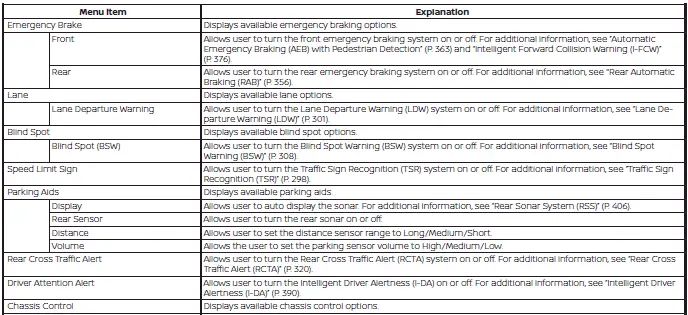
ECO Mode Setting
The ECO Mode Setting menu allows the driver to configure how ECO mode operates, supporting improved fuel efficiency and smoother throttle response in the Nissan Sentra.
Some ECO mode options may not be available on all models.

TPMS Settings
The TPMS Settings menu allows the user to select the preferred tire pressure units displayed in the Nissan Sentra vehicle information display.

Clock
The Clock menu allows the driver to set or adjust the time shown in the vehicle information display for the Nissan Sentra.

Vehicle Settings
The Vehicle Settings menu allows the user to adjust lighting, door locking, and other convenience features of the Nissan Sentra.
Some settings shown may not be available depending on vehicle equipment.
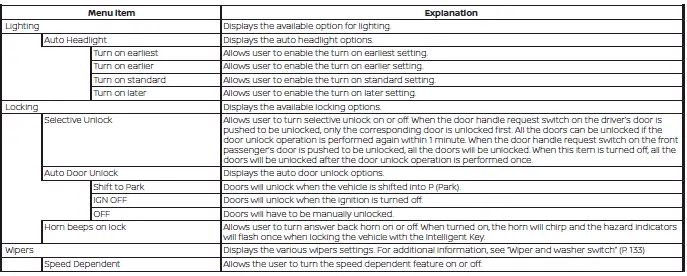

Maintenance
The Maintenance menu allows the driver to set reminders for key maintenance items, helping keep the Nissan Sentra operating safely and efficiently.
WARNING
The tire replacement indicator is not a substitute for routine tire inspections, including regular tire pressure checks. For additional information, see "Changing wheels and tires". Tire wear depends on many factors such as inflation pressure, alignment, driving habits, and road conditions. Setting a tire replacement distance does not guarantee tire life. Use the tire replacement indicator only as a guide and always perform regular inspections.
Failure to perform regular tire inspections, including tire pressure checks, may result in tire failure. Serious vehicle damage could occur and may lead to a collision, resulting in serious personal injury or death.

Customize Display
The Customize Display menu allows the driver to choose which information is shown on the Nissan Sentra vehicle information display, improving readability and convenience.
Some customization options may not be available on all models.
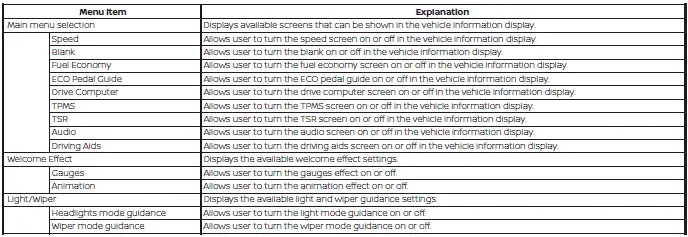
Unit
The Unit menu allows the user to select measurement units, such as miles or kilometers, shown throughout the Nissan Sentra vehicle information display.

Language
The Language menu allows the driver to change the display language used in the Nissan Sentra vehicle information display.

Factory Reset
The Factory Reset menu restores all vehicle information display settings to their original factory defaults, removing any personalized adjustments made in the Nissan Sentra.

Other materials:
U2118-87 Can Comm Err (intelligent Key)
Dtc Description
DTC Description
DESCRIPTION
CAN (Controller Area Network) is a serial communication
line for real time applications. It is an on-Nissan Sentra vehicle multiplex communication
line with high data communication speed and excellent error detection
ability. Modern Nissan ...
Abs Warning Lamp
Component Function Check
Component Function Check
CHECK ABS WARNING LAMP FUNCTION
Check that ABS warning lamp in combination meter
turns ON for 1 second after ignition switch is placed ON.
CAUTION:
Never start th ...
Front Passenger Air Bag Module
Exploded View
Exploded View
1.
Instrument panel
assembly
2.
Front passenger air bag
module
...