Nissan Sentra B18 (2020-2025) Owner's Manual: How to use the vehicle information display
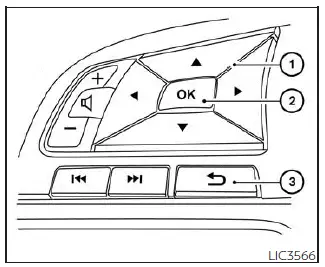
The vehicle information display in the Nissan Sentra is operated using the
 ,
,
 ,
and OK buttons located on the steering wheel, allowing the driver to safely access
vehicle data while driving.
,
and OK buttons located on the steering wheel, allowing the driver to safely access
vehicle data while driving.
-
 - Use these buttons to scroll through and navigate the vehicle information display
menus.
- Use these buttons to scroll through and navigate the vehicle information display
menus. - OK - Confirms a selection or changes the currently highlighted item in the vehicle information display.
-
 - Returns to the previous menu or screen.
The OK,
 and
and
 buttons
may also control audio and control panel functions in certain conditions. Most screens
and menus display on-screen guidance for the steering wheel buttons, making operation
of the Nissan Sentra vehicle information display intuitive and user-friendly. The
OK button can be used to change the audio source when the audio screen is active,
and the
buttons
may also control audio and control panel functions in certain conditions. Most screens
and menus display on-screen guidance for the steering wheel buttons, making operation
of the Nissan Sentra vehicle information display intuitive and user-friendly. The
OK button can be used to change the audio source when the audio screen is active,
and the
 buttons allow manual control of voice recognition features. The OK button also provides
quick access to audio source selection, while the
buttons allow manual control of voice recognition features. The OK button also provides
quick access to audio source selection, while the
 buttons are used when manually navigating voice recognition prompts.
For additional connectivity and multimedia features, refer to the separate NissanConnect Owner's Manual specific to the Nissan Sentra.
Startup display
When the vehicle is placed in the ON position, the vehicle information display in the Nissan Sentra may show the following screens:
- Active system status (if so equipped)
- Trip computer information
- Fuel economy data
- System warnings
- Outside air temperature
- Odometer/Twin Trip Odometer
Warning messages are displayed only when a condition requiring attention is detected. For more details, see "Vehicle information display warnings and indicators".
Other materials:
Front Brake Caliper Assembly
Exploded View
Exploded View
1.
Brake caliper body
2.
Bleeder valve
3.
...
B1041-82 Vehicle Speed Signal
Dtc Description
DTC Description
DTC DETECTION LOGIC
DTC No.
CONSULT screen items
(Trouble diagnosis
content)
DTC Detection Condition
...
B2c20-12 Starter Cut Relay
Dtc Description
DTC Description
DTC DETECTION LOGIC
DTC No.
CONSULT screen items
(Trouble diagnosis
content)
DTC detecting condition
...