Nissan Sentra B18 (2020-2025) Service Manual: Sonar System :: Basic Inspection
Diagnosis and Repair Work Flow. Work Flow. Work Flow
Work Flow
OVERALL SEQUENCE
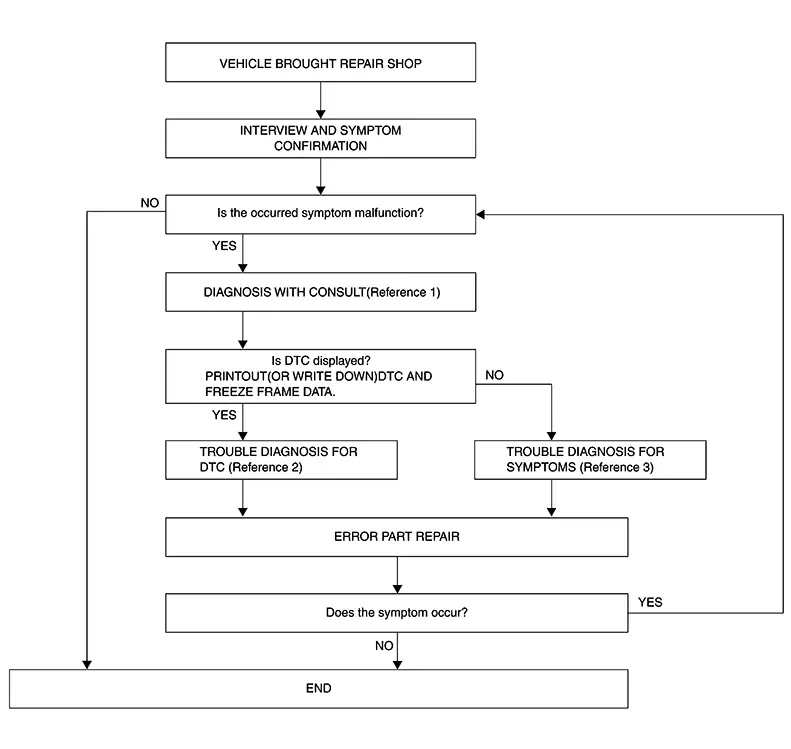
-
Reference 1: Refer to CONSULT Function.
-
Reference 2: Refer to DTC Index.
-
Reference 3: Refer to Symptom Table.
DETAILED FLOW
-
INTERVIEW AND SYMPTOM CONFIRMATION
-
Check the malfunction symptoms by performing the following items:
-
Interview the customer to obtain the malfunction information (conditions and environment when the malfunction occurred).
-
Check the symptom.
-
Is the occurred symptom a malfunction?
YES>>GO TO 2.
NO>>Inspection End.
-
-
DIAGNOSIS WITH CONSULT
-
 CONSULT
-
Select "Self Diagnosis Result" mode of “SONAR�. Refer to CONSULT Function.
Note:
Skip to step 4 of the diagnosis procedure if “SONAR� is not displayed.
-
When DTC is detected, record DTC and Freeze Frame Data (FFD).
-
Is DTC displayed?
YES>>GO TO 3.
NO>>GO TO 4.
-
-
TROUBLE DIAGNOSIS FOR DTC
-
CONSULT
-
Check the DTC indicated in the “Self Diagnostic Result�.
-
Perform the relevant diagnosis referring to the DTC Index. Refer to DTC Index.
-
GO TO 5.
-
-
TROUBLE DIAGNOSIS FOR SYMPTOMS
-
Perform the relevant diagnosis referring to the diagnosis chart by symptom. Refer to Symptom Table.
GO TO 5.
-
-
ERROR PART REPAIR
-
-
Repair or replace the identified malfunctioning parts.
-
Select "Self Diagnosis Result" mode of “SONAR�.
Note:
Erase the stored self-diagnosis results after repairing or replacing the relevant components if any DTC has been indicated in the “Self Diagnostic Result�.
-
Check that the symptom does not occur.
-
Does the symptom occur?
YES>>GO TO 1.
NO>>Inspection End.
-
Additional Service When Replacing Sonar Control Unit. Work Procedure. Work Procedure
Work Procedure
Perform "Configuration" when replacing sonar control unit. Refer to Work Procedure.
Configuration (sonar Control Unit). Work Procedure. Work Procedure
Work Procedure
Description
Vehicle specification needs to be written with CONSULT after replacing sonar control unit.
Work Procedure (Before Replacement)
-
SAVING Nissan Sentra Vehicle SPECIFICATION
-
CONSULT
Read/save the current Nissan Sentra vehicle specification in CONSULT according to the configuration procedure in CONSULT operation manual.
Note:
-
“TYPE ID� is saved in CONSULT for sonar control unit.
-
“TYPE ID� means the parts number (Nissan Sentra vehicle specification) stored in the sonar control unit.
-
Work End.
-
Work Procedure (After Replacement)
-
CHECKING SONAR CONTROL UNIT TYPE ID
-
CONSULT
-
Perform ECU setting according to the “CONFIGURATION� procedure in the “CONSULT Operation Manual�. Refer to CONSULT Operation Manual.
-
Check if the Type ID of the sonar control unit is displayed on the CONSULT screen.
-
Is Type ID displayed?
YES >>GO TO 2.
NO >>GO TO 3.
-
-
WRITING Nissan Sentra Vehicle SPECIFICATION
-
CONSULT
Follow the procedure displayed in CONSULT for writing the saved Nissan Sentra vehicle specification data to the sonar control unit.
GO TO 5.
-
-
CHECKING SONAR CONTROL UNIT TYPE ID
-
Use Global Web-FAST (NISSAN parts catalogue) to search for the sonar control unit of the applicable Nissan Sentra vehicle and find the Type ID. Refer to “FAST linked� in the “CONSULT Operation Manual�.
Note:
For FAST linked parts, even if a system number cannot be acquired from the sonar control unit before replacement, the applicable ECU setting operation can still be performed by acquiring the system number from Global Web-FAST (NISSAN parts catalogue).
GO TO 4.
-
-
WRITING Nissan Sentra Vehicle SPECIFICATION (FAST LINKED)
-
CONSULT
Perform ECU setting according to the “C/U setting� procedure in the “CONSULT Operation Manual�. Refer to CONSULT Operation Manual.
GO TO 5.
-
-
CHECK ALL ECU SELF DIAGNOSTIC RESULT
-
CONSULT
-
Erase all ECU self-diagnosis results.
-
Ignition switch OFF.
-
Ignition switch ON.
-
Check that all ECU self-diagnosis results have no DTC.
-
Work End.
-
Other materials:
Power Window Control System. Removal and Installation
Main Power Window and Door Lock/unlock Switch. Removal and Installation
Removal and Installation
Removal and Installation
REMOVAL
Using
suitable tool, release clips and pawls and remove main power window
and door lock/unlock switch finisher (1).
...
Tire Pressure Monitoring System Symptom Table. Symptom Table
Symptom Table
Symptom Table
LOW TIRE PRESSURE WARNING LAMP SYMPTOM
CHART
Diagnosis items
Symptom
(Ignition switch ON)
Low tire pressure warning
...
U2148-87 Can Comm Err (brake Control Unit)
Dtc Description
DTC Description
DESCRIPTION
CAN (Controller Area Network) is a serial communication
line for real time applications. It is an on-Nissan Sentra vehicle multiplex communication
line with high data communication speed and excellent error detection
ability. Modern Nissan ...