Nissan Sentra B18 (2020-2025) Service Manual: Removal and Installation (rh)
Removal and Installation (RH)
Note:
When removing components such as hoses, tubes, lines, etc., cap or plug openings to prevent fluid from spilling.
REMOVAL
For M/T models, drain the M/T oil. Refer to Draining.
Remove disc brake rotor. Refer to Removal and installation.
CAUTION:
Do not depress the brake pedal while the brake caliper is removed.
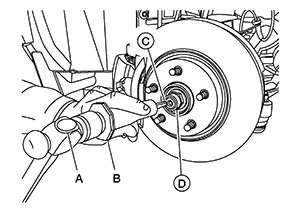
Using hammer (A) and Tool (B) release staked area (C) of wheel hub lock nut (D).
|
Tool number (B) |
: (NI-52982) |
Visually verify that staked area
(A) of wheel hub lock nut (B) is completely released from front drive
shaft (1) or damage to drive shaft can occur.
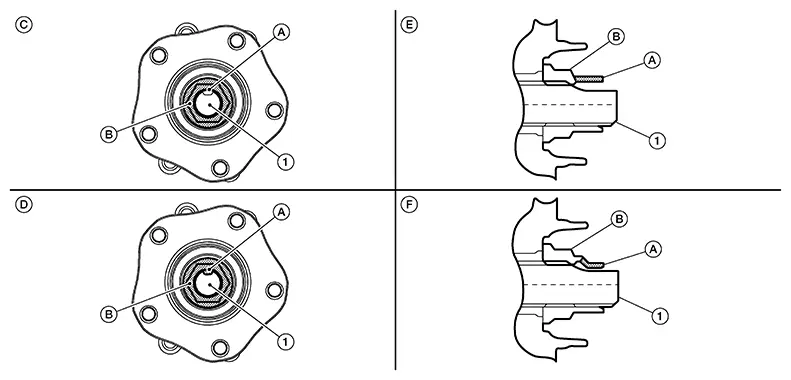
|
(C) |
: Fully released |
|
(D) |
: Not fully released |
|
(E) |
: Fully released (sectional view) |
|
(F) |
: Not fully released (sectional view) |
Warning:
To avoid risk of death or severe personal injury:
-
Be sure that staked area of wheel hub lock nut is fully released or damage to drive shaft can occur.
-
Do not damage front drive shaft threads.
Hold the wheel hub and bearing using
Tool (A). Loosen the wheel hub lock nut.
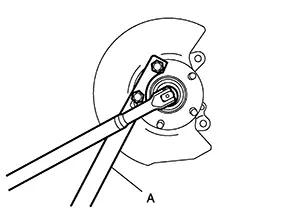
|
Tool (A) number |
: KV40104000 ( — ) |
Warning:
To avoid risk of death or severe personal injury:
-
Do not use power tool.
-
Do not damage front drive shaft threads.
-
Do not reuse drive shaft lock nut.
-
When loosening lock nut, if it does not turn smoothly, verify that staked area is completely released.
Using a piece of wood and a suitable
tool, tap on the wheel hub lock nut to disengage the drive shaft from
the wheel hub and bearing.
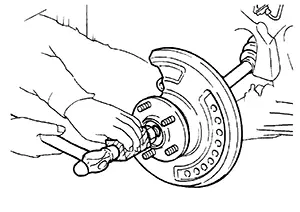
CAUTION:
-
Do not place the drive shaft joint at an extreme angle. Also be careful not to overextend slide joint.
-
Do not allow the drive shaft to hang down without support.
Use a suitable puller if the drive shaft cannot be separated from the wheel hub and bearing even after performing the above procedure.
Remove the wheel hub lock nut.
Remove the bolts and the support bearing retainer.
Remove the nut and bolt from the lower ball joint. Disconnect the steering knuckle from the transverse link.
Remove the drive shaft from the
wheel hub and bearing.
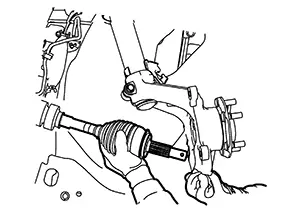
Insert the Tool (A) between the
shaft and the transaxle. Remove the drive shaft from the transaxle.
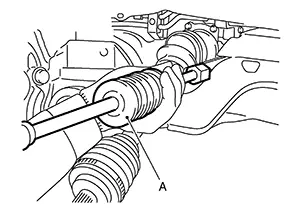
CAUTION:
Confirm that the circular clip is attached to the drive shaft.
|
Tool (A) |
: Drive shaft joint puller (Commercially available) |
Remove the differential side oil seal. Refer to Removal and Installation.
If necessary, remove the support bearing bracket bolts and the support bearing bracket.
Inspect the components. Refer to Inspection (RH).
INSPECTION AFTER REMOVAL
-
Move joint up/down, left/right, and in axial direction. Check for any rough movement or significant looseness.
-
Check boot for cracks or other damage, and for grease leakage.
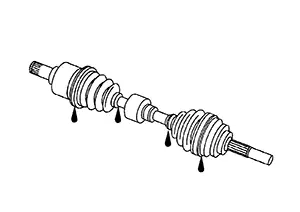
-
If damaged, disassemble drive shaft to verify damage, and repair or replace as necessary.
INSTALLATION
Installation is in the reverse order of removal.
TRANSAXLE SIDE
-
Install a new differential side oil seal. Refer to Removal and Installation.
CAUTION:
Do not reuse the differential side oil seal.
-
CVT
-
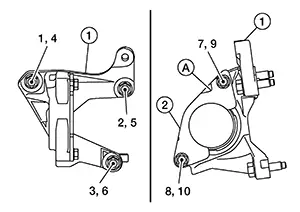
When installing the support bearing bracket (1), note the following:
-
Tighten the support bearing bracket bolts in 2 stages in the order of 1 to 6 as shown.
Support bearing bracket bolt torque
48.0 N·m (4.9 kg−m, 35 ft−lb)
-
Install the support bearing bracket plate (2) with the notch (A) upward. Tighten the support bearing bracket plate bolts in 2 stages in the order of 7 to 10 as shown.
CAUTION:
Do not reuse the support bearing bracket plate.
Support bearing bracket plate bolt torque
21.0 N·m (2.1 kg−m, 15 ft−lb)
-
-
-
MT
-
When installing the support bearing bracket (1), note the following:
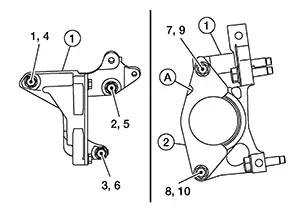
-
Tighten the support bearing bracket bolts in 2 stages in the order of 1 to 6 as shown.
Support bearing bracket bolt torque
48.0 N·m (4.9 kg−m, 35 ft−lb)
-
Install the support bearing bracket plate (2) with the notch (A) upward. Tighten the support bearing bracket plate bolts in 2 stages in the order of 7 to 10 as shown.
CAUTION:
Do not reuse the support bearing bracket plate.
Support bearing bracket plate bolt torque
21.0 N·m (2.1 kg−m, 15 ft−lb)
-
-
-
Place Tool (A) onto the differential side oil seal to prevent damage to the oil seal while inserting the drive shaft. Slide drive shaft sliding joint and tap with a hammer to install securely.
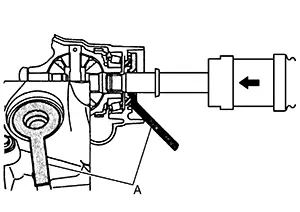
Tool (A) number
: KV38107900 (NI-52469-1)
Warning:
Ensure that the circular clip is properly engaged, otherwise the joint sub-assembly could pull away from the transaxle during Nissan Sentra vehicle operation resulting in loss of drive force and possible drive shaft damage, which may cause a crash and serious injury or damage to the drive shaft.
-
To ensure the circular clip is properly engaged, grasp the housing (1) and pull back and forth in axial direction while listening for clicking sounds.
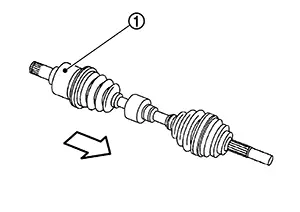
-
Pull the joint sub-assembly in the axial direction away from transaxle. Confirm that the joint sub assembly cannot be pulled out.
-
-
For MT models, refill the M/T oil. Refer to Refilling.
-
Complete the inspection. Refer to Inspection (RH).
WHEEL HUB SIDE
-
Clean the mating surfaces of the wheel hub lock nut and the wheel hub and bearing.
CAUTION:
Do not apply lubricating oil to these mating surfaces.
-
Apply a moderate coat of paste [service parts (440037S000)] to bearing surface (A) as shown.
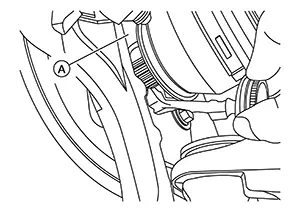 Note:
Note:
Always check with the Parts Department for the latest parts information.
-
Hold the wheel hub and bearing using suitable tool. Tighten the wheel hub lock nut.
Wheel hub lock nut
165 N·m (17 kg−m, 122 ft−lb)
CAUTION:
-
Do not reuse the wheel hub lock nut.
-
Since the drive shaft is assembled by press-fitting, use a torque wrench to tighten the wheel hub lock nut. Do not use a power tool.
-
Too much torque causes axle noise. Too little torque causes wheel bearing looseness. Tighten the wheel hub lock nut to the specification.
Tool number
: KV40104000 ( — )
-
-
Using hammer (A) and cold chisel (B) stake the wheel hub lock nut (C) as shown.
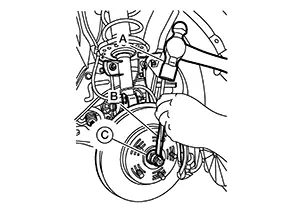
Warning:
To avoid the risk of death or severe personal injury:
-
Use the following range when staking the wheel hub lock nut.
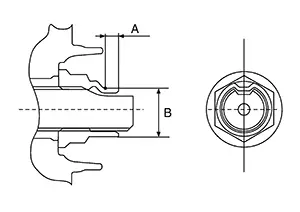
(A)
: 6.2 mm (0.244 in)
(B)
: 26.4 - 27.8 mm (1.039 - 1.094 in)
-
-
Align the matching marks (A) on the disc brake rotor and on the wheel hub and bearing.
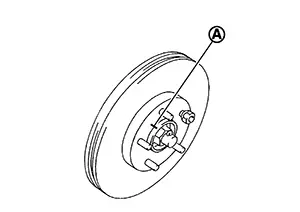
-
Complete the inspection. Refer to Inspection (RH).
Other materials:
P0127 Iat Sensor
Dtc Description
DTC Description
DTC DETECTION LOGIC
DTC
CONSULT screen terms
(Trouble diagnosis
content)
DTC detection
condition
...
Fuel Lines
Inspection
Inspection
Inspect
fuel lines, fuel filler cap, and fuel tank for improper attachment,
leakage, cracks, damage, loose connections, chafing or
deterioration.
(A)
: Engine
...
Remote Keyless Entry Function
System Diagram
System Diagram
System Description
System Description
The Intelligent Key has the same functions as the
remote control entry system. Therefore, it can be used in the same
manner as the remote controller by operating the door lock/unlock
button.
OPERATION
Re ...