Nissan Sentra B18 (2020-2025) Service Manual: Basic Inspection
Diagnosis and Repair Workflow
Work Flow
Work Flow
OVERALL SEQUENCE
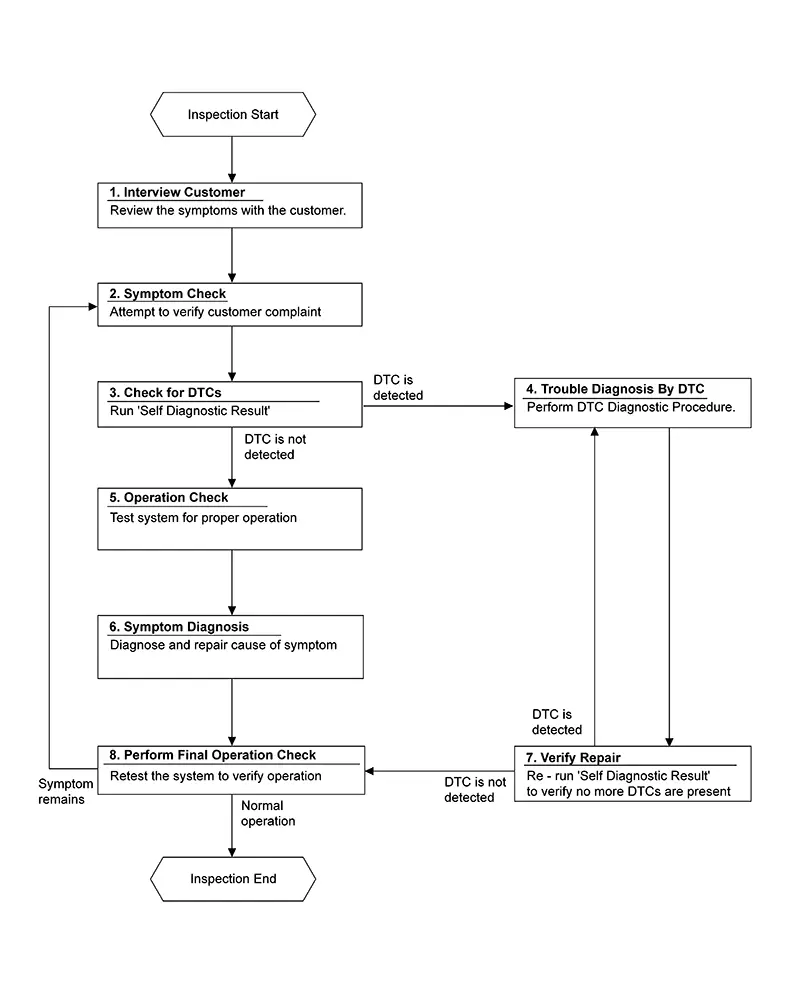
DETAILED FLOW
-
INTERVIEW CUSTOMER
-
Interview the customer to obtain as much information as possible about the conditions and environment under which the malfunction occurred.
GO TO 2.
-
-
SYMPTOM CHECK
-
Verify symptoms.
GO TO 3.
-
-
CHECK FOR DTCS
-
 CONSULT
-
Ignition switch ON.
-
Select “Self Diagnostic Result” mode of “HVAC”.
-
Check DTC.
-
Is any DTC detected?
YES >>GO TO 4.
NO >>GO TO 5.
-
-
TROULE DIAGNOSIS BY DTC
-
Perform the diagnostic procedure for the detected DTC. Refer to DTC Inspection Priority Chart.
GO TO 7.
-
-
OPERATION CHECK
-
Perform the operation check. Refer to Work Procedure.
GO TO 6.
-
-
SYMPTOM DIAGNOSIS
-
Check the symptom diagnosis table. Refer to Diagnosis Chart By Symptom.
GO TO 8.
-
-
VERIFY REPAIR
-
CONSULT
-
Ignition switch ON.
-
Select “Self Diagnostic Result” mode of “HVAC”.
-
Check DTC.
-
Is any DTC detected?
YES >>GO TO 4.
NO >>GO TO 8.
-
-
PERFORM FINAL OPERATION CHECK
-
Perform the operation check. Refer to Work Procedure.
Does it operate normally?
YES >>Inspection End.
NO >>GO TO 2.
-
Operation Inspection
Work Procedure
Work Procedure
DESCRIPTION
The purpose of the operational check is to check that the individual system operates normally.
|
Conditions |
: Engine running at normal operating temperature |
INSPECTION PROCEDURE
-
CHECK MEMORY FUNCTION
-
-
Start the engine.
-
Operate the temperature control switch (driver side) and raise the temperature setting to 89°F or 90°F (32°C).
-
Press the OFF switch.
-
Ignition switch OFF.
-
Ignition switch ON.
-
Press the AUTO switch.
-
Check that the temperature setting, before placing the ignition switch OFF, is stored.
-
Is the inspection result normal?
YES >>GO TO 2.
NO >>Check power and ground circuits for A/C auto amp. Refer to Diagnosis Procedure.
-
-
CHECK BLOWER MOTOR SPEED
-
-
Operate the fan control dial. Check that the fan speed changes.
-
Check the operation for all fan speeds.
-
Is the inspection result normal?
YES >>GO TO 3.
NO >>Check blower motor system. Refer to Diagnosis Procedure.
-
-
CHECK DISCHARGE AIR (MODE SWITCH AND DEF SWITCH)
-
-
Press the MODE switch and the DEF switch.
-
Check that the air outlets change according to each indicated air outlet by placing a hand in front of the outlets. Refer to System Description.

Confirm that the A/C compressor clutch is engaged (sound or visual inspection) and intake door position is at FRE (
 )
(REC
)
(REC  position is not selected) when the D/F
(
position is not selected) when the D/F
( ) or DEF (
 ) is selected.
 -
Is the inspection result normal?
YES >>GO TO 4.
NO >>Check mode door system. Refer to Diagnosis Procedure.
-
-
CHECK INTAKE AIR
-
-
Press REC (
) switch one time. REC indicator should
illuminate. -
Listen to the sound of the air coming out of the vent.
-
Press REC (
) switch one more time. REC indicator
should go off. -
There should be an audible change to the sound of the air flowing out of the vent.
Confirm that the A/C compressor clutch is engaged (sound or visual inspection) and the FRE (
) door is open (REC position is not selected) when the D/F
() or DEF () is selected. -
Is the inspection result normal?
YES >>GO TO 5.
NO >>Check intake door system. Refer to Diagnosis Procedure.
-
-
CHECK A/C SWITCH
-
-
Press the A/C switch.
-
The A/C switch indicator is turned ON.
Confirm that the A/C compressor clutch engages (sound or visual inspection).
-
Is the inspection result normal?
YES >>GO TO 6.
NO >>Check magnet clutch system. Refer to Diagnosis Procedure.
-
-
CHECK TEMPERATURE DECREASE
-
-
Operate the A/C compressor.
-
Operate the temperature control switch (driver side) and lower the temperature setting to 60°F or 61°F (18°C).
-
Check that the cool air blows from the outlets.
-
Is the inspection result normal?
YES >>GO TO 7.
NO >>Check for insufficient cooling. Refer to Diagnosis Procedure.
-
-
CHECK TEMPERATURE INCREASE
-
-
Operate the temperature control switch (driver side) and raise the temperature setting to 89°F or 90°F (32°C) after warming up the engine.
-
Check that the warm air blows from the outlets.
-
Is the inspection result normal?
YES >>GO TO 8.
NO >>Check for insufficient heating. Refer to Diagnosis Procedure.
-
-
CHECK DUAL MODE FUNCTION
-
-
Press the DUAL mode switch, and then check that “DUAL” is shown on the display.
-
Operate the temperature control switch (driver side). Check that the discharge air temperature (driver side) changes.
-
Operate the temperature control switch (passenger side). Check that the discharge air temperature (passenger side) changes.
-
Press the DUAL mode switch, and then check that the temperature setting (driver/passenger) is unified to the driver side temperature setting.
-
Is the inspection result normal?
YES >>GO TO 9.
NO >>Refer to Diagnosis Chart By Symptom and perform the appropriate diagnosis.
-
-
CHECK AUTO MODE
-
-
Press the AUTO switch, and then check that “AUTO” is shown on the display.
-
Operate the temperature control switch (driver side). Check that the fan speed, outlet air or intake air changes. The discharge air temperature or fan speed varies depending on the ambient temperature, in-Nissan Sentra vehicle temperature, and temperature setting.
-
Is the inspection result normal?
YES >>Inspection End.
NO >>Refer to Diagnosis Chart By Symptom and perform the appropriate diagnosis.
-
System Setting
Temperature Setting Trimmer
Temperature Setting Trimmer
Description
If the temperature felt by the customer is different than the airflow temperature controlled by the temperature setting, the auto amplifier control temperature can be adjusted to compensate for the temperature setting.
How to set
CONSULT
Select “TEMP SET CORRECT” in “Work support” mode of “HVAC”.
|
Work support items |
Display (°F) |
Display (°C) |
|---|---|---|
|
TEMP SET CORRECT |
6 |
3.0 |
|
5 |
2.5 |
|
|
4 |
2.0 |
|
|
3 |
1.5 |
|
|
2 |
1.0 |
|
|
1 |
0.5 |
|
|
0 (initial status) |
0 (initial status) |
|
|
−1 |
−0.5 |
|
|
−2 |
−1.0 |
|
|
−3 |
−1.5 |
|
|
−4 |
−2.0 |
|
|
−5 |
−2.5 |
|
|
−6 |
−3.0 |
-
When the temperature setting is set to 77°F (25.0°C) and −6°F (−3.0°C), the temperature controlled by auto amp. is 77°F (25.0°C) −6°F (−3.0°C) = 71°F (22.0°C) and the temperature becomes lower than the temperature setting.
-
When the battery cable is disconnected from the negative terminal or when the battery voltage becomes 10V or less, the setting of the difference between the temperature setting and control temperature may be cancelled.
Inlet Port Memory Function (fre)
Inlet Port Memory Function (FRE)
Description
-
If the ignition switch is placed to the OFF position while the FRE (
) switch is set to ON (fresh air intake),
“Perform the memory” or “Do not perform the memory” of the FRE () switch
ON (fresh air intake) condition
can be selected. -
If “Perform the memory” was set, the FRE (
) switch will be ON (fresh air
intake)
when placing the ignition switch to the ON position again. -
If “Do not perform the memory” was set, the air inlets will be controlled automatically when placing the ignition switch to the ON position again.
How to set
CONSULT
Select “FRE MEMORY SET” in “Work support” mode of “HVAC”.
|
Work support items |
Display |
Setting |
|---|---|---|
|
FRE MEMORY SET |
WITHOUT |
Perform the memory of manual FRE |
|
WITH (initial status) |
Do not perform the memory of manual FRE (auto control) |
When the battery cable is disconnected from the negative terminal or when the battery voltage becomes 10V or less, the setting of the FRE switch memory function may be cancelled.
Inlet Port Memory Function (rec)
Inlet Port Memory Function (REC)
Description
-
If the ignition switch is placed to the OFF position while the REC (
) switch is set to ON (recirculation),
“Perform the memory” or “Do not perform the memory” of the REC () switch
ON (recirculation) condition
can be selected. -
If “Perform the memory” was set, the REC (
) switch will be ON
(recirculation) when
placing the ignition switch to the ON position again. -
If “Do not perform the memory” was set, the air inlets will be controlled automatically when placing the ignition switch to the ON position again.
How to set
CONSULT
Select “REC MEMORY SET” in “Work support” mode of “HVAC”.
|
Work support items |
Display |
Setting |
|---|---|---|
|
REC MEMORY SET |
WITHOUT (initial status) |
Perform the memory of manual REC |
|
WITH |
Do not perform the memory of manual REC (auto control) |
When the battery cable is disconnected from the negative terminal or when the battery voltage becomes 10V or less, the setting of the REC switch memory function may be cancelled.
Target Evaporator Temp Upper Limit
Target Evaporator Temp Upper Limit
DESCRIPTION
Set the target evaporator temperature upper limit.
HOW TO SET
CONSULT
Select “TARGET EVAPORATOR TEMP UPPER LIMIT SETTING” in “Work support” mode of “HVAC”.
|
Work support items |
Display |
|---|---|
|
TARGET EVAPORATOR TEMP UPPER LIMIT SETTING |
Initial Setting |
|
Low |
|
|
Middle |
|
|
High |
Foot Position Setting Trimmer
Foot Position Setting Trimmer
DESCRIPTION
In FOOT mode, the air blowing to DEF can change ON/OFF.
HOW TO SET
CONSULT
Select “BLOW SET” in “Work support” mode of “HVAC”.
|
Work support items |
Display |
Defroster door position |
|
|---|---|---|---|
|
Auto control |
Manual control |
||
|
BLOW SET |
Mode1 (initial status) |
OPEN |
CLOSE |
|
Mode2 |
OPEN |
OPEN |
|
|
Mode3 |
CLOSE |
OPEN |
|
|
Mode4 |
CLOSE |
CLOSE |
|
When the battery cable is disconnected from the negative terminal or when the battery voltage becomes 10V or less, the setting of the discharge air mix ratio in FOOT mode may be cancelled.
Door Motor Starting Position Reset
Description
Description
-
Reset signal is transmitted from A/C auto amp. to air mix door motor and mode door motor. Starting position reset can be performed.
Note:
During reset, DEF switch indicator blinks.
-
When air mix door motor or mode door motor is removed and installed, always perform door motor starting position reset.
Work Procedure
Work Procedure
-
PERFORM DOOR MOTOR STARTING POSITION RESET
-
CONSULT
-
Ignition switch ON.
-
Select “Door Motor Starting Position Reset” in “Active Test” mode of “HVAC”.
-
Select “Start” and wait a few seconds.
-
Make sure the “COMPLETED” is displayed on CONSULT screen.
-
Inspection End.
-
Other materials:
B2070-68 Key Registration
Dtc Description
DTC Description
DTC DETECTION LOGIC
DTC No.
CONSULT screen items
(Trouble diagnosis
content)
DTC detecting condition
...
Intake Sensor
Diagnosis Procedure
Diagnosis Procedure
CHECK INTAKE SENSOR
Ignition switch OFF.
Remove intake sensor. Refer to Removal and Installation.
Check resis ...
U0101 Can Comm Circuit
Dtc Description
DTC Description
CAN (Controller Area Network) is a serial communication line for
real time application. It is an on-Nissan Sentra vehicle multiplex communication line with
high data communication speed and excellent error detection ability. Many
electronic control un ...