Nissan Sentra B18 (2020-2025) Service Manual: Basic Inspection
Diagnosis and Repair Work Flow
Work Flow
Work Flow
OVERALL SEQUENCE
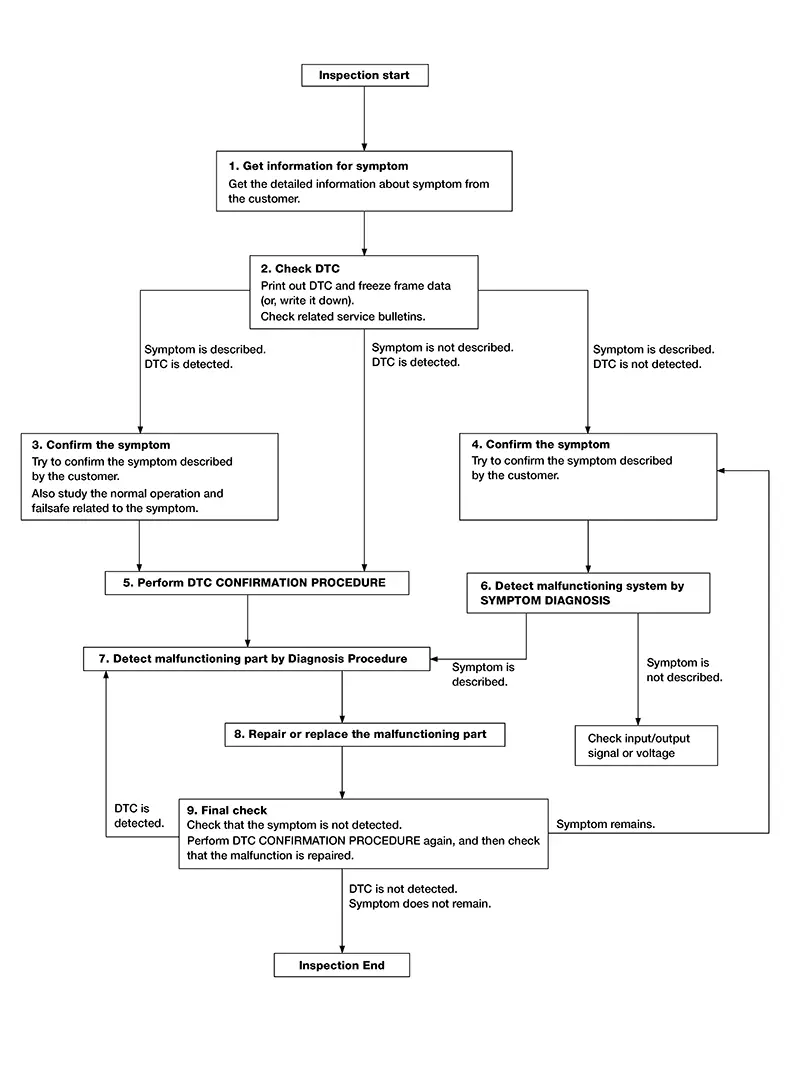
DETAILED FLOW
-
GET INFORMATION FOR SYMPTOM
-
-
Get detailed information from the customer about the symptom (the condition and the environment when the incident/malfunction occurs).
-
Check operation condition of the component or system that is malfunctioning.
-
GO TO 2.
-
-
CHECK DTC
-
 CONSULT
-
Check DTC.
-
Perform the following procedure if DTC is detected:
-
Record DTC and freeze frame data (print them out).
-
Erase DTC.
-
Study the relationship between the cause detected by DTC and the symptom described by the customer.
-
-
Check related service bulletins for information.
-
Are any symptoms described and any DTC detected?
Symptom is described, DTC is detected>>GO TO 3.
Symptom is described, DTC is not detected>>GO TO 4.
Symptom is not described, DTC is detected>>GO TO 5.
-
-
CONFIRM THE SYMPTOM
-
Try to confirm the symptom described by the customer.
Also study the normal operation and fail-safe related to the symptom.
Verify relation between the symptom and the condition when the symptom is detected.
GO TO 5.
-
-
CONFIRM THE SYMPTOM
-
Try to confirm the symptom described by the customer.
Verify relation between the symptom and the condition when the symptom is detected.
Note:
Freeze frame data is useful if the DTC is not detected.
GO TO 6.
-
-
PERFORM DTC CONFIRMATION PROCEDURE
-
CONSULT
Perform DTC CONFIRMATION PROCEDURE for the detected DTC, and then check that DTC is detected again. At this time, always connect CONSULT to the Nissan Sentra vehicle, and check self diagnostic results in real time.
If two or more DTCs are detected, refer to DTC Inspection Priority Chart (BCM) or DTC Inspection Priority Chart (Intelligent Key unit), and determine trouble diagnosis order.
Is DTC detected?
YES >>GO TO 7.
NO >>Refer to Intermittent Incident.
-
-
DETECT MALFUNCTIONING SYSTEM BY SYMPTOM DIAGNOSIS
-
CONSULT
Detect malfunctioning system according to SYMPTOM DIAGNOSIS based on the confirmed symptom in step 4, and determine the trouble diagnosis order based on possible causes and symptom.
Is the symptom described?
YES >>GO TO 7.
NO >>Monitor input data from related sensors or check voltage of related module terminals using CONSULT.
-
-
DETECT MALFUNCTIONING PART BY DIAGNOSIS PROCEDURE
-
Inspect according to Diagnosis Procedure of the system.
Is malfunctioning part detected?
YES >>GO TO 8.
NO >>Refer to Intermittent Incident.
-
-
REPAIR OR REPLACE THE MALFUNCTIONING PART
-
CONSULT
-
Repair or replace the malfunctioning part.
-
Reconnect parts or connectors disconnected during Diagnosis Procedure again after repair and replacement.
-
Check DTC. If DTC is detected, erase it.
-
GO TO 9.
-
-
FINAL CHECK
-
CONSULT
When DTC is detected in step 2, perform DTC CONFIRMATION PROCEDURE again, and then check that the malfunction is repaired securely.
When symptom is described by the customer, refer to confirmed symptom in step 3 or 4, and check that the symptom is not detected.
Is DTC detected and does symptom remain?
YES >>DTC is detected: GO TO 7.
YES >>Symptom remains: GO TO 4.
NO >>Inspection End.
-
Procedure for Temporarily Disabling the Ignition Battery Saver System
Work Procedure (with Cvt)
Work Procedure (With CVT)
-
The ignition battery saver system can be temporarily disabled, without using CONSULT, to prevent it from functioning when performing trouble diagnosis.
Note:
When ignition battery saver is disabling, operation of the push-button ignition switch is not accepted for less than 2 seconds.
-
To resume ignition battery saver system, press and hold the push-button ignition switch continuously for 3 seconds or more when all of the following conditions are satisfied (push-button ignition switch ON -> OFF):
-
Shift selector: Except P or N position
-
Brake pedal: Not depressed
-
-
WORK PROCEDURE
-
-
Push-button ignition switch OFF.
-
Without depressing the brake pedal, press the push-button ignition switch.
-
With depressing the brake pedal, shift the shift selector in another position except P or N.
-
Without depressing the brake pedal, press and hold the push-button ignition switch continuously for 3 seconds or more.
-
Shift the shift selector to P position to stop the P position warning (buzzer).
Note:
If you are not concerned about the P position warning (buzzer) volume and battery discharge, this is not a necessary step.
-
Work End.
-
Work Procedure (with M/t)
Work Procedure (With M/T)
-
The ignition battery saver system can be temporarily disabled, without using CONSULT, to prevent it from functioning when performing trouble diagnosis.
Note:
When ignition battery saver is disabling, operation of the push-button ignition switch is not accepted for less than 2 seconds.
-
To resume ignition battery saver system, press and hold the push-button ignition switch continuously for 3 seconds or more when all of the following conditions are satisfied (push-button ignition switch ON -> OFF):
-
Shift selector: Except neutral position
-
Brake pedal: Not depressed
-
-
WORK PROCEDURE
-
-
Push-button ignition switch OFF.
-
With depressing the clutch pedal, shift the shift selector in another position except neutral.
-
Without depressing the brake pedal, press and hold the push-button ignition switch continuously for 3 seconds or more.
-
Work End.
-
Other materials:
Decel G Sensor Calibration
Description
Description
TCM stores calibration data (inherent characteristic value) of
decel G sensor to provide accurate control.
Therefore, it is required to perform calibration of decel G sensor
after the following work is performed.
Removing/ installing ABS actuator ...
P059f Active Grille Shutter
Dtc Description
DTC Description
DTC DETECTION LOGIC
Active grille shutter normally stops within zone which
is defined by zone (90°±20°).
If the active grille shutter stops within zone stuck
error is detected, and if the active grille shutter stops at position beyond
zon ...
B1041-82 Vehicle Speed Signal
Dtc Description
DTC Description
DTC DETECTION LOGIC
DTC No.
CONSULT screen items
(Trouble diagnosis
content)
DTC Detection Condition
...