Nissan Sentra B18 (2020-2025) Owner's Manual: Windows
Power windows
WARNING
- Ensure that all passengers keep their hands, arms, and other body parts inside the Nissan Sentra while the vehicle is moving and before closing any windows. Always use the window lock switch to prevent unintended operation of the power windows.
- To reduce the risk of serious injury or death caused by unintended operation of the vehicle or its systems—including window entrapment or accidental door locking—never leave children, individuals who require assistance, or pets unattended in your Nissan Sentra. In addition, the interior temperature of a closed vehicle can rise rapidly on warm days, posing a severe risk to people and animals.
The power windows in the Nissan Sentra operate when the ignition switch is in the ON position and for a short period after the ignition switch is turned to the OFF position. If the driver’s door is opened during this retained power period, window operation will be canceled.
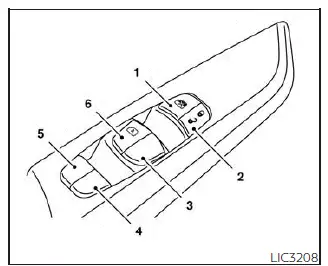
- Window lock button
- Power door lock switch
- Front passenger side switch
- Right rear passenger side switch
- Left rear passenger side switch
- Driver side automatic window switch
Driver's side power window switch
The driver’s side control panel on the Nissan Sentra is equipped with switches that allow opening and closing of all vehicle windows.
To open a window, press the switch downward and hold it until the desired window position is reached. To close a window, pull the switch upward and continue holding it until the window reaches the desired position.
Locking passengers' windows
When the window lock button is pressed, only the driver’s side window can be operated. Press the button again to cancel the window lock function and restore control to the other window switches.
Front passenger's power window switch
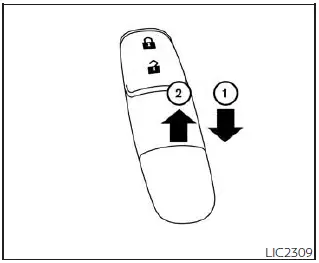
The front passenger window switch operates only the corresponding passenger-side window.
To open the window, press the switch downward and hold it until the desired position is reached 1. To close the window, pull the switch upward and hold it until the desired window position is reached 2.
Rear power window switch
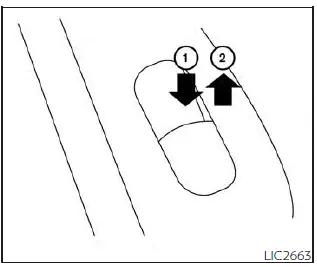
The rear power window switches operate only their respective rear windows. To open a rear window, press the switch downward and hold it 1. To close the window, pull the switch upward and hold it 2.
Automatic operation
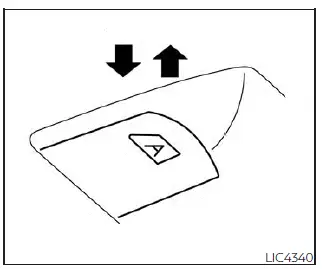
To fully open a window equipped with the automatic function, press the window switch down to the second detent and release it. The window will open completely without holding the switch. To stop the window while it is opening, pull the switch upward.
To fully close a window with automatic operation, pull the switch up to the second detent and release it. The window will close completely on its own. To stop the window while it is closing, press the switch downward.
Auto-reverse function
The auto-reverse function activates when a window equipped with automatic operation is closing and an obstruction is detected.
Depending on environmental or driving conditions, the auto-reverse function may activate if an impact or resistance similar to an object being caught in the window is detected.
WARNING
There are small areas immediately before the window is fully closed that may not be detected by the auto-reverse system. Always ensure that all passengers keep their hands and other body parts inside the vehicle before closing the windows.
If the Nissan Sentra battery has been disconnected, replaced, or jump-started, the power window auto-reverse function may not operate correctly. In this case, the system must be re-initialized. It is recommended that you visit a NISSAN dealer for this service.
If the control unit detects an object caught in a window during automatic closing, the window will immediately reverse direction and lower.
When power window switch does not operate
If the automatic power window function (closing only) does not operate properly, perform the following procedure to initialize the power window system:
1. Place the ignition switch in the ON position.
2. Open the window more than halfway using the power window switch.
3. Pull the power window switch upward to close the window and continue holding the switch for more than 3 seconds after the window has fully closed.
4. Release the switch. Operate the window using the automatic function to confirm that initialization is complete. The window should automatically open or close depending on the selected function.
5. Repeat steps 2 through 4 for each remaining window.
If the power window system still does not operate correctly after completing this procedure, have the system inspected and repaired. It is recommended that you visit a NISSAN dealer for service.
Other materials:
U2118-87 Can Comm Circuit
Dtc Description
DTC Description
CAN (Controller Area Network) is a serial
communication system for real time application. It is an on-Nissan Sentra vehicle
multiplex communication system with high data communication speed
and excellent error detectability. Many electronic control un ...
Seats
This section describes the seat design and adjustment features of the Nissan
Sentra, helping drivers and passengers achieve a safe, comfortable, and ergonomically
correct seating position.
WARNING
Do not ride in a moving Nissan Sentra when the seatback is reclined.
This is extremely ...
Dtc/circuit Diagnosis
C1b80-54 Control Module
Dtc Description
DTC Description
DTC DETECTION LOGIC
DTC No.
CONSULT screen terms
(Trouble diagnosis
content)
...