Nissan Sentra B18 (2020-2025) Owner's Manual: USB/iPod charging ports
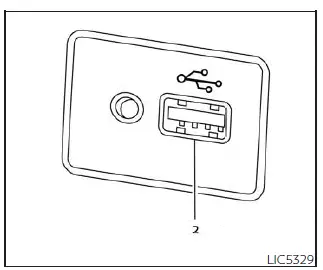
Front (Type A) (if so equipped)
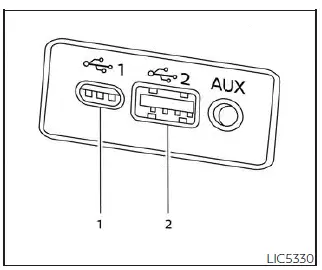
Front (Type B) (if so equipped)
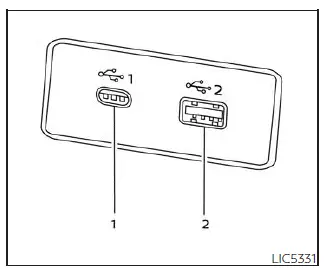
Front (Type B) (if so equipped)
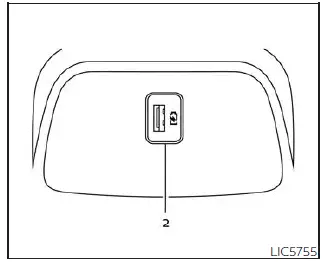
Rear (if so equipped)
- Type-C USB
- Type-A USB
The Nissan Sentra is equipped with USB charging ports that allow convenient charging of compatible devices. Rear USB charging ports, when equipped, are located on the back of the center console for easy access by rear-seat passengers and are intended primarily for device charging.
NOTE:
- Not all USB charging ports are connected to the vehicle’s display screen or audio system. Only the USB ports located beneath the climate control panel allow operation of USB devices through the Nissan Sentra audio and infotainment system.
- For optimal charging performance, it is recommended to use manufacturer-approved USB cables, which are sold separately. USB Type-C to USB Type-A adapters (or vice versa) may also be used, but charging speed and compatibility can vary depending on the device.
CAUTION
- Do not force a USB device into the connector. Inserting a USB plug at an angle or upside down may damage the connector. Always ensure the USB device is aligned correctly before inserting it into the port.
- Do not use reversible USB cables. Use of such cables may cause damage to the USB connector.
Other materials:
Optical Sensor Circuit
Component Function Check
Component Function
Check
CHECK OPTICAL SENSOR SIGNAL
Ignition switch ON.
Turn lighting switch AUTO.
With the optical sen ...
Driver Side
Exploded View
Exploded View
POWER SEAT
1.
Seatback trim
2.
Seatback pad
3.
...
Precaution. Precautions
Precautions
Precautions for Supplemental Restraint System (srs) "air Bag" and "seat Belt Pre-Tensioner"
Precautions for Supplemental Restraint System (SRS) "AIR BAG" and "SEAT BELT PRE-TENSIONER"
The Supplemental Restraint System such as
“AIR BAG� and “SEAT BELT PRE-TENSIONER�,
...