Nissan Sentra B18 (2020-2025) Owner's Manual: Emergency Call (SOS) button
Emergency support
NissanConnect Services provide a range of features designed to assist the driver and occupants of the Nissan Sentra during emergency situations.
For example, in the event of illness, injury, or another serious emergency, assistance can be requested by pressing the in-vehicle Emergency Call (SOS) button. This connects you directly to the NissanConnect Services Response Center, where trained specialists can identify the vehicle’s location using GPS data and relay the information to police, medical services, or other emergency agencies as required.
For additional information about NissanConnect Services emergency-related features, contact NissanConnect Customer Support at 1-855-426-6628 or visit the NissanConnect Services website at www.nissanusa.com/connect (U.S.) or www.nissan.ca/nissanconnect (English) / www.nissan.ca/nissanconnect/fr (French) for Canada.
WARNING
- Please be aware that the Automatic Collision Notification service and
Emergency Call (SOS) function cannot be used under the following conditions:
- Emergency services are unavailable without an active, paid subscription to NissanConnect Services.
- The NissanConnect Services network system is disabled.
- The Nissan Sentra is outside the service area where the TCU (Telematics Control Unit) can connect.
- The vehicle is located in an area without cellular network coverage.
- The vehicle is in an area with weak signal reception, such as tunnels, underground parking garages, behind buildings, or mountainous regions.
- The communication line is busy.
- The TCU (Telematics Control Unit) or related vehicle systems are not functioning properly.
- Depending on the severity of a collision or emergency, it may not be possible to place an emergency call.
- Always park the vehicle in a safe location and apply the parking brake before operating the Emergency Call (SOS) button.
- Use this service only in true emergency situations. Inappropriate use of the service may result in penalties.
- Radio waves generated by the system may interfere with certain medical devices. Individuals using pacemakers should consult the device manufacturer regarding potential effects before using NissanConnect Services.
- The TCU (Telematics Control Unit) antenna is installed inside the upper central area of the instrument panel. Occupants should not position themselves closer to the antenna than the distance specified by the pacemaker manufacturer. Radio waves from the TCU antenna may affect pacemaker operation while using NissanConnect Services.
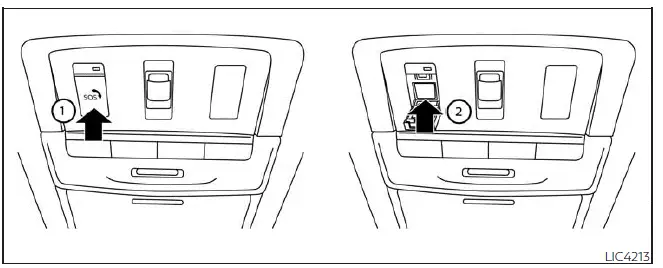
Making an emergency call
The Emergency Call (SOS) button is located near the map light and is protected by a small cover.
1. Press the cover once to release it. The cover will drop down and expose the Emergency Call (SOS) button.
2. Press the Emergency Call (SOS) button to initiate an emergency call.
3. Once the connection is established, speak clearly with the NissanConnect Services Response Specialist.
If you need to cancel the emergency call, press and hold the Emergency Call (SOS) button for several seconds.
NOTE:
- After pressing the Emergency Call (SOS) button, a short delay may occur before the system connects, depending on network conditions and whether the TCU is being used by other services.
- An indicator light on the Emergency Call (SOS) button shows system readiness. If the indicator light is not illuminated, pressing the button will not connect the Nissan Sentra to the Response Specialist. The indicator light will blink while connected to the NissanConnect Services Response Center.
- Even when the indicator light is illuminated, a connection may not be possible. If this occurs during an emergency, contact local authorities using alternative methods.
- To help maintain the connection, keep the engine running during an emergency call if it is safe to do so.
Other materials:
P0127 Iat Sensor
Dtc Description
DTC Description
DTC DETECTION LOGIC
DTC
CONSULT screen terms
(Trouble diagnosis
content)
DTC detection
condition
...
Sonar System. Removal and Installation. Sonar Control Unit. Removal and Installation
Sonar Control Unit. Removal and Installation
Removal and Installation
Removal and Installation
REMOVAL
CAUTION:
When replacing the sonar control unit, perform
"ADDITIONAL SERVICE WHEN REPLACING SONAR CONTROL UNIT". Refer to Work Procedure.
Partially
remove the trunk s ...
Door Lock and Unlock Switch
Driver Side
Component Function Check
Component Function
Check
CHECK FUNCTION
CONSULT
Ignition switch ON.
Select ″CDL LOCK SW″, ″CDL UNLOCK SW″ in ″Data
...