Nissan Sentra B18 (2020-2025) Owner's Manual: Trip computer
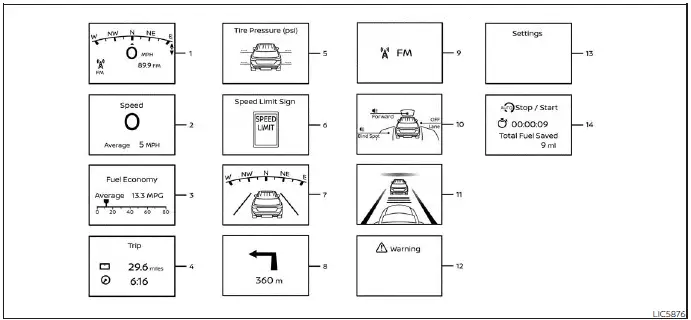
1. Home
This display represents the main home screen of the trip computer in the Nissan Sentra, providing quick access to commonly used driving information and system statuses.
2. Vehicle speed
The vehicle speed mode displays the current driving speed as well as the average vehicle speed calculated since the last reset, allowing the Nissan Sentra driver to monitor driving behavior more accurately.
Average vehicle speed:
Press the OK button on the steering wheel to open the drive computer Reset menu, then follow the on-screen instructions to reset the average speed calculation.
The average vehicle speed display is refreshed every 30 seconds. During the first 30 seconds after a reset, the display will show “- - -� until sufficient data is collected.
3. Fuel economy display
Current fuel consumption:
The current fuel consumption mode shows real-time fuel usage, helping Nissan Sentra drivers adapt their driving style for improved efficiency.
Average fuel consumption:
The average fuel consumption mode displays the average fuel usage since the last reset. To reset this value, press the OK button on the steering wheel, access the drive computer Reset menu, and follow the displayed instructions.
The fuel economy display is updated every 30 seconds.
For approximately the first 1/3 of a mile (500 m) after a reset, the display will show “- -� until enough driving data is available.
4. Elapsed time and trip odometer
Elapsed time:
The elapsed time screen shows the amount of time that has passed since the last reset. Press the OK button to access the drive computer Reset menu and reset the elapsed time as needed.
Trip odometer:
The trip odometer displays the total distance the Nissan Sentra has traveled since the last reset. To reset the trip odometer, press the OK button on the steering wheel, open the Reset menu, and follow the instructions shown.
5. Tire Pressures
The tire pressure mode shows the individual pressure values of all four tires while the Nissan Sentra is being driven, supporting safe and efficient operation.
When the “Tire Pressure Low - Add Air� warning appears, the display can be switched
directly to the tire pressure screen by pushing the
 or
or
 switch to view additional details related to the warning.
6. Traffic Sign Recognition (if so equipped)
The Traffic Sign Recognition (TSR) system provides the driver with information about the most recently detected speed limit, enhancing driver awareness in the Nissan Sentra.
7. Compass
This display indicates the current compass direction in which the vehicle is traveling.
8. Navigation (if so equipped)
When route guidance is active in the navigation system, this screen displays relevant navigation route information to assist the Nissan Sentra driver.
9. Audio
The audio mode shows the current status of the audio system, including source and playback information.
10. Driving Aids
The driving aids mode displays the operating status of the following driver assistance systems (if so equipped) available on the Nissan Sentra:
- Forward
- Automatic Emergency Braking (AEB) with Pedestrian Detection system
- Intelligent Forward Collision Warning (I-FCW)
- Lane:
- Lane Departure Warning (LDW)
- Blind Spot:
- Blind Spot Warning (BSW)
11. Intelligent Cruise Control
The Intelligent Cruise Control (ICC) mode shows the current operating condition of the ICC system, helping maintain a set speed and following distance when driving the Nissan Sentra.
12. Warnings
The warnings mode allows the driver to view any active warning messages currently present on the vehicle information display.
NOTE:
The warnings mode will only appear when one or more warnings are currently active.
13. Settings
The settings mode allows the driver to view, adjust, or customize various vehicle and display settings according to personal preferences.
14. Idling Stop System (if so equipped)
The Idling Stop System screen provides information on the amount of fuel saved while the system is operating, supporting efficient driving in the Nissan Sentra.
Other materials:
B20ce-15 Hl (hi) Lh Pwr Sply Circ
Dtc Description
DTC Description
DTC DETECTION LOGIC
DTC No.
CONSULT screen items
(Trouble diagnosis content)
DTC detection condition
...
Removal and Installation
Av Control Unit
Exploded View
Exploded View
1.
Audio unit bracket (LH)
2.
Audio unit
3.
...
Unit Disassembly and Assembly
Rear Combination Lamp (body Side)
Exploded View
Exploded View
1.
Rear combination lamp
2.
Stop/tail lamp bulb
...