Nissan Sentra B18 (2020-2025) Owner's Manual: Resetting the drive computer
The drive computer on the Nissan Sentra is organized into three separate information screens, allowing the driver to easily monitor key trip and driving data during everyday use:
- Average Speed
- Average Fuel Economy
- Trip Distance & Time
1. Press the
 buttons repeatedly until the desired drive computer mode is displayed on the vehicle
information screen.
buttons repeatedly until the desired drive computer mode is displayed on the vehicle
information screen.
2. Press and hold the OK button for approximately 1 second to reset the data shown on the currently active screen of the Nissan Sentra drive computer.
NOTE:
If you want to reset all drive computer values at the same time, press and hold the OK button for approximately 3 seconds until the reset menu appears on the display, then follow the on-screen instructions carefully. This function is useful when starting a new trip or tracking fresh driving statistics in your Nissan Sentra.
Settings
- The settings mode allows you to modify the information shown in the vehicle information display and to adjust several vehicle-related functions for the Nissan Sentra:
- VDC Setting
- Driver Assistance
- ECO Mode Setting
- TPMS Setting
- Clock
- Vehicle Settings
- Maintenance
- Customize Display
- Unit/Language
- Factory Reset
VDC Setting
The VDC Setting menu allows the driver to enable or disable the Vehicle Dynamic Control (VDC) system. This system helps maintain vehicle stability during acceleration, cornering, and slippery road conditions, enhancing overall safety in the Nissan Sentra.

Driver Assistance
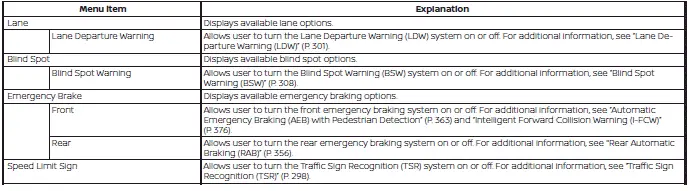
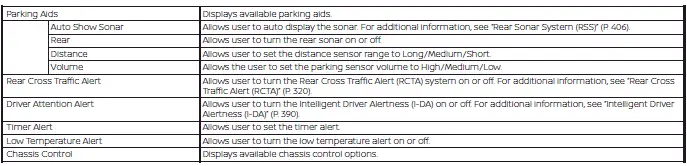
The driver assistance menu allows the user to adjust settings related to driving aids, parking assistance, and braking support systems, depending on the equipment installed on the Nissan Sentra.
Some menu items shown below may not be equipped on your vehicle, as availability depends on trim level and optional features.
ECO Mode Setting
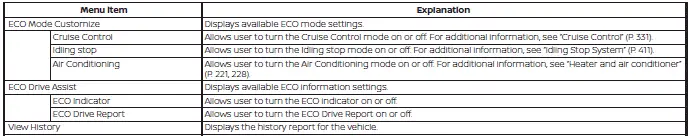
The ECO mode setting menu allows the driver to customize how the ECO mode operates, helping optimize fuel efficiency and promote economical driving habits in the Nissan Sentra.
TPMS Setting
The TPMS settings menu allows the driver to view or change the tire pressure units displayed in the vehicle information display, making it easier to monitor tire pressure according to personal preference or regional standards.

Clock
The clock menu allows the driver to adjust the time and time format displayed on the Nissan Sentra instrument cluster.

Vehicle Settings
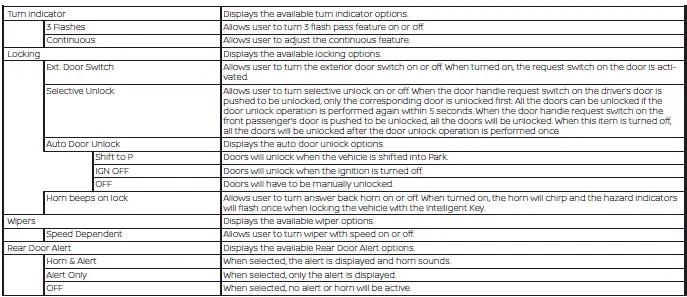
The vehicle settings menu allows the driver to customize various comfort and convenience features, including lighting behavior, wiper operation, door locking, key-related functions, and other configurable systems available on the Nissan Sentra.
Some menu items shown below may not be equipped on your vehicle.

Maintenance
The maintenance menu allows the driver to set reminders for various scheduled maintenance items, helping ensure the Nissan Sentra remains in optimal operating condition.
WARNING
The tire replacement indicator is not a substitute for regular tire inspections, including routine tire pressure checks. For additional information, see "Changing wheels and tires". Many factors, including tire inflation level, wheel alignment, driving habits, and road conditions, affect tire wear and the timing of tire replacement. Setting the tire replacement indicator for a specific driving distance does not guarantee that the tires will last that long. Use this indicator as a general guide only and always perform regular tire checks.
Failure to perform regular tire inspections, including tire pressure checks, may result in tire failure. Serious vehicle damage could occur and may lead to a collision, which could result in serious personal injury or death.

Customize Display
The customize display menu allows the driver to personalize the information shown on the vehicle information display, making it easier to view preferred data while driving the Nissan Sentra.
Some menu items shown below may not be equipped on your vehicle.
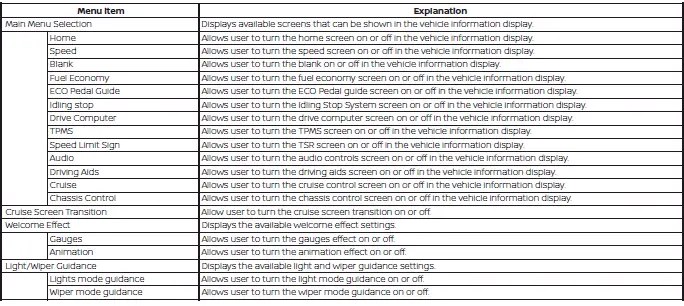
Unit/Language
The unit/language menu allows the driver to change measurement units and the display language shown on the vehicle information display, ensuring clarity and convenience for different regions and driver preferences.

Factory Reset
The factory reset menu allows the driver to restore all vehicle information display settings to their original factory defaults. This can be useful when troubleshooting display issues or preparing the Nissan Sentra for a new owner.

Other materials:
Diagnosis System (distance Sensor)
Consult Function (laser/radar)
CONSULT Function (LASER/RADAR)
APPLICATION ITEMS
CONSULT performs the following functions via CAN communication
with ADAS control unit 2 and the communication with distance sensor.
...
Driver Assistance Buzzer Circuit
Component Function Check
Component Function Check
CHECK DRIVER ASSISTANCE BUZZER
CONSULT
Select “ADAS buzzer 2� in
“Active Test� mode of “ICC/ADAS
2�.
Check that the function operates
...
B2083-23 Request Sw (fr)
Dtc Description
DTC Description
DTC DETECTION LOGIC
DTC No.
CONSULT screen terms
(Trouble diagnosis
content)
DTC Detection Condition
...