Nissan Sentra B18 (2020-2025) Owner's Manual: How to use the vehicle information display
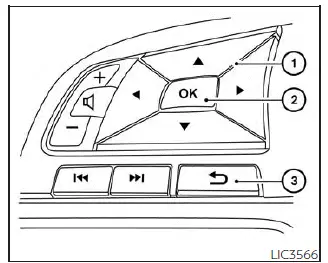
The vehicle information display in the Nissan Sentra can be operated using the
 ,
,
 , and OK buttons located
on the steering wheel, allowing the driver to safely navigate menus while driving.
, and OK buttons located
on the steering wheel, allowing the driver to safely navigate menus while driving.
 - Use these
buttons to scroll through and navigate the vehicle information display menus.
- Use these
buttons to scroll through and navigate the vehicle information display menus.- OK - Confirm, change, or select an item in the vehicle information display.
 - Returns to
the previous menu or screen.
- Returns to
the previous menu or screen.
The OK,  and
and
 buttons may also control
audio and control panel functions under certain conditions. On most screens, visual
prompts indicate which steering wheel buttons can be used to operate the vehicle
information display.
buttons may also control
audio and control panel functions under certain conditions. On most screens, visual
prompts indicate which steering wheel buttons can be used to operate the vehicle
information display.
Dots displayed on the right side of the vehicle information display indicate that additional pages of menu items or warning messages are available, depending on the selected meter screen.
The OK button can be used to change the audio source when the audio screen is
shown, and the  buttons
can also be used to manually control voice recognition functions.
buttons
can also be used to manually control voice recognition functions.
The  buttons allow
manual control of voice recognition prompts. For further details, refer to the separate
NissanConnect Owner's Manual.
buttons allow
manual control of voice recognition prompts. For further details, refer to the separate
NissanConnect Owner's Manual.
Startup display
When the Nissan Sentra ignition switch is placed in the ON position, the vehicle information display may show the following screens (if equipped):
- Home
- Drive Computer - Speed, Fuel Economy, Trip Distance & Time
- Convenience
- Digital speed and average speed
- Instant fuel economy/ average fuel economy
- Tire Pressure
- Audio/telephone
- Intelligent Cruise Control (ICC)
- Speed Limit Sign
- Driving Aids
- Settings
- Warnings*
*Warnings will only appear if any are currently active. For additional information, see "Vehicle information display warnings and indicators".
To customize which items are shown on the vehicle information display, refer to "How to use the vehicle information display".
Other materials:
Component Parts
Exterior Lighting System
Component Parts Location
Component Parts
Location
A.
View of instrument panel
B.
M/T transmi ...
Horn. Precaution. Precautions. Precaution for Supplemental Restraint System (srs) "air Bag" and "seat Belt Pre-Tensioner"
Precautions. Precaution for Supplemental Restraint System (srs) "air Bag" and "seat Belt Pre-Tensioner"
Precaution for Supplemental Restraint System (srs) "air Bag" and "seat Belt Pre-Tensioner"
Precaution for Supplemental Restraint System (SRS) "AIR BAG" an ...
U0101 Can Comm Circuit
Dtc Description
DTC Description
CAN (Controller Area Network) is a serial communication line for
real time application. It is an on-Nissan Sentra vehicle multiplex communication line with
high data communication speed and excellent error detection ability. Many
electronic control un ...