Nissan Sentra B18 (2020-2025) Owner's Manual: Traffic Sign Recognition (TSR)
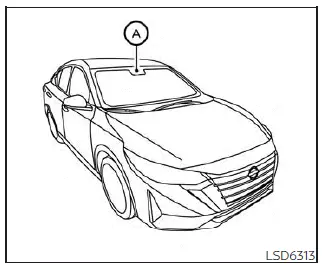
The Traffic Sign Recognition (TSR) system in the Nissan Sentra provides the driver with information about the most recently detected speed limit and certain traffic signs. The system captures road sign data using the multi-sensing front camera unit (A), which is mounted on the windshield in front of the interior rearview mirror, and then displays the recognized signs on the vehicle information display. On Nissan Sentra models equipped with a navigation system, the displayed speed limit is determined using a combination of live camera recognition and navigation map data. TSR information is always shown at the top of the vehicle information display and, depending on vehicle settings, may also appear in the main central area of the display screen.
WARNING
The TSR system is designed as a driver support feature only. It does not replace the driver’s responsibility to remain attentive to traffic conditions, road signs, and safe driving practices. The system cannot prevent accidents caused by inattention or unsafe driving. The driver of the Nissan Sentra must always stay alert and maintain full control of the vehicle.
System operation
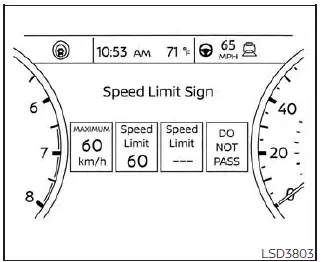
For vehicles with the 7 inch meter display
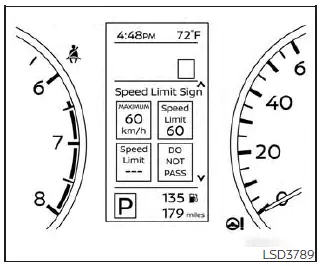
For vehicles with the 4.2 inch meter display
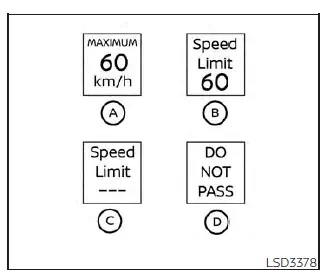
- Speed limit sign detected (Canada specification)
- Speed limit sign detected (USA specification)
- No speed limit sign detected
- "Do not pass" traffic sign detected
CAUTION
- The TSR system in the Nissan Sentra is intended to assist attentive driving only. The driver must always observe all applicable traffic laws and road signs directly.
- The TSR system may not operate correctly under certain conditions, including
but not limited to:
- When traffic signs are obscured, damaged, faded, or affected by severe weather conditions.
- When rain, snow, frost, or dirt accumulates on the windshield in front of the multi-sensing camera.
- When headlight performance is reduced due to dirt on the lens or improper headlight aiming.
- When strong light enters the camera unit, such as direct sunlight during sunrise or sunset.
- When there is a sudden change in brightness, for example when entering or exiting tunnels or driving under bridges.
- If discrepancies exist between actual road conditions and navigation system data due to route changes.
- When overtaking buses or trucks displaying speed-related stickers.
Turning the Traffic Sign Recognition (TSR) system on and off
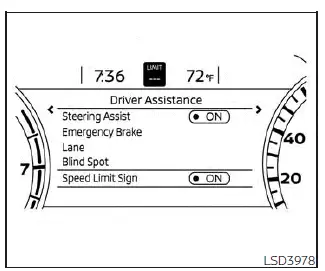
For vehicles with the 7 inch meter display
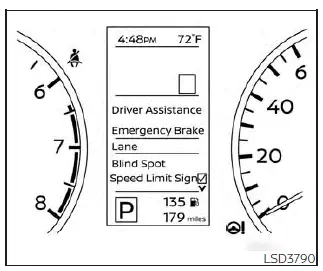
For vehicles with the 4.2 inch meter display
Follow the steps below to enable or disable the TSR system on your Nissan Sentra.
1. Press the
 button until "Settings" appears in the vehicle information display.
Use the
 button to select "Driver Assistance," then press the OK button.
2. Select "Speed Limit Sign" and press the OK button to turn the TSR system on or off.
System temporarily unavailable
If the Nissan Sentra is parked under direct sunlight in high ambient temperatures (above approximately 104°F [40°C]) and then started, the TSR system may temporarily deactivate. In this case, the warning message "Unavailable: High Camera Temperature" will be displayed on the vehicle information display.
Action to take:
Once the interior temperature decreases and normal operating conditions are restored, the TSR system will automatically resume operation.
System malfunction
If a malfunction is detected, the TSR system will automatically shut off and a "Malfunction" warning message will appear on the vehicle information display.
Action to take:
If the TSR "Malfunction" message is displayed, safely pull over and stop the Nissan Sentra. Turn the engine off, then restart the vehicle. If the warning message remains, have the system inspected. It is recommended to visit an authorized NISSAN dealer for diagnosis and service.
System maintenance
The TSR system uses the same multi-sensing front camera unit as the Lane Departure Warning (LDW) system. This camera is located in front of the interior rearview mirror and should be kept clean and unobstructed to ensure proper operation.
Other materials:
Intake Sensor
Diagnosis Procedure
Diagnosis Procedure
CHECK INTAKE SENSOR
Ignition switch OFF.
Remove intake sensor. Refer to Removal and Installation.
Check resis ...
B2f73-23 Clutch Switch
Dtc Description
DTC Description
DTC DETECTION LOGIC
DTC No.
CONSULT screen items
(Trouble diagnosis
content)
DTC detecting condition
...
Hazard warning flasher switch
Press the hazard warning flasher switch to alert other drivers when you must
stop or park your Nissan Sentra under emergency conditions. When activated, all
turn signal lights will flash simultaneously to increase vehicle visibility and
warn surrounding traffic.
WARNING
If stopping du ...