Nissan Sentra B18 (2020-2025) Owner's Manual: ECO mode switch
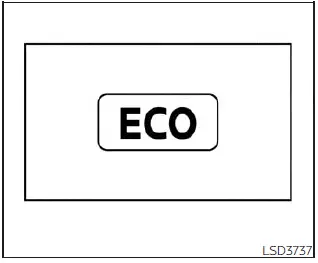
The ECO mode in the Nissan Sentra is designed to improve fuel efficiency by optimizing throttle response and transmission shift points during normal driving conditions.
To activate ECO mode, press the ECO mode switch. When enabled, the ECO mode indicator light on the meter or vehicle information display will remain illuminated.
To deactivate ECO mode, press the ECO mode switch again. The indicator light will turn off once the mode is disabled.
The ECO mode cannot be turned off while the accelerator pedal is depressed, even if the switch is pressed. Release the accelerator pedal to deactivate the ECO mode.
If a system malfunction is detected, the ECO mode in the Nissan Sentra will automatically turn off to protect vehicle operation.
Consider turning off ECO mode or fully depressing the accelerator pedal when:
- Driving with a heavy passenger load or carrying significant cargo
- Climbing steep uphill roads or mountain slopes
- When maximum air conditioner performance is required, as ECO mode may slightly reduce A/C efficiency
NOTE:
Selecting ECO mode does not guarantee improved fuel economy in all situations, as driving habits, road conditions, and traffic patterns significantly affect fuel consumption.
Shift lever indicator (2.0L 4 cylinder (MR20DD engine model) Manual Transmission models only)
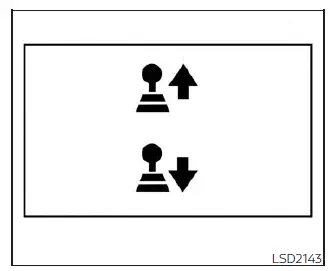
The shift lever indicator assists the driver in selecting the optimal gear change timing to enhance fuel efficiency. This feature operates only when ECO mode is activated.
The indicator displays both the shift icon and the recommended gear position.
The upshift or downshift icon guides the driver toward more economical driving in the Nissan Sentra.
NOTE:
- The shift indicator is intended as a fuel economy guide only. Always prioritize road conditions and surrounding traffic.
- If the downshift icon is not displayed, shift to the 1 (1st) gear position when necessary.
- If the downshift icon appears while decelerating, it indicates that engine speed is too low for the selected gear.
Eco Drive Report
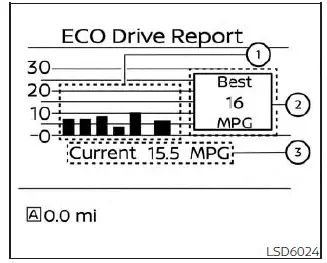
When the ignition switch of the Nissan Sentra is in the OFF position, the ECO management display automatically appears.
- Fuel economy history for the previous five trips
- Best recorded fuel economy
- Current average fuel economy
The ECO evaluation results are displayed approximately 30 seconds after the ignition switch is turned ON and the vehicle has been driven at least 1/3 mile (500 meters).
- The average fuel economy of the last five trips is shown.
- The best fuel economy achieved during recent driving history is displayed.
- The average fuel economy since the last system reset is displayed.
The Eco Drive Report function can be enabled or disabled according to driver preference.
Other materials:
Main Line Between Abs and M&a Circuit
Diagnosis Procedure
Diagnosis Procedure
CHECK CONNECTOR
Turn the ignition switch OFF.
Disconnect the battery cable from the
negative terminal.
Check the following terminals and
...
U0073-00 Can Comm Circuit
Dtc Description
DTC Description
DTC DETECTION LOGIC
DTC
CONSULT screen terms
(Trouble diagnosis
content)
DTC detection
conditi ...
B1041-82 Vehicle Speed Signal
Dtc Description
DTC Description
DTC DETECTION LOGIC
DTC No.
CONSULT screen items
(Trouble diagnosis
content)
DTC Detection Condition
...