Nissan Sentra B18 (2020-2025) Owner's Manual: Parking brake
WARNING
- Always ensure that the parking brake is fully released before driving the Nissan Sentra. Driving with the parking brake engaged can cause excessive brake wear, reduced braking performance, and may lead to brake system failure or a serious accident.
- Never attempt to release the parking brake from outside the Nissan Sentra. Doing so may result in unexpected vehicle movement and increase the risk of injury.
- Do not rely on the shift lever as a substitute for the parking brake. When parking the Nissan Sentra, always make sure the parking brake is fully engaged to prevent unintended vehicle movement.
- To reduce the risk of injury or death caused by unintended vehicle operation, never leave children, individuals requiring assistance, or pets unattended inside the Nissan Sentra. On warm days, the interior temperature of a closed vehicle can rise rapidly and become life-threatening.
Hand type
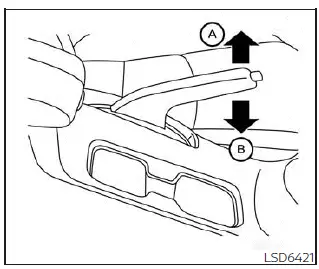
To engage: Pull the parking brake lever upward firmly until it is fully applied (A).
To release:
1. Firmly apply the foot brake to keep the Nissan Sentra stationary.
2. Manual transmission models:
Place the shift lever into the N (Neutral) position.
Continuously Variable Transmission models:
Move the shift lever into the P (Park) position.
3. While slightly pulling up on the parking brake lever, press the release button and lower the lever completely (B).
4. Before driving the Nissan Sentra, confirm that the brake warning light on the instrument panel turns off.
Pedal type
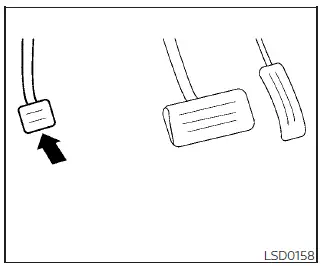
To engage: Firmly depress the parking brake pedal until it is fully applied.
To release:
1. Firmly apply the foot brake.
2. Move the shift lever to the P (Park) position.
3. Firmly depress the parking brake pedal again; the system will release automatically.
4. Before driving, verify that the brake warning light is no longer illuminated.
Other materials:
P27ec-00 Transmission Range Control a Position Sensor/switch
Dtc Description
DTC Description
DTC DETECTION LOGIC
DTC
CONSULT screen terms
(Trouble diagnosis
content)
DTC detection
...
B272d Front Buzzer
Dtc Description
DTC Description
DTC DETECTION LOGIC
DTC No.
CONSULT screen terms
(Trouble diagnosis content)
DTC detection condition
...
P0454 Evap System Pressure Sensor
Dtc Description
DTC Description
DTC DETECTION LOGIC
DTC
CONSULT screen terms
(Trouble diagnosis
content)
DTC detection
conditi ...