Nissan Sentra B18 (2020-2025) Owner's Manual: Driving the vehicle
Continuously Variable Transmission (CVT)
WARNING
- Do not depress the accelerator pedal while shifting from P (Park) or
N (Neutral) to R (Reverse), D (Drive), or L (Low) (if so equipped). Always keep
the brake pedal firmly depressed until shifting is fully completed.
Failure to follow this procedure in your Nissan Sentra may cause loss of vehicle control and could result in an accident.
- Because cold engine idle speed is higher, exercise extra caution when shifting into a forward or reverse gear before the Nissan Sentra engine has fully warmed up.
- Do not downshift abruptly on slippery or icy roads. Sudden downshifting can lead to reduced traction and a loss of control.
- Never shift to P (Park) or R (Reverse) while the Nissan Sentra is moving forward, and never shift to P (Park) or D (Drive) while the vehicle is reversing. Doing so may cause severe transmission damage or a serious accident.
The CVT installed in the Nissan Sentra is electronically controlled to deliver smooth acceleration, efficient power transfer, and optimal fuel economy under a wide range of driving conditions.
The recommended operating procedures for this Continuously Variable Transmission are described in the following sections. Carefully following these guidelines will help ensure maximum performance, long-term reliability, and driving enjoyment from your Nissan Sentra.
NOTE:
Engine power may be automatically limited to protect the CVT if engine speed increases rapidly, such as when driving on slippery surfaces or when the vehicle is being tested on certain dynamometers.
Starting the vehicle
WARNING
- Do not depress the accelerator pedal while shifting from P (Park) or
N (Neutral) to R (Reverse), D (Drive), or L (Low) (if so equipped). Always depress
the brake pedal until the shift operation is complete.
Failure to do so may result in loss of control of your Nissan Sentra and could cause an accident.
- Cold engine idle speed is high, so take extra care when shifting into a forward or reverse gear before the engine has warmed up.
- Do not downshift abruptly on slippery road surfaces, as this may lead to instability or loss of traction.
- Never shift to P (Park) or R (Reverse) while the Nissan Sentra is moving forward, and never shift to P (Park) or D (Drive) while reversing. This can cause transmission damage or a collision.
CAUTION
- Except in an emergency, do not shift to the N (Neutral) position while
driving.
Coasting with the transmission in N (Neutral) can cause serious damage to the CVT system in your Nissan Sentra.
- To avoid possible damage when stopping on an uphill grade, do not hold the vehicle in place by pressing the accelerator pedal. Always use the foot brake to keep the Nissan Sentra stationary.
1. After starting the engine, fully depress the foot brake pedal before moving the shift lever out of the P (Park) position.
2. Keep the foot brake pedal depressed and move the shift lever into the desired driving gear.
3. Release the foot brake pedal gradually, then smoothly begin driving the Nissan Sentra.
4. Bring the vehicle to a complete stop before moving the shift lever back into the P (Park) position.
The Continuously Variable Transmission is designed so that the foot brake pedal MUST be depressed before shifting from P (Park) to any driving position while the ignition switch is in the ON position.
The shift lever cannot be moved out of P (Park) into any other gear position if the ignition switch is in the LOCK, OFF, or AUTO ACC position.
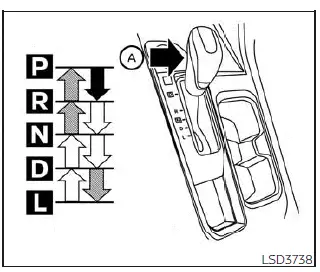
To move the shift lever:
 Press
the button A while depressing the brake pedal
Press
the button A while depressing the brake pedal
 Press
the button A to shift
Press
the button A to shift
 Shift
without pressing the button A
Shift
without pressing the button A
Shifting
After starting the engine, fully depress the brake pedal and move the shift lever from P (Park) to the desired shift position appropriate for driving conditions.
WARNING
Always apply the parking brake if the shift lever is in any position while the engine is not running. Failure to do so may allow the Nissan Sentra to move unexpectedly or roll away, resulting in serious personal injury or property damage.
If the ignition switch is placed in the OFF or AUTO ACC position for any reason while the vehicle is in N (Neutral) or any drive position, the ignition switch cannot be turned to the LOCK position. If this situation occurs, perform the following steps:
1. Apply the parking brake once the vehicle is fully stopped.
2. Move the shift lever to the P (Park) position to secure the Nissan Sentra, then place the ignition switch in the LOCK position.
P (Park)
CAUTION
To help prevent transmission damage, use the P (Park) position only when the Nissan Sentra is completely stopped.
Use the P (Park) shift lever position when parking the Nissan Sentra or when starting the engine. Always confirm that the vehicle has come to a complete stop. The brake pedal must be fully depressed and the shift lever button pressed to move the shift lever from N (Neutral) or any drive position into P (Park).
Apply the parking brake whenever the vehicle is parked. When parking the Nissan Sentra on a hill, apply the parking brake first, then place the shift lever into the P (Park) position to help prevent vehicle movement.
R (Reverse)
CAUTION
To avoid transmission damage, use the R (Reverse) position only after the vehicle has come to a complete stop.
Use the R (Reverse) position when backing up the Nissan Sentra.
Before selecting R (Reverse), make sure the vehicle is completely stopped. The brake pedal must be depressed and the shift lever button pressed to move the shift lever from P (Park), N (Neutral), or any forward drive position into R (Reverse).
N (Neutral)
In the N (Neutral) position, neither a forward nor a reverse gear is engaged.
The engine can be started while the Nissan Sentra is in this position. It is also possible to shift into N (Neutral) and restart a stalled engine while the vehicle is moving, if conditions permit.
D (Drive)
Use the D (Drive) position for all normal forward driving conditions in the Nissan Sentra.
L (Low) (if so equipped)
Use the L (Low) position to obtain maximum engine braking when descending steep hills, climbing sharp inclines, or when approaching tight bends. Do not use the L (Low) position under normal driving conditions, as it is intended only for specific situations requiring increased engine braking.
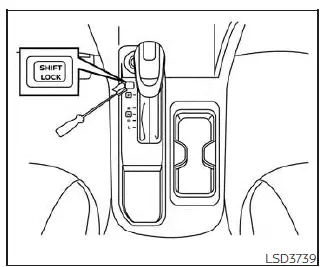
Shift lock release
If the battery charge is low or completely discharged, the shift lever on the Nissan Sentra may not move out of the P (Park) position, even when the brake pedal is depressed and the shift lever button is pressed.
In this situation, it will be necessary to jump start the vehicle or recharge the battery. For additional details, refer to the “Jump starting� section. It is recommended that you contact a NISSAN dealer or a professional towing service for assistance.
To manually move the shift lever, perform the following procedure:
1. Push the ignition switch to the LOCK position.
2. Apply the parking brake firmly.
3. Using a protective cloth on the tip of a 3 mm screwdriver, carefully remove the shift lock release cover.
- If available, a plastic trim removal tool may also be used to avoid damage.
4. Insert the small screwdriver into the shift lock release slot and press downward.
5. While holding the shift lock release down, move the shift lever to the N (Neutral) position.
6. Push the ignition switch to the ON position to unlock the steering wheel. The Nissan Sentra can now be moved to the desired location.
If the shift lever still cannot be moved out of P (Park), have the transmission inspected as soon as possible. It is strongly recommended that you visit a NISSAN dealer for this service.
WARNING
If the shift lever cannot be moved from the P (Park) position while the engine is running and the brake pedal is depressed, the stop lights may not operate correctly.
Non-functioning stop lights can cause an accident, potentially resulting in serious injury to you and others.
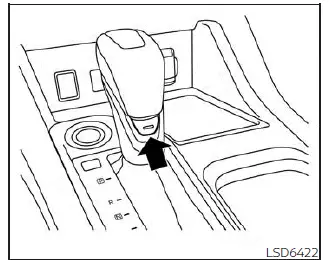
Drive sport mode switch
To activate drive sport mode, press the drive sport mode switch while the shift lever is in the D (Drive) position.
When drive sport mode is engaged, the indicator illuminates in the vehicle information display next to the Transmission Shift Position indicator.
To deactivate drive sport mode, press the drive sport mode switch again. The indicator will turn off. If the shift lever is moved to any position other than D (Drive), drive sport mode will automatically disengage.
OFF position:
Use the OFF position for normal daily driving and optimal fuel economy in the Nissan Sentra.
ON position:
Use the ON position when driving up or down long slopes where enhanced engine braking is needed, or when stronger acceleration is desired. In this mode, the transmission automatically selects different gear ratios to allow the engine to deliver higher output.
Avoid driving at high speeds for extended periods with drive sport mode engaged, as this can reduce fuel efficiency.
Accelerator downshift - in D (Drive) position -
For passing or climbing hills, fully depress the accelerator pedal. The transmission will automatically downshift to a lower ratio, depending on vehicle speed, to provide increased power.
High fluid temperature protection mode
The transmission in the Nissan Sentra is equipped with a high fluid temperature protection mode. If transmission fluid temperature becomes excessive—such as during prolonged uphill driving in hot weather with heavy loads—engine power and, in some cases, vehicle speed will be automatically reduced to help prevent transmission damage.
Although vehicle speed can still be adjusted using the accelerator pedal, overall engine output and speed may be limited until temperatures return to normal operating levels.
Fail-safe
If the Nissan Sentra is operated under extreme driving conditions, such as excessive wheel spin followed by heavy braking, the transmission fail-safe system may automatically activate to protect critical components.
When this occurs, the Malfunction Indicator Light (MIL) may illuminate to inform the driver that fail-safe mode has been engaged.
This indication may appear even when all electrical circuits are functioning normally.
If fail-safe mode is activated, place the ignition switch in the OFF position and wait for approximately 10 seconds.
After waiting, push the ignition switch back to the ON position. In most cases, the Nissan Sentra will return to normal operating condition. If normal operation does not resume, have the transmission inspected and repaired if necessary. It is strongly recommended that you visit a NISSAN dealer for this service.
WARNING
When high fluid temperature protection mode or fail-safe operation is active, vehicle speed may be reduced gradually. This reduced speed may be lower than surrounding traffic and could increase the risk of a collision. Exercise extra caution when driving. If necessary, pull over to a safe location and allow the transmission to cool and return to normal operation, or have the vehicle repaired if required.
Manual transmission
WARNING
- Do not downshift abruptly on slippery roads, as this may result in loss of vehicle control.
- Do not over-rev the engine when shifting to a lower gear. Excessive engine speed can cause loss of control or engine damage.
- Do not shift into the N (Neutral) position while driving. This may cause loss of engine braking and increase the risk of an accident.
CAUTION
- Do not rest your foot on the clutch pedal while driving. This practice may cause premature clutch wear or damage.
- Always fully depress the clutch pedal before shifting to help prevent transmission damage.
- Bring the Nissan Sentra to a complete stop before shifting into R (Reverse).
- When stopped with the engine running, such as at a traffic light, shift into N (Neutral) and release the clutch pedal while keeping the foot brake applied.
- Do not shift into the N (Neutral) position while driving, as this may result in loss of engine braking.
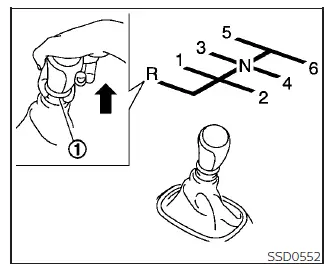
Shifting
To change gears in the Nissan Sentra equipped with a manual transmission, fully depress the clutch pedal, move the shift lever into the desired gear, and then release the clutch pedal smoothly and gradually.
For smooth gear engagement, always depress the clutch pedal completely before operating the shift lever. Failure to do so may result in gear noise and possible transmission damage.
Start the vehicle in 1st gear and upshift sequentially through 2nd, 3rd, 4th, 5th, and up to 6th gear according to vehicle speed and driving conditions.
To reverse, lift the shift lever ring 1 and move the lever into the R (Reverse) position only after the vehicle has come to a complete stop.
The shift lever ring 1 automatically returns to its original position when the shift lever is moved back to the N (Neutral) position.
If difficulty is encountered when shifting into R (Reverse) or 1st gear, shift into N (Neutral), release the clutch pedal, then depress the clutch again and retry the shift.
Suggested up-shift speeds
The following suggested vehicle speeds indicate when to shift into a higher gear for optimal fuel economy and performance.
These values are guidelines only. Actual upshift speeds may vary depending on road conditions, weather, load, and individual driving habits.
2.0L 4 cylinder (MR20DD engine models) (6 M/T)
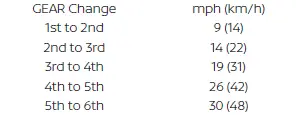
Suggested maximum speed in each gear
Downshift to a lower gear if the engine does not run smoothly or if additional acceleration is required.
Do not exceed the recommended maximum speed for each gear. When driving on level roads, use the highest appropriate gear for the current speed. Always follow posted speed limits and adapt driving to road conditions to ensure safe operation. Avoid over-revving the engine during downshifts, as this may lead to engine damage or loss of control.
2.0L 4 cylinder (MR20DD engine models) (6 M/T)
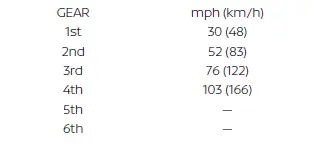
Other materials:
Automatic Emergency Braking (AEB) with Pedestrian Detection
WARNING
Failure to carefully follow all warnings and instructions for proper use of
the Automatic Emergency Braking (AEB) with Pedestrian Detection system could result
in serious injury or death.
The AEB with Pedestrian Detection system on the Nissan Sentra is a supplemental
driver assis ...
Low Tire Pressure Warning Lamp Does Not Turn Off
Symptom Description
Symptom Description
The low tire pressure warning lamp does not turn
OFF after several seconds is passed after the engine starts.
Diagnosis Procedure
Diagnosis Procedure
CHECK TIRE PRESSURE
Ignition switch ...
Diagnosis System (intelligent Key Unit)
Consult Function (hands Free Module)
CONSULT Function
(HANDS FREE MODULE)
Intelligent Key unit
Refer to CONSULT Function
(HANDS FREE MODULE).
...