Nissan Sentra B18 (2020-2025) Owner's Manual: Steering wheel switch for audio control
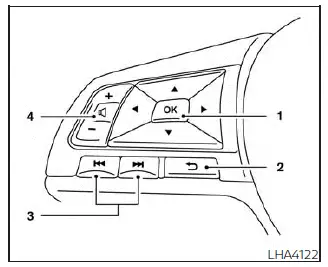
-
 Menu control switch / OK button
 -
 (back) switch
 -
 (SEEK/TRACK) buttons
 - Volume control switch
 SEEK/TRACK buttons
On the Nissan Sentra, the SEEK/TRACK switches provide different functions depending on how long they are pressed. Pressing the switch for more than 1.5 seconds performs a different action than pressing it briefly for less than 1.5 seconds, allowing flexible control of various audio sources.
AM and FM:
- Press the
 or
or
 buttons for less than 1.5 seconds to switch between preset radio stations.
 - Press the
 or
or
 buttons for more than 1.5 seconds to seek down or up to the next available radio
station.
buttons for more than 1.5 seconds to seek down or up to the next available radio
station.
iPod:
- Press the
 or
or
 buttons for less than 1.5 seconds to skip to the previous or next track.
USB:
- Press the
 or
or
 buttons for less than 1.5 seconds to move between tracks.
 - Press the
 or
or
 buttons for more than 1.5 seconds to rewind or fast-forward the current track.
Bluetooth Audio:
- Press the
 or
or
 buttons for less than 1.5 seconds to skip to the previous or next song.
 - Press the
 or
or
 buttons for more than 1.5 seconds to rewind or fast-forward the currently playing
track.
buttons for more than 1.5 seconds to rewind or fast-forward the currently playing
track.
 Menu control switch / OK button
Using the Nissan Sentra vehicle information display, navigate to “Customize Display�, then “Main menu selection�, and select “Audio�. Press the OK button to change the audio mode in the following sequence:
AM → FM → USB / iPod* → Bluetooth Audio* → AUX* → AM.
* These audio modes are available only when compatible media devices are connected to the Nissan Sentra audio system.
Volume control switch
Push the volume control switch upward or downward to increase or decrease the audio volume without removing your hands from the steering wheel.
 (back) switch
Press the
 (back) switch to return to the previous screen or to cancel the current selection.
Radio Antenna
Window Antenna
The Nissan Sentra is equipped with a window antenna, with the antenna pattern printed directly on the inside of the rear window.
CAUTION
- Do not place metallized window film near the rear window glass or attach metal objects to it, as this may cause poor radio reception or unwanted noise.
- When cleaning the inside of the rear window, avoid scratching or damaging
the antenna pattern.
Gently wipe along the antenna using a soft cloth dampened with water.
- Do not allow luggage or cargo to damage the antenna pattern.
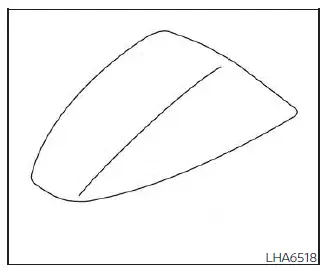
Satellite radio antenna
The satellite radio antenna on the Nissan Sentra is located on the rear portion of the vehicle roof to ensure optimal signal reception.
CAUTION
- A buildup of ice on the satellite antenna may reduce radio performance.
Remove any ice accumulation to restore proper radio reception.
- When clearing snow from the roof, do not apply excessive force to the satellite antenna, as this may cause damage to the antenna or dent the roof panel.
- When using a high-pressure car wash, keep the nozzle away from the satellite antenna to prevent seal deformation or damage.
- Radio performance may be reduced if cargo carried on the roof blocks the satellite signal. Whenever possible, avoid placing cargo near the antenna.
Other materials:
Power Supply, Ground & Circuit Elements. Basic Inspection
Battery
How to Handle Battery
How to Handle Battery
CAUTION:
If it becomes necessary to start the engine with
a booster battery and jumper cables, use a 12-volt booster
battery.
After connecting battery cables, ensure that they
...
Front Passenger Air Bag Module
Exploded View
Exploded View
1.
Instrument panel
assembly
2.
Front passenger air bag
module
...
B2033-4a Dongle Ng
Dtc Description
DTC Description
DTC DETECTION LOGIC
DTC No.
CONSULT screen items
(Trouble diagnosis
content)
DTC detection condition
...