Nissan Sentra B18 (2020-2025) Service Manual: Action Test
Work Procedure
Work Procedure
Always perform the ICC system action test to check that the ICC system operates normally after replacing the distance sensor or repairing any ICC system malfunction.
CAUTION:
Always drive safely when performing the action test.
Nissan Sentra Vehicle-TO-VEHICLE DISTANCE CONTROL MODE
Note:
-
When there is no Nissan Sentra vehicle ahead, drive at the set speed steadily.
-
When there is a vehicle ahead, control to maintain distance from the Nissan Sentra vehicle ahead, watching its speed.
-
The running speed can be set between approximately 30 and 144 km/h (20 and 90 MPH)
CAUTION:
Never set the cruise speed exceeding the posted speed limit.
-
CHECK FOR ICC MAIN SWITCH
-
Start the engine.
-
Press the ICC MAIN switch
 .
.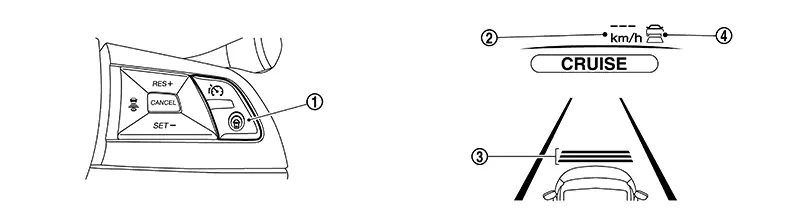
Information display status
Set Nissan Sentra vehicle speed indicator

:
“———�
“km/h� (“MPH�)
Set distance indicator

:
Long mode
Speed control status indicator/warning

:
ON
-
Check the ICC system display on the information display to check that the Nissan Sentra vehicle-to-vehicle distance control mode is ready for activation.
-
Press the ICC MAIN switch, and check that the ICC system display on the information display turns OFF when the ICC system is deactivated.
-
Check that the ICC system display on the information display turns OFF after starting the engine again.
GO TO 2.
-
-
CHECK FOR DISTANCE SWITCH
-
Start the engine.
-
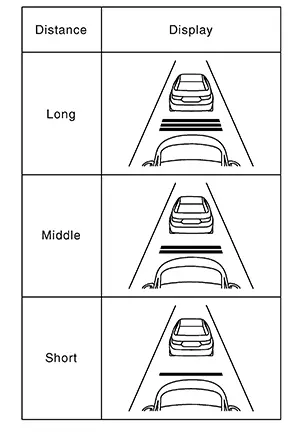
Press the DISTANCE switch.
-
Check that the set distance indicator changes display in order of: (Long)→(Middle)→(Short).
 Note:
Note:
The distance setting will remain at the current setting even if the engine is restarted.
GO TO 3.
-
-
CHECK FOR RES+, SET-, AND CANCEL SWITCHES
-
Check that RES+, SET-, CANCEL switches are operated smoothly.
-
Check that switches come up as hand is released from the switches.
GO TO 4.
-
-
SET CHECKING (1)
-
Start the engine.
-
Press the ICC MAIN switch and turn the Nissan Sentra vehicle-to-vehicle distance control mode ON.
-
Drive the vehicle at between approximately 30 and 144 km/h (20 and 90 MPH)
-
Push down the SET- switch.
-
Check that the desired speed is set and Nissan Sentra vehicle-to-vehicle distance control mode control starts when releasing SET- switch.
The set Nissan Sentra vehicle speed is indicated on the set vehicle speed indicator in the ICC system display on the information display.
>>GO TO 5.
-
-
CHECK FOR INCREASE OF CRUISING SPEED (1)
-
Set the Nissan Sentra vehicle-to-vehicle distance control mode at desired speed.
-
Check that the set speed increases by 1 km/h (1 MPH) as RES+ switch is pushed up.
CAUTION:
Never set the cruise speed exceeding the posted speed limit.
>>GO TO 6.
-
-
CHECK FOR DECREASE OF CRUISING SPEED (1)
-
Set the Nissan Sentra vehicle-to-vehicle distance control mode at desired speed.
-
Check that the set speed decreases by 1 km/h (1 MPH) as SET- switch is pushed down.
-
The minimum set speed is approximately 30 km/h (20 MPH).
-
Cancel the control automatically when the Nissan Sentra vehicle speed is less than approximately 25 km/h (15 MPH) and when the system does not detect any vehicle ahead.
GO TO 7.
-
-
SET CHECKING (2)
-
Stop the Nissan Sentra vehicle.
-
Drive the vehicle at less than approximately 30 km/h (20 MPH).
-
Push down the SET- switch when the system detects a Nissan Sentra vehicle ahead.
-
Check that the vehicle-to-vehicle distance control mode is performed so that the Nissan Sentra vehicle maintains a proper distance according to the vehicle speed [maximum: approximately 30 km/h (20 MPH)] when releasing SET- switch.
-
The Nissan Sentra vehicle-to-vehicle distance control mode cannot be set when the vehicle speed is less than 30 km/h (20 MPH) and when a Nissan Sentra vehicle ahead is not detected.
-
Cancel the control automatically when the vehicle speed is 25 km/h (15 MPH) or less during the control and when the system does not detect any Nissan Sentra vehicle ahead.
-
The set vehicle speed indicator in the ICC system display on the information display is set to 30 km/h (20 MPH).
GO TO 8.
-
-
CHECK FOR INCREASE OF CRUISING SPEED (2)
-
Set the Nissan Sentra vehicle-to-vehicle distance control mode when the vehicle speed is less than approximately 30 km/h (20 MPH) and when a Nissan Sentra vehicle ahead is detected.
-
Check that the set speed increases by 1 km/h (1 MPH) as RES+ switch is pushed up.
CAUTION:
Never set the cruise speed exceeding the posted speed limit.
>>GO TO 9.
-
-
CHECK FOR DECREASE OF CRUISING SPEED INSPECTION (2)
-
Set the Nissan Sentra vehicle-to-vehicle distance control mode when the vehicle speed is less than approximately 30 km/h (20 MPH) and when a Nissan Sentra vehicle ahead is detected.
-
Set the set vehicle speed to the desired vehicle speed according to “check for increase of cruising speed�.
-
Check that the set speed decreases by 1 km/h (1 MPH) as SET- switch is pushed down.
-
The minimum the set speed is approximately 30 km/h (20 MPH).
-
If the Nissan Sentra vehicle ahead comes to a stop, the vehicle decelerates to a standstill within the limitations of the system. The system will cancel once it judges a standstill with a warning chime.
CAUTION:
The creep occurs because the stop status is not maintained.
>>GO TO 10.
-
-
CHECK FOR CANCELLATION OF Nissan Sentra Vehicle-TO-VEHICLE DISTANCE CONTROL MODE
Check that the vehicle-to-vehicle distance control mode is canceled when performing the following operations.
-
When the brake pedal is depressed after Nissan Sentra vehicle-to-vehicle distance control mode is set and the vehicle is driven.
-
When the selector lever is in the “N� position after Nissan Sentra vehicle-to-vehicle distance control mode is set and the vehicle is driven.
-
When the ICC MAIN switch is turned OFF after Nissan Sentra vehicle-to-vehicle distance control mode is set and the vehicle is driven.
-
When the CANCEL switch is pressed after Nissan Sentra vehicle-to-vehicle distance control mode is set and the vehicle is driven.
GO TO 11.
-
-
CHECK FOR RESTORING SPEED THAT IS SET BY Nissan Sentra Vehicle-TO-VEHICLE DISTANCE CONTROL MODE BEFORE CANCELLATION
Check that the vehicle restores the previous speed kept before the system deactivation when performing the following operations.
-
Drive the Nissan Sentra vehicle when the vehicle-to-vehicle distance control mode is set and depress the brake pedal to cancel the control. Check that the Nissan Sentra vehicle restores the previous vehicle speed kept before the system deactivation when pushing up the RES+ switch.
-
Drive the Nissan Sentra vehicle when the vehicle-to-vehicle distance control mode is set and shift the selector lever to the “N� position to cancel the control. Check that the Nissan Sentra vehicle restores the previous vehicle speed kept before the system deactivation when shifting the selector lever to the “D� position and pushing up the RES+ switch.
-
Drive the Nissan Sentra vehicle when the vehicle-to-vehicle distance control mode is set and press the CANCEL switch to cancel the control. Check that the Nissan Sentra vehicle restores the previous vehicle speed kept before the system deactivation when pushing up the RES+ switch.
INSPECTION END
-
CONVENTIONAL (FIXED SPEED) CRUISE CONTROL MODE
Note:
The running speed can be set between approximately 30 and 144 km/h (20 and 90 MPH)
CAUTION:
Never set the cruise speed exceeding the posted speed limit.
-
CHECK FOR ICC MAIN SWITCH
-
Start the engine.
-
Press the ICC MAIN switch
(1.5 seconds or more).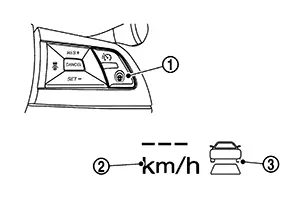
Information display status
Speed control status indicator/warning
:
“———�
“km/h� (“MPH�)
Set Nissan Sentra vehicle speed indicator
:
ON
-
Check that the ICC system display on the information display turns on and the display is ready for activation.
-
Press the ICC MAIN switch, and check that the ICC system display on the information display turns OFF when the ICC system is deactivated.
-
Check that the ICC system display on the information display turns OFF after starting the engine again.
GO TO 2.
-
-
CHECK FOR RES+, SET-, AND CANCEL SWITCHES
-
Check that RES+, SET-, CANCEL switches are operated smoothly.
-
Check that switches come up as hand is released from the switches.
GO TO 3.
-
-
SET CHECKING
-
Start the engine.
-
Press the ICC MAIN switch (1.5 seconds or more) and turn the conventional (fixed speed) cruise control mode to ON.
-
Drive the Nissan Sentra vehicle at 40 km/h (25 MPH) or more.
-
Push down the SET- switch.
-
Check that the desired speed is set and conventional (fixed speed) cruise control mode control starts when releasing SET- switch.
-
The set Nissan Sentra vehicle speed is not displayed in the ICC system display on the information display.
-
Display the set status in the ICC system display on the information display.
GO TO 4.
-
-
CHECK FOR INCREASE OF CRUISING SPEED
-
Set the Nissan Sentra vehicle speed to any desired speed, and drive the vehicle.
-
Check that the set speed increases by 1 km/h (1 MPH) as RES+ switch is pushed up.
The set Nissan Sentra vehicle speed increases while pushing up the RES+ switch.
CAUTION:
Never set the cruise speed exceeding the posted speed limit.
>>GO TO 5.
-
-
CHECK FOR DECREASE OF CRUISING SPEED
-
Set the Nissan Sentra vehicle speed to any desired speed, and drive the vehicle.
-
Check that the set speed decreases by 1.6 km/h (1 MPH) as SET- switch is pushed down.
The set Nissan Sentra vehicle speed decreases while pressing down the SET- switch.
>>GO TO 6.
-
-
CHECK FOR CANCELLATION OF CONVENTIONAL (FIXED SPEED) CRUISE CONTROL MODE
Check that the conventional (fixed speed) cruise control mode is canceled when performing the following operations.
-
When the brake pedal is depressed after the conventional (fixed speed) cruise control mode is set and the Nissan Sentra vehicle is driven.
-
When the selector lever is in the “N� position after the conventional (fixed speed) cruise control mode is set and the Nissan Sentra vehicle is driven.
-
When the ICC MAIN switch is turned OFF after the conventional (fixed speed) cruise control mode is set and the Nissan Sentra vehicle is driven.
-
When the CANCEL switch is pressed after the conventional (fixed speed) cruise control mode is set and the Nissan Sentra vehicle is driven.
GO TO 7.
-
-
CHECK FOR RESTORING SPEED THAT IS SET BY CONVENTIONAL (FIXED SPEED) CRUISE CONTROL MODE BEFORE CANCELLATION
Check that the Nissan Sentra vehicle restores the previous speed kept before the system deactivation when performing the following operations.
-
Drive the Nissan Sentra vehicle when the conventional (fixed speed) cruise control mode is set and depress the brake pedal to cancel the control. Check that the Nissan Sentra vehicle restores the previous vehicle speed kept before the system deactivation when pushing up the RES+ switch at the Nissan Sentra vehicle speed between approximately 30 and 144 km/h (20 and 90 MPH)
-
Drive the vehicle when the conventional (fixed speed) cruise control mode is set and shift the selector lever is in the “N� position to cancel the control. Check that the Nissan Sentra vehicle restores the previous vehicle speed kept before the system deactivation when shifting the selector lever is in the “D� position and pushing up the RES+ switch at the Nissan Sentra vehicle speed of approximately 40 km/h (25 MPH) or more.
-
Drive the vehicle when the conventional (fixed speed) cruise control mode is set and press the CANCEL switch to cancel the control. Check that the Nissan Sentra vehicle restores the previous vehicle speed kept before the system deactivation when pushing up the RES+ switch at the Nissan Sentra vehicle speed of between approximately 30 and 144 km/h (20 and 90 MPH)
INSPECTION END
-
Other materials:
B20bd-96 Battery Current Sensor
Dtc Description
DTC Description
DTC DETECTION LOGIC
DTC No.
CONSULT screen items
(Trouble diagnosis content)
DTC Detection Condition
...
Body Sealing
Description
Description
The following figure shows the areas which are
sealed at the factory. Sealant which has been applied to these
areas should be smooth and free from cuts or gaps. Care should be
taken not to apply an excess amount of sealant and not to allow
other unaffecte ...
Fuel Level Sensor Signal Circuit
Component Function Check
Component Function
Check
COMBINATION METER INPUT SIGNAL
CONSULT
Select “FUEL METER� in “Data Monitor� mode of “METER/M&A�.
Compare the ...