Nissan Sentra B18 (2020-2025) Service Manual: Rear Disc Brake Rotor
Exploded View
Exploded View
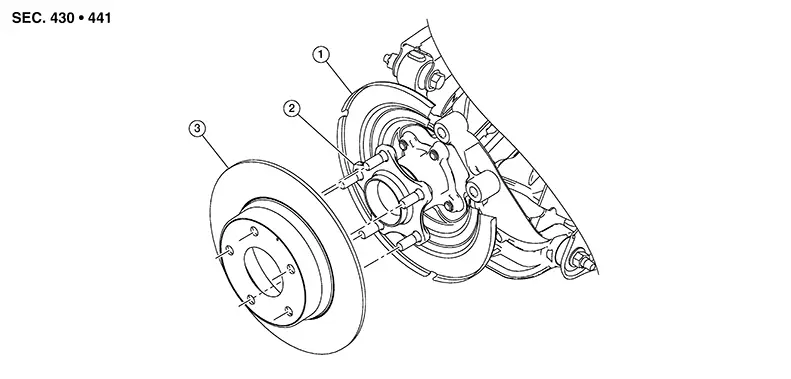
|
1. |
Back plate |
2. |
Wheel hub |
3. |
Disc brake rotor |
Removal and Installation
Removal and Installation
REMOVAL
Observe the brake fluid level in the master cylinder reservoir tank. Partially drain brake fluid if necessary. Refer to Draining.
Remove the rear wheel and tire using a power tool. Refer to Removal and Installation.
Remove the brake pads, pad springs, and shims from the torque member. Refer to Removal and Installation.
CAUTION:
-
Do not damage the pad retainers or the piston boot.
-
Do not drop the brake pads, shims, or pad retainers.
-
Note the position of components during removal to aid with installation.
Remove the bolts and the torque member. Refer to Exploded View.
Place alignment marks on the disc brake rotor and the wheel hub, then remove the disc brake rotor.
CAUTION:
Do not drop the disc brake rotor.
INSTALLATION
Installation is in the reverse order of removal.
-
Using a suitable tool, turn the piston into the brake caliper body.
CAUTION:
Do not damage the piston boot.
-
Check brake fluid level and refill as necessary. Refer to Inspection.
INSPECTION AFTER INSTALLATION
Burnish contact surfaces after refinishing or replacing disc brake rotors or if a soft pedal occurs at very low mileage. Refer to Periodic Maintenance Operation.
Other materials:
Operation
4.2 Inch Information Display
Operation
Operation
SWITCH NAME AND FUNCTION
No.
Switch name
Description
...
Moonroof
Power moonroof
The power moonroof on the Nissan Sentra operates only when the ignition switch
is placed in the ON position, providing controlled and safe operation while driving.
In addition, the power moonroof remains operational for a short period even after
the ignition switch is moved ...
Precautions when starting and driving
WARNING
Do not leave children or adults who normally require assistance unattended
in your Nissan Sentra.
Pets should also never be left alone inside the vehicle.
They could accidentally injure themselves or others through unintended
operation of vehicle controls. In addition, on ho ...