Nissan Sentra B18 (2020-2025) Service Manual: Rear Brake Pad
Exploded View
Exploded View
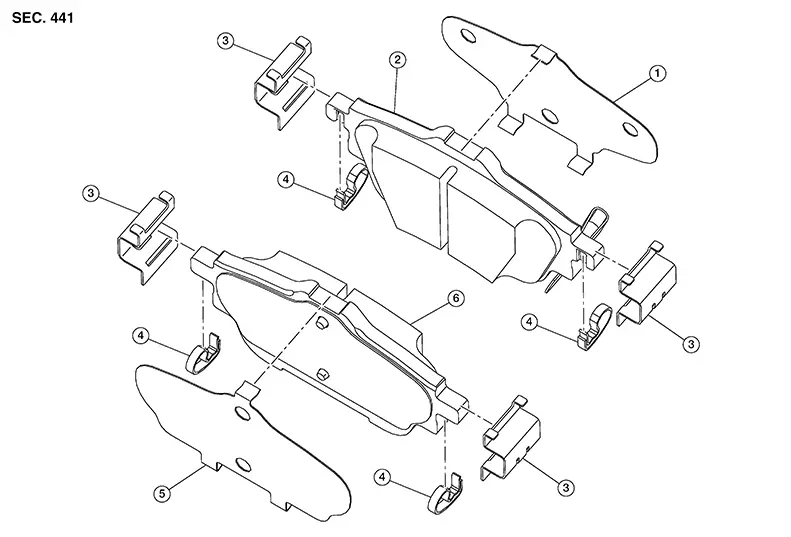
|
1. |
Inner shim |
2. |
Inner pad |
3. |
Pad retainer |
|
4. |
Pad spring |
5. |
Outer shim |
6. |
Outer pad |
Removal and Installation
Removal and Installation
Warning:
Clean dust on the brake caliper and the brake pads using a vacuum dust collector to minimize the hazards of airborne particles or other material.
CAUTION:
-
Do not depress the brake pedal while removing the brake pads because the piston may pop out.
-
It is not necessary to remove bolts on the torque member and the brake hose except for disassembly or replacement of the brake caliper. For brake pad removal, hang the brake caliper using a wire so as not to stretch the brake hose.
-
If brake fluid or grease adheres to the brake caliper or the disc brake rotor, quickly wipe it off.
-
Do not reuse drained brake fluid.
REMOVAL
Observe the brake fluid level in the master cylinder reservoir tank. Partially drain brake fluid if necessary. Refer to Draining.
Remove the rear wheel and tire using power tool. Refer to Removal and Installation.
Remove the bolts from the parking brake bracket on the rear knuckle. Refer to Exploded View (HAND LEVER WITH REAR DISC BRAKES) or to Exploded View (FOOT PEDAL WITH REAR DISC BRAKES).
Secure the disc brake rotor using wheel nuts.
Remove the slide pin bolts.
Remove the brake caliper from the torque member. Leaving the brake hose attached, reposition the brake caliper aside using wire.
Remove the brake pads, shims, pad springs, and pad retainers from the torque member. Refer to Exploded View.
CAUTION:
-
Do not damage the pad retainers or the piston boot.
-
Do not drop the brake pads, shims, or pad retainers.
-
Note the position of components during removal to aid with installation.
INSTALLATION
Install the pad retainers to the torque member. Refer to Exploded View.
CAUTION:
-
Do not deform the pad retainers.
-
Verify that the pad retainers are secured properly to the torque member.
Install the pad springs to the brake pads.
Install the shims to the brake pads.
Install the brake pads, the pad springs, and the shims to the torque member.
Using a suitable tool, turn the piston into the brake caliper body.
CAUTION:
Do not damage the piston boot.
Install the brake caliper to the torque member.
Install the slide pin bolts. Refer to Exploded View.
Depress the brake pedal several times and perform the inspection after installation.
Install the rear wheel and tire. Refer to Removal and Installation.
Check brake fluid level and refill as necessary. Refer to Inspection.
INSPECTION AFTER INSTALLATION
Check the drag of the rear disc brake. If any drag is found, perform the following procedure: Remove the brake pads. Refer to Removal and Installation. Using a suitable tool, turn the piston into the brake caliper body.
CAUTION:
Do not damage the piston boot.
Install the brake pads. Depress the brake pedal several times. Check the drag of the rear disc brake again. If any drag is found, disassemble the brake caliper body. Refer to Disassembly and Assembly.Burnish contact surfaces after replacing the brake caliper or if a soft pedal occurs at very low mileage. Refer to Periodic Maintenance Operation.
Other materials:
P0451 Evap Control System Pressure Sensor
Dtc Description
DTC Description
DTC DETECTION LOGIC
DTC
CONSULT screen terms
(Trouble diagnosis
content)
DTC detection
condition
...
C1700-86 Control Unit
Dtc Description
DTC Description
Note:
The Signal Tech II Tool [– (NI-50190)] can be used
to perform the following functions: Refer to the Signal Tech II User
Guide for additional information.
Activate and display TPMS sensor IDs
Display tire pressure rep ...
B2f70-01 Stop Lamp
Dtc Description
DTC Description
DTC DETECTION LOGIC
DTC No.
CONSULT screen items
(Trouble diagnosis
content)
DTC detecting condition
...