Nissan Sentra B18 (2020-2025) Service Manual: Operation
Switch Name and Function
Switch Name and Function
OPERATION AND DISPLAY OF AUTOMATIC AIR CONDITIONING SYSTEM
Display: Display in A/C switch assembly
-
Air conditioning operation status is indicated on display in A/C switch assembly.
-
Air conditioning status display screen is indicated when MODE switch is pressed while air conditioning is OFF.
CONTROL OPERATION
A/C Switch Assembly
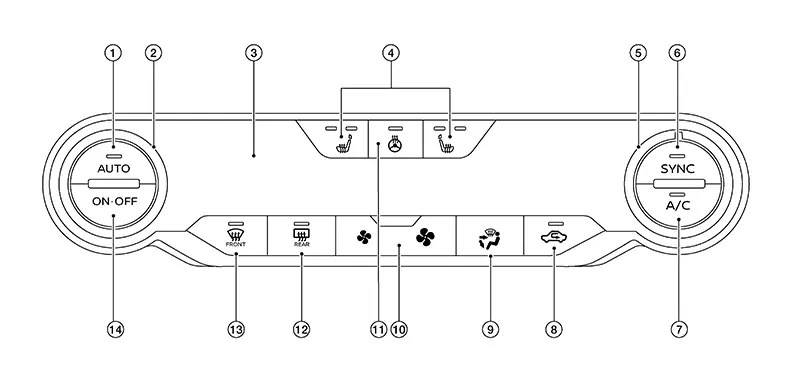
(With heated seats shown, without heated seats similar)
|
1. |
AUTO switch |
2. |
Temperature control dial (Driver side) |
3. |
Display |
|
4. |
Heated seat switches 1 |
5. |
Temperature control dial (Passenger side) |
6. |
SYNC switch |
|
7. |
A/C switch |
8. |
Recirculation switch |
9. |
MODE switch |
|
10. |
Fan switch |
11. |
Heated steering wheel switch 2 |
12. |
Rear window and outside mirror defroster switch 3 |
|
13. |
Front DEF switch |
14. |
ON/OFF switch |
||
1: With heated seat system
2: With heated steering wheel
3: With heated mirrors
Switch Operation
|
AUTO switch |
Turns the switch indicator lamp and "AUTO" indicator on the display ON, and then front air conditioning system becomes the following states:

Under certain conditions A/C compressor may be prohibited. Refer to Compressor Control. |
|
Front defroster switch |
Turns defroster mode (switch indicator) between ON ⇔ OFF each time. When defroster switch is pressed while front air conditioning system is in the ON position.
When defroster switch is pressed while front air conditioning system is in the OFF position.
When defroster mode turns ON while front air conditioning system is in automatic control (“AUTO� is indicated), automatic control is released (“AUTO� turns OFF). |
|
Rear window and outside mirror defroster switch* |
When this mode is selected, the indicator lamp turns ON. The rear window and the door mirrors will defrost. |
|
SYNC switch |
When the SYNC mode is selected, the "SYNC" switch indicator lamp turns ON. Left, rear and right ventilation temperature separately changes between ON ⇔ OFF each time this switch is pressed while blower motor is operated
|
|
Fan switch (UP/DOWN) |
Blower fan speed is manually controlled with these switches. Seven speeds are available for manual control (as shown on the display screen). Note:
|
|
A/C switch |
A/C compressor control (switch indicator) changes between ON ⇔ OFF each time this switch is pressed while blower motor is operated. Note:
|
|
MODE switch |
Selects air outlet sequentially from VENT ⇒ B/L ⇒ FOOT ⇒ D/F ⇒ VENT each time. Note:
|
|
ON/OFF switch |
|
|
Recirculation switch |
Air inlet changes to recirculation (REC) when this switch is pressed.
|
|
Temperature control dial (Driver side) |
Setting temperature is selected using this dial within a range between 60°F or 61°F (18°C) and 89°F or 90°F (32°C) at a rate of 1.0°F (0.5°C) per adjustment. Note:
When air conditioning system is OFF, setting temperature can be selected only while air conditioning system status screen [only when MODE switch (driver side) is pressed] is indicated on display. |
|
Temperature control dial (Passenger side) |
|
*With heated mirrors
Other materials:
P27f0-00 Transmission Range Control B Position Sensor/switch
Dtc Description
DTC Description
DTC DETECTION LOGIC
DTC
CONSULT screen terms
(Trouble diagnosis
content)
DTC detection
...
B1383 Incomp Steering Angle Sensor Adjust
Dtc Description
DTC Description
DTC DETECTION LOGIC
DTC No.
CONSULT screen terms
(Trouble diagnosis
content)
DTC detection condition
...
Sheet Metal Work
Sheet Metal Work Tools
Sheet Metal Work Tools
Sheet Metal Work Tools
This section explains various tools used in body
repair work.
Hammers
Hammers
A hammer is used to correct dents, projections or
other deformations. Various shapes have been designed according to
their pur ...