
Nissan Sentra B18 (2020-2025) Service Manual: Occupant Classification System Sensor
Removal and Installation
OCCUPANT CLASSIFICATION SYSTEM SENSORS
Warning:
-
When working near the occupant classification system sensor or other air bag system sensors with the ignition switch ON or engine running, DO NOT use air or electric power tools or strike near the sensors with a hammer. Heavy vibration could activate the sensor(s) and deploy the air bag(s), possibly causing serious injury.
-
Before servicing the SRS, place the ignition switch in the OFF position, disconnect both battery terminals then wait at least three minutes.
-
Do not use air tools or electric tools for servicing the occupant classification system sensor.
-
Do not cause impact to the occupant classification system sensor by dropping, etc. Replace the occupant classification system sensor if it has been dropped or sustained an impact.
-
Do not allow oil, grease, detergent, or water to come in contact with the occupant classification system sensor.
CAUTION:
-
When working with the metal seat frame, use caution to avoid injury from sharp edges.
-
When removing or installing the seat trim, handle it carefully to keep dirt out and to avoid damage.
-
When removing or installing the seat, use shop cloths to protect components from damage.
-
When disconnecting or connecting the harness and harness connectors, handle them carefully to avoid damage.
REMOVAL
Remove the passenger seat cushion. Refer to Disassembly and assembly .
Disconnect
the harness connectors (A) from the occupant classification system
sensors. 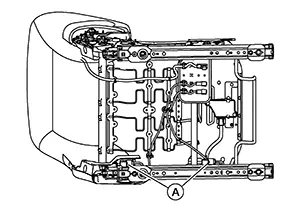
Install the
passenger seat to the Nissan Sentra vehicle and tighten bolts to specification in
the order shown: 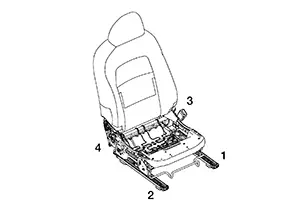
|
Passenger seat bolts |
: 50 N·m (5.1 kg-m, 37 ft-lb) |
Remove the
passenger seat frame assembly from the seat track using the
following procedure:
Release pawl and position aside the
seat cushion inner finisher [LH (1)].
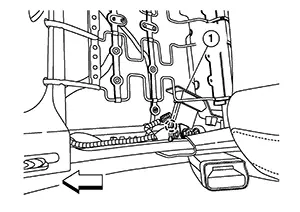
|
|
: Pawl |
|
|
: Front |


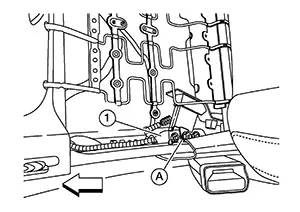
CAUTION:
Do not reuse nut (A).
Remove nut (A) from the RH (outboard) rear of the seat frame assembly (1).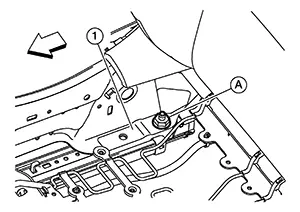
|
|
: Front |
CAUTION:
Do not reuse nut (A).
Remove nut (A) from the RH (outboard) front of the seat frame assembly (1).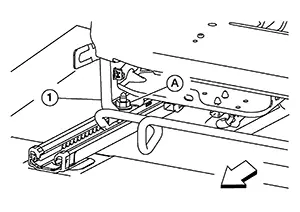
|
|
: Front |
CAUTION:
Do not reuse nut (A).
Remove nut (A) from the LH (inboard) front of the seat frame assembly (1).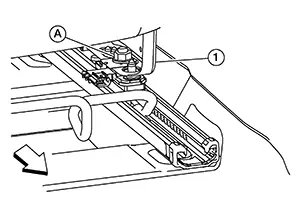
|
|
: Front |
CAUTION:
Do not reuse nut (A).
Separate the seat frame assembly from the seat track and remove the seat frame assembly from Nissan Sentra vehicle. Remove nuts
(A) and remove the front occupant classification system sensor (1)
from the seat track. 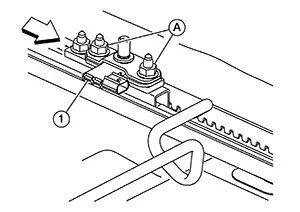
|
|
: Front |
CAUTION:
-
Make sure spacer plates under the occupant classification system sensors remain on the seat track.
-
Do not reuse nut (A).
Remove nuts
(A) and remove the rear occupant classification system sensor (1)
from the seat track. 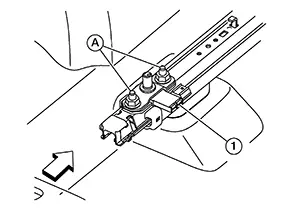
|
|
: Front |
CAUTION:
Do not reuse nut (A).
INSTALLATION
CAUTION:
-
Do not damage the occupant classification system sensor during installation.
-
Do not damage occupant classification system sensor harness during installation.
-
After installation is complete, check that no system malfunction is detected causing the air bag warning lamp to illuminate.
-
If a malfunction is indicated by the air bag warning lamp after repair or replacement of the malfunctioning parts, perform the SRS final check. Refer to SRS Final Check.
-
Perform zero point reset function after the front passenger seat is installed in the Nissan Sentra vehicle and all bolts are tightened to specification. Refer to Special Repair Requirement.
Install the
rear occupant classification system sensor (1) to the seat track
and tighten nuts (A) to specification.
|
Occupant classification system sensor nut |
: 24 N·m (2.4 kg-m, 18 ft-lb) |
|
|
: Front |
Install
front classification system sensor (1) to the seat track and
tighten nuts to specification.
|
Occupant classification system sensor nut |
: 24 N·m (2.4 kg-m, 18 ft-lb) |
|
|
: Front |
Install the passenger seat frame assembly to the seat track using the following procedure: Gently place the passenger seat frame assembly on the seat track.
CAUTION:
-
Do not cause impact to the occupant classification sensors when placing the seat frame assembly on the seat track.
-
Do not damage the occupant classification system sensor harness connectors.
|
Seat frame assembly nut |
: 45 N·m (4.6 kg-m, 33 ft-lb) |
|
|
: Front |
|
Seat frame assembly nut |
: 45 N·m (4.6 kg-m, 33 ft-lb) |
|
|
: Front |
|
Seat frame assembly nut |
: 45 N·m (4.6 kg-m, 33 ft-lb) |
|
|
: Front |
|
Seat frame assembly nut |
: 45 N·m (4.6 kg-m, 33 ft-lb) |
|
|
: Front |
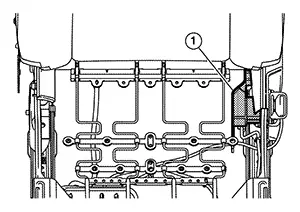
|
|
: Front |
Installation of the remaining components is in the reverse order of removal.
 Occupant Classification System Control Unit
Removal and Installation
Removal and Installation
OCCUPANT CLASSIFICATION SYSTEM CONTROL
UNIT
Warning:
When working near the Air Bag Diagnosis Sensor
Unit ...

Other materials:
Supplemental air bag warning labels
SRS Air bag warning labels The warning labels are positioned on the surface
of the sun visor and are clearly visible to remind occupants of important safety
precautions related to the Nissan Sentra Supplemental Restraint System.
Warning labels related to the supplemental front-impact ...
Hfo-1234yf (r-1234yf) Service Tool and Equipment
HFO-1234yf (R-1234yf)
Service Tool and Equipment
Do not mix HFO-1234yf (R-1234yf) refrigerant and/or
its specified oil with HFC-134a (R-134a) or CFC-12 refrigerant and/or
its oil.
Separate and non-interchangeable service equipment
must be used for handling each type of refrigeran ...
Trunk Lid Striker
Removal and Installation
Removal and Installation
REMOVAL
Remove the
trunk rear finisher. Refer to Removal and Installation.
Remove
bolts (A).
Remove
trunk lid striker (1).
INSTALLATION
Installation is in the reverse order of
removal.
CAUTION:
...
