Nissan Sentra B18 (2020-2025) Owner's Manual: Heater and air conditioner (manual)
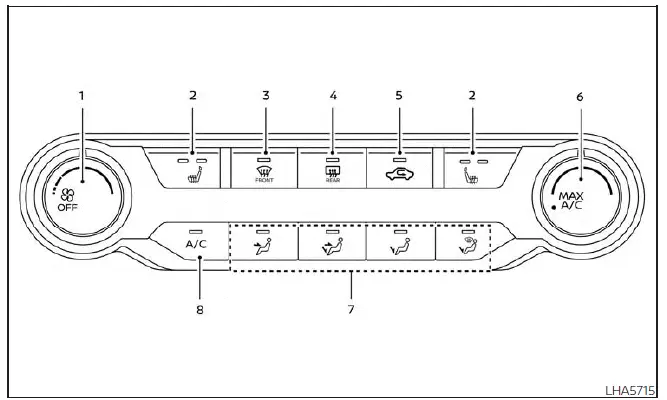
-
 Fan speed control dial
 -
 Heated seat switches (if so equipped)
 -
 Front defroster button
 -
 Rear window and outside mirror defroster switch (if so equipped)
 -
 Air recirculation button
 - MAX A/C / temperature control dial
- Air flow control buttons
- A/C (air conditioner) button
WARNING
- The air conditioning system in the Nissan Sentra operates only when the engine is running.
- Never leave children, dependent adults, or pets unattended in the vehicle.
On hot or sunny days, interior temperatures in a closed Nissan Sentra can rise rapidly and may cause serious or fatal injuries.
- Avoid prolonged use of air recirculation mode, as it can cause stale air and window fogging.
NOTE:
- Odors from inside or outside the Nissan Sentra may accumulate in the air conditioning system and enter the cabin through the vents.
- When parking, switch off air recirculation to allow fresh air to circulate and help reduce interior odors.
Controls
Fan speed control dial
The
 fan speed control dial switches the blower fan on or off and allows precise adjustment
of the fan speed. In the Nissan Sentra, this control helps regulate cabin airflow
intensity for everyday driving comfort.
fan speed control dial switches the blower fan on or off and allows precise adjustment
of the fan speed. In the Nissan Sentra, this control helps regulate cabin airflow
intensity for everyday driving comfort.
Air flow control buttons
The air flow control buttons in the Nissan Sentra allow you to select where conditioned air is directed inside the passenger compartment, improving comfort in different driving and weather conditions.
 – Air flows from the center and side vents, ideal for upper-body cooling.
 – Air flows from the center and side vents as well as the foot outlets, providing
balanced airflow.
– Air flows from the center and side vents as well as the foot outlets, providing
balanced airflow.
 – Air flows mainly from the foot outlets, commonly used for heating.
 – Air flows from the defroster outlets and foot outlets, helping clear the windshield
while keeping feet warm.
– Air flows from the defroster outlets and foot outlets, helping clear the windshield
while keeping feet warm.
 – Air flows mainly from the defroster outlets to improve windshield visibility.
Temperature control dial
The temperature control dial allows you to fine-tune the outlet air temperature in the Nissan Sentra. Turn the dial to the left to lower the temperature, or to the right to increase cabin warmth.
Turning the dial to the MAX A/C position activates maximum cooling. In this mode, air flows primarily from the center and side vents.
MAX A/C automatically switches the system to air recirculation with the air conditioner on and vent mode selected, enhancing cooling performance in hot conditions.
Air recirculation button
On position (Indicator light on):
Interior air is recirculated inside the Nissan Sentra, limiting the entry of outside air.
Press the
 button to the ON position when:
- driving on dusty or polluted roads.
- preventing traffic fumes from entering the passenger compartment.
- seeking maximum cooling efficiency while using the air conditioner.
Off position (Indicator light off):
Outside air is drawn into the passenger compartment and distributed through the selected outlets.
Use this position for normal heater or air conditioner operation to maintain fresh airflow inside the Nissan Sentra.
A/C (air conditioner) button
Start the engine, turn the
 fan speed control dial to the desired position, and press the
 button to activate the air conditioner. To turn the air conditioner off, press the
 button again.
The air conditioner cooling function in the Nissan Sentra operates only when the engine is running.
Rear window and outside mirror (if so equipped) defroster switch
For additional details on operation and usage, refer to the section titled “Rear window and outside mirror (if so equipped) defroster switch� in the Nissan Sentra owner’s documentation.
Heated seat switches (if so equipped)
For more information about using the heated seat switches in the Nissan Sentra, see the section “Heated seat switches�.
Controls
Fan speed control dial
The
fan speed control dial switches the blower fan on or off and allows precise adjustment
of fan speed. In the Nissan Sentra, this control helps regulate cabin airflow intensity
for daily driving comfort and seasonal climate needs.
Air flow control buttons
The air flow control buttons in the Nissan Sentra allow you to choose where conditioned air is directed inside the passenger compartment, improving comfort in various driving and weather conditions.
– Air flows from the center and side vents, ideal for cooling the upper body during
warm weather.
– Air flows from the center and side vents as well as the foot outlets, providing
balanced airflow for front and rear occupants.
– Air flows mainly from the foot outlets, commonly selected for heating and cold-weather
driving.
– Air flows from the defroster outlets and foot outlets, helping clear the windshield
while keeping feet warm.
– Air flows mainly from the defroster outlets to improve windshield visibility in
humid or icy conditions.
Temperature control dial
The temperature control dial allows you to fine-tune outlet air temperature in the Nissan Sentra. Turn the dial to the left to lower the temperature or to the right to increase cabin warmth.
Turning the dial to the MAX A/C position activates maximum cooling. In this mode, air flows primarily from the center and side vents.
MAX A/C automatically switches the system to air recirculation with the air conditioner on and vent mode selected, enhancing cooling performance in hot conditions.
Air recirculation button
On position (Indicator light on):
Interior air is recirculated inside the Nissan Sentra, limiting the entry of outside air.
Press the
button to the ON position when:
- driving on dusty or polluted roads;
- preventing traffic fumes from entering the passenger compartment;
- seeking maximum cooling efficiency while using the air conditioner.
Off position (Indicator light off):
Outside air is drawn into the passenger compartment and distributed through the selected outlets.
Use this position for normal heater or air conditioner operation to maintain fresh airflow inside the Nissan Sentra.
A/C (air conditioner) button
Start the engine, turn the
fan speed control dial to the desired position, and press the
button to activate the air conditioner. To turn the air conditioner off, press the
button again.
The air conditioner cooling function in the Nissan Sentra operates only when the engine is running.
Rear window and outside mirror (if so equipped) defroster switch
For additional details on operation and usage, refer to the section titled “Rear window and outside mirror (if so equipped) defroster switch� in the Nissan Sentra owner’s documentation.
Heated seat switches (if so equipped)
For more information about using the heated seat switches in the Nissan Sentra, see the section “Heated seat switches�.
Other materials:
C1058-04 Control Unit
Dtc Description
DTC Description
DTC DETECTION LOGIC
DTC No.
CONSULT screen item
(Trouble diagnosis
content)
DTC detection condition
...
Front Suspension. Removal and Installation
Front Coil Spring and Strut
Exploded View
Exploded View
1.
Steering knuckle
2.
Strut
3.
...
Symptom Diagnosis
Rear Automatic Braking
Symptom Table
Symptom Table
CAUTION:
Perform the self-diagnosis with CONSULT before the symptom
diagnosis. Perform the trouble diagnosis if any DTC is detected.
Symptom
...