Nissan Sentra B18 (2020-2025) Owner's Manual: Heater and air conditioner (automatic)
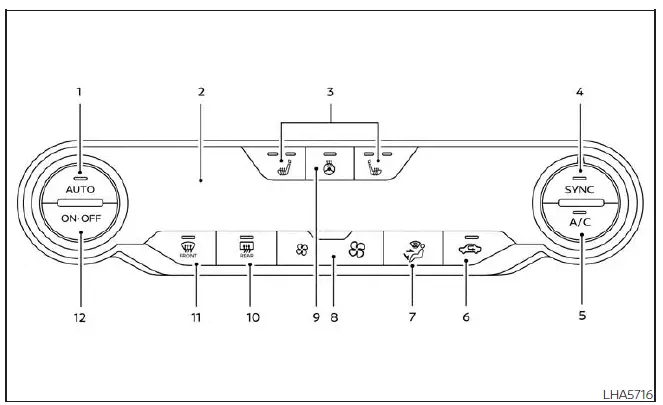
- AUTO (automatic) climate control button / temperature control dial (driver's side)
- Display screen
-
 Heated seat switches (if so equipped)
 - SYNC button / temperature control dial (passenger's side)
- A/C (air conditioner) button
-
 Air recirculation button
 -
 Air flow control button
 -
 Fan speed control buttons
 -
 Heated steering wheel switch (if so equipped)
 -
 Rear window and outside mirror (if so equipped) defroster switch
 -
 Front defroster button
 - ON-OFF button
WARNING
- The air conditioner cooling function operates only when the engine is running.
- Do not leave children or adults who would normally require the assistance
of others alone in your vehicle.
Pets should also not be left unattended.
Inadvertent operation of the Nissan Sentra controls could cause injury. On hot, sunny days, interior temperatures can rise rapidly and may result in serious or fatal injuries to people or animals.
- Do not use the air recirculation mode for extended periods, as interior air quality may deteriorate and the windows may fog.
Start the engine and operate the controls to activate the automatic climate control system in the Nissan Sentra.
NOTE:
- Odors from inside or outside the vehicle may accumulate in the air conditioning unit and enter the cabin through the vents.
- When parking, switch off air recirculation to allow fresh air into the Nissan Sentra passenger compartment. This practice helps minimize odor buildup.
Automatic operation
Cooling and/or dehumidified heating (AUTO)
This operating mode can be used year-round. The Nissan Sentra automatic climate control system maintains a selected cabin temperature by automatically adjusting air flow distribution, air intake control, and fan speed.
1. Press the AUTO button to activate automatic mode.
2. Turn the temperature control dial left or right to set the desired temperature.
- For typical comfort, set the display to approximately 75ºF (24ºC).
- The passenger compartment temperature is maintained automatically.
Air distribution, intake selection, and fan speed are continuously adjusted for optimal comfort.
- A light mist may occasionally be visible from the vents in hot and humid conditions due to rapid cooling. This is normal and does not indicate a malfunction.
3. The driver’s and front passenger’s temperatures can be adjusted independently using the respective control dials. To synchronize both settings, press the SYNC button.
Heating (A/C OFF)
In this mode, the air conditioner does not operate. Use this setting when only heating is required.
1. Press the AUTO button.
2. Turn the temperature control dial to the desired heating level.
- The Nissan Sentra automatically maintains the selected temperature.
Air flow distribution and fan speed are managed automatically.
- Do not set the temperature lower than the outside air temperature, as this may reduce system effectiveness.
- This mode is not recommended if window fogging occurs.
Dehumidified defrosting or defogging
1. Press the
 front defroster button.
2. Turn the temperature control dial to the desired setting.
- For rapid ice removal, use the
 fan speed control buttons to select maximum speed.
 - Once the windshield is clear, press the AUTO button to return to automatic operation.
- When the
 front defroster button is activated, the air conditioner automatically turns
on at outside temperatures above 36ºF (2ºC). Air recirculation is disabled,
allowing fresh outside air into the cabin to improve defogging performance.
front defroster button is activated, the air conditioner automatically turns
on at outside temperatures above 36ºF (2ºC). Air recirculation is disabled,
allowing fresh outside air into the cabin to improve defogging performance.
Remote Engine Start with Intelligent Climate Control (if so equipped)
Vehicles equipped with automatic climate control and the Remote Engine Start function may automatically select heating or cooling modes when Remote Engine Start is activated, depending on outside temperature and current cabin conditions. In the Nissan Sentra, this intelligent feature helps precondition the interior for improved comfort before driving. During this period, the climate control display and buttons remain inoperative until the ignition switch is placed in the ON position. When Remote Engine Start operates in defrosting mode, the rear window defroster, heated seats (if so equipped), and heated steering wheel (if so equipped) may activate automatically to enhance visibility and occupant comfort.
Manual operation
Fan speed control buttons
Press the
 fan speed control buttons to manually adjust the blower speed according to personal
preference.
fan speed control buttons to manually adjust the blower speed according to personal
preference.
Press the AUTO button to return the Nissan Sentra climate system to automatic fan speed control.
Temperature control dial
The temperature control dial allows precise adjustment of outlet air temperature. Turn the dial to the left to lower the temperature or to the right to increase warmth. In the Nissan Sentra, temperature settings can be adjusted independently for both the driver’s and front passenger’s sides.
Air recirculation
Press the
 air recirculation button to circulate interior air within the vehicle.
The
 indicator light on the button illuminates when recirculation is active.
Air recirculation cannot be selected when the air conditioner is operating in
 front defrost mode.
When outside temperatures exceed 70ºF (21ºC), the Nissan Sentra air conditioning system may automatically default to air recirculation mode to reduce overall power consumption and improve cooling efficiency.
To exit air recirculation mode, press the air recirculation button again. The indicator light will turn off and the system will return to fresh air intake.
Automatic intake air control
In AUTO mode, intake air selection is controlled automatically. To manually override
intake air control, press the
 air recirculation button. To return to automatic intake air control, press and hold
the
air recirculation button. To return to automatic intake air control, press and hold
the
 air recirculation button for approximately 2 seconds.
The indicator light will flash twice, confirming that intake air control has returned to automatic operation.
A/C (air conditioner) button
Start the engine, press the
 fan speed control buttons to the desired setting, and then press the
 button to activate the air conditioner. To switch the air conditioner off, press
the
button to activate the air conditioner. To switch the air conditioner off, press
the
 button again.
The air conditioner cooling function operates only when the engine is running.
Air flow control
Pressing the
 button allows manual selection of air flow direction and outlet configuration:
 – Air flows from the center and side vents.
 – Air flows from the center and side vents as well as the foot outlets.
 – Air flows mainly from the foot outlets.
 – Air flows from the defroster and foot outlets.
Synchronize climate settings
Press the SYNC button to synchronize climate control settings between the driver and front passenger. The SYNC indicator will illuminate when synchronization is active.
When SYNC is enabled, adjustments to the driver’s side controls automatically apply to the front passenger’s side.
While SYNC is active:
- The driver’s temperature control dial adjusts both driver and front passenger temperatures.
- The fan speed controls adjust blower speed for both zones.
To exit SYNC mode:
- Turn the front passenger’s temperature control dial to separate temperature settings.
- Pressing the SYNC button again will re-enable synchronization.
To turn system off
Press the ON-OFF button to shut down the automatic climate control system.
Operating tips
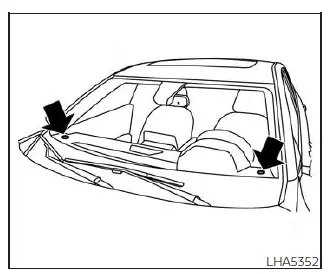
The sunload sensors, positioned on the upper right and upper left areas of the instrument panel, assist the automatic climate control system in the Nissan Sentra by continuously monitoring sunlight intensity. This information allows the system to maintain a stable and comfortable interior temperature under changing light conditions.
Do not place any objects on or near these sensors, as obstruction may interfere with proper climate control operation in the Nissan Sentra.
- When the climate control system is operating in automatic mode and both the engine coolant temperature and outside air temperature are low, the air flow outlet may temporarily default to the defroster mode for up to 2 minutes and 30 seconds. This behavior is normal and does not indicate a malfunction. After the engine coolant temperature increases, the air flow outlet will automatically switch back to foot mode and normal operation will resume.
- When both the outside temperature and interior cabin temperature are moderate to high, the intake setting may automatically turn off air recirculation to allow fresh air into the passenger compartment. During this transition, you may briefly notice air flow from the foot mode, bi-level mode, or side demist vent outlets for up to approximately 15 seconds. This may occur when the previous climate control setting was turned off. This is not a malfunction. Once the initial warm air is expelled, intake air control will return to automatic operation, air flow outlets will revert to the previous settings, and normal operation will continue. To exit this transition sooner, press any climate control button.
- For optimal cooling performance, keep the moonroof (if so equipped) closed while the air conditioner is operating in the Nissan Sentra.
- If the selected air flow mode does not appear to match the outlets from
which air is delivered, manually select the
 mode to correct air distribution.
 - When changing the air flow mode, a brief burst of air from the foot outlets may be felt. This is a normal system response and not a malfunction.
Other materials:
Clutch. Service Data and Specifications (sds). Service Data and Specifications (sds)
Service Data and Specifications (sds)
General Specifications
General Specifications
Unit: mm (in)
Type of clutch control
Hydraulic
Recommended clutch fluid
...
P0137 Ho2s2
Dtc Description
DTC Description
The heated oxygen sensor 2 has a much longer switching time
between rich and lean than the air fuel ratio (A/F) sensor 1. The oxygen storage
capacity of the three way catalyst (manifold) causes the longer switching
time.
...
B1383 Incomp Steering Angle Sensor Adjust
Dtc Description
DTC Description
DTC DETECTION LOGIC
DTC No.
CONSULT screen terms
(Trouble diagnosis
content)
DTC detection condition
...