Nissan Sentra B18 (2020-2025) Service Manual: Camera Image Signal Circuit
Diagnosis Procedure
Diagnosis Procedure
-
CHECK CAMERA IMAGE SIGNAL CIRCUIT CONTINUITY
-
-
Ignition switch OFF.
-
Disconnect AV control unit connector and around view monitor control unit connector.
-
Check continuity between AV control unit connector and around view monitor control unit connector.
AV control unit
Around view monitor control unit
Continuity
Connector
Terminal
Connector
Terminal
M104
52
B72
4
Yes
-
Check continuity between AV control unit connector and ground.
AV control unit
—
Continuity
Connector
Terminal
M104
52
Ground
No
-
Is inspection result normal?
YES >>GO TO 4.
NO >>Repair or replace harness or connectors.
-
-
CHECK CAMERA GROUND CIRCUIT CONTINUITY
-
Check continuity between AV control unit connector and around view monitor control unit connector.
AV control unit
Around view monitor control unit
Continuity
Connector
Terminal
Connector
Terminal
M104
53
B72
3
Yes
Is inspection result normal?
YES >>GO TO 5.
NO >>Repair or replace harness or connectors.
-
-
CHECK CAMERA IMAGE SIGNAL
-
-
Connect AV control unit connector and around view monitor control unit connector.
-
Ignition switch ON.
-
Shift the selector lever to R (reverse).
-
Check signal between AV control unit connector and ground.
(+)
(—)
Condition
Reference value
AV control unit
Connector
Terminal
M104
52
Ground
Camera image displayed.
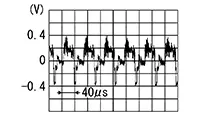
-
Is inspection result normal?
YES >>Replace AV control unit. Refer to Removal and Installation.
NO >>Replace around view monitor control unit. Refer to Removal and Installation.
-
Other materials:
Before Replacing ECM
SAVE ECM DATA
With CONSULT
Turn ignition switch OFF.
Reconnect all harness connectors
disconnected.
Turn ignition switch ON.
Select “SAVING DATA FOR REPLC
...
Symptom Diagnosis. Rear View Monitor System
Rear View Monitor System
Symptom Table
Symptom Table
REAR VIEW MONITOR SYSTEM
Symptoms
Check items
Probable malfunction
location
...
Trunk Lid Opener Actuator
Component Function Check
Component Function Check
CHECK FUNCTION
CONSULT
Select "Trunk/back door" in "Active Test" mode of
"BCM(TRUNK)".
Select “On� to check tha ...