Nissan Sentra B18 (2020-2025) Service Manual: Basic Inspection
Diagnosis and Repair Workflow
Work Flow
Work Flow
OVERALL SEQUENCE
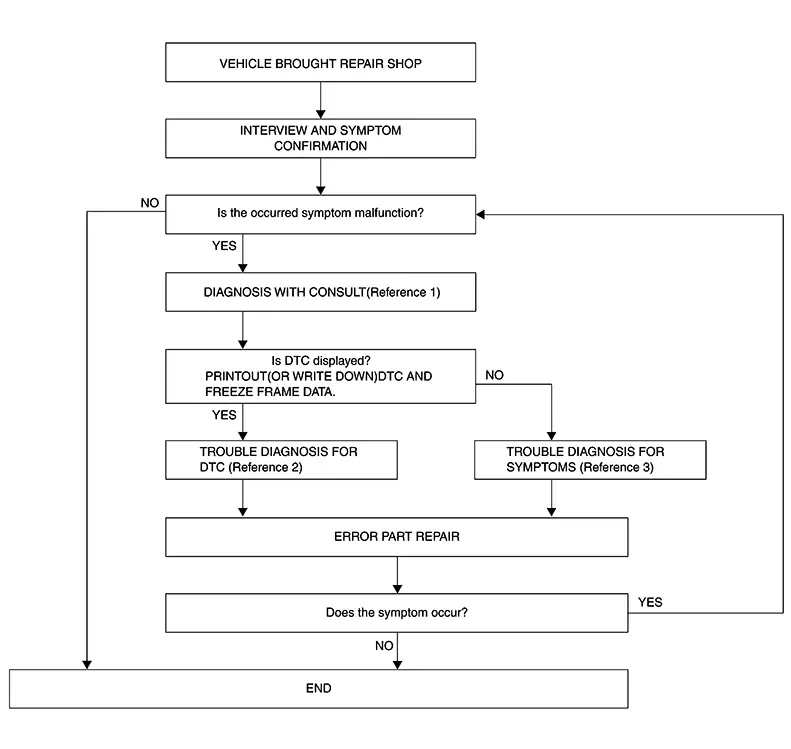
-
Reference 1··· Refer to CONSULT Function.
-
Reference 2··· Refer to DTC Index.
-
Reference 3··· Refer to Symptom Table.
DETAILED FLOW
-
INTERVIEW AND SYMPTOM CONFIRMATION
-
Check the malfunction symptoms by performing the following items:
-
Interview the customer to obtain the malfunction information (conditions and environment when the malfunction occurred).
-
Check the symptom.
-
Is the occurred symptom malfunction?
YES>>GO TO 2.
NO>>Inspection End.
-
-
DIAGNOSIS WITH CONSULT
-
 CONSULT
-
Select “Self Diagnostic Result� mode of “MULTI AV�. Refer to CONSULT Function.
Note:
Skip to step 4 of the diagnosis procedure if “MULTI AV� is not displayed.
-
When DTC is detected, follow the instructions below:
-
Record DTC and Freeze Frame Data.
-
-
Is DTC displayed?
YES>>GO TO 3.
NO>>GO TO 4.
-
-
TROUBLE DIAGNOSIS FOR DTC
-
CONSULT
-
Check the DTC indicated in the “Self Diagnostic Result�.
-
Perform the relevant diagnosis referring to the DTC Index. Refer to DTC Index.
-
GO TO 5.
-
-
TROUBLE DIAGNOSIS FOR SYMPTOMS
-
Perform the relevant diagnosis referring to the diagnosis chart by symptom. Refer to Symptom Table.
GO TO 5.
-
-
ERROR PART REPAIR
-
CONSULT
-
Repair or replace the identified malfunctioning parts.
-
Select “Self Diagnostic Result� mode of “MULTI AV�.
Note:
Erase the stored self-diagnosis results after repairing or replacing the relevant components if any DTC has been indicated in the “Self Diagnostic Result�.
-
Check that the symptom does not occur.
-
Does the symptom occur?
YES>>GO TO 1.
NO>>Inspection End.
-
Predictive Course Line Center Position Adjustment
Description
Description
Adjust the center position of the predictive course line of the rear view monitor.
Work Procedure
Work Procedure
-
DRIVING
-
Drive the vehicle straight ahead 100 m (328.1 ft) or more at a speed of 30 km/h (18.6 MPH) or more.
Work End.
-
Other materials:
Sonar System. Ecu Diagnosis Information. Sonar Control Unit
Sonar Control Unit
Values on the Diagnosis Tool
Values on the Diagnosis Tool
Note:
The following table includes information (items)
inapplicable to this Nissan Sentra vehicle. For information (items) applicable to
this vehicle, refer to CONSULT display items.
...
Stop Lamp Switch
Component Inspection
Component Inspection
CHECK STOP LAMP SWITCH 1
Ignition switch OFF.
Disconnect stop lamp switch connector.
Check continuity betwe ...
Symptom Diagnosis
Telematics System
Symptom Table
Symptom Table
TELEMATICS SYSTEM
Symptom
Display
icon
Error message
Possible cause
...