Nissan Sentra B18 (2020-2025) Service Manual: B2e08 Microphone
Dtc Description
DTC Description
DTC DETECTION LOGIC
|
DTC No. |
CONSULT screen terms (Trouble diagnosis content) |
DTC detection condition |
||
|---|---|---|---|---|
|
B2E08–01 |
Microphone (Microphone) |
1 |
Diagnosis condition |
When ignition switch is ON. |
|
Signal (terminal) |
Microphone signal |
|||
|
Threshold |
7.2 V or more |
|||
|
Diagnosis delay time |
1 second or more |
|||
|
2 |
Diagnosis condition |
When ignition switch is ON. |
||
|
Signal (terminal) |
Microphone signal |
|||
|
Threshold |
0.2 V or less |
|||
|
Diagnosis delay time |
1 second or more |
|||
POSSIBLE CAUSE
-
Microphone signal circuit short to power supply
-
Microphone signal circuit short to ground
-
Microphone
FAIL-SAFE
Microphone does not operate
Confirmation Procedure
Confirmation Procedure
-
PERFORM DTC CONFIRMATION PROCEDURE
-
 CONSULT
-
Ignition switch ON.
-
Ignition switch OFF and wait at least 30 seconds.
-
Ignition switch ON and wait at least 30 seconds or more.
-
Select “Self Diagnostic Result� mode of “IVC�.
-
Check DTC.
-
Is DTC B2E08–01 detected?
YES>>Proceed to DTC Diagnosis Procedure.
NO>>To check malfunction symptom before repair: Refer to Intermittent Incident.
NO>>Confirmation after repair: Inspection End.
-
Dtc Diagnosis Procedure
DTC Diagnosis Procedure
-
CHECK MICROPHONE SIGNAL CIRCUIT AND MICROPHONE VCC CIRCUIT CONTINUITY
-
-
Ignition switch OFF.
-
Disconnect TCU connector and microphone connector.
-
Check continuity between TCU connector and microphone connector.
TCU
Microphone
Continuity
Connector
Terminal
Connector
Terminal
M160
17
R17
1
Yes
18
4
-
Check the continuity between TCU connector and ground.
TCU
—
Continuity
Connector
Terminal
M160
17
Ground
No
18
-
Is the inspection result normal?
YES >>GO TO 2.
NO >>Repair or replace harness or connectors.
-
-
CHECK MICROPHONE VCC VOLTAGE
-
-
Connect TCU connector and microphone connector.
-
Ignition switch ON.
-
Check voltage between TCU connector and ground.
(+)
(−)
Voltage
(Approx.)
TCU
Connector
Terminal
M160
18
Ground
5 V
-
Is the inspection result normal?
YES >>GO TO 3.
NO >>Replace TCU. Refer to Removal and Installation.
-
-
CHECK MICROPHONE SIGNAL
-
Check signal between TCU connector and ground.
(+)
(−)
Condition
Reference value
TCU
Connector
Terminal
M160
17
Ground
Speak into microphone.
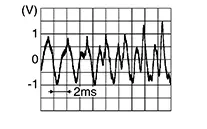
Is the inspection result normal?
YES >>Replace TCU. Refer to Removal and Installation.
NO >>Replace microphone. Refer to Removal and Installation.
-
Other materials:
Component Parts
Engine Control System
Component Parts Location
Component Parts Location
ENGINE ROOM COMPARTMENT
Area behind left head
lamp
...
Primary Pressure Solenoid Valve Circuit
Diagnosis Procedure
Diagnosis Procedure
CHECK HARNESS CONNECTOR
Ignition switch OFF.
Check the mating condition of TCM
harness connector and CVT unit harness
connector.
Is the inspect ...
Ecu Diagnosis Information. Bcm, Ipdm E/r
Bcm, Ipdm E/r
List of Ecu Reference
List of ECU Reference
ECU
Reference
BCM
Values on the Diagnosis Tool
...