Nissan Sentra B18 (2020-2025) Service Manual: B2a1a Rear Camera
Dtc Description
DTC Description
DTC DETECTION LOGIC
|
DTC No. |
CONSULT screen terms (Trouble diagnosis content) |
DTC detection condition |
|
|---|---|---|---|
|
B2A1A-38 |
Rear camera (Rear camera image signal) |
Diagnosis condition |
Ignition switch ON |
|
Signal (terminal) |
RV video signal circuit (terminal 20) |
||
|
Threshold |
RV video signal circuit is open or short |
||
|
Diagnosis delay time |
— |
||
POSSIBLE CAUSE
-
RV video signal circuit
-
Rear camera
-
Around view monitor control unit
FAIL-SAFE
-
Camera image may not be displayed.
-
MOD (Moving Object Detection) function is stopped.
Confirmation Procedure
Confirmation Procedure
-
PERFORM DTC CONFIRMATION PROCEDURE
-
 CONSULT
-
Ignition switch ON.
-
Ignition switch OFF and wait at least 30 seconds.
-
Ignition switch ON and wait at least 30 seconds or more.
-
Select “Self Diagnostic Result� mode of “AVM�.
-
Check DTC.
-
Is DTC B2A1A–38 detected?
YES >>Proceed to DTC Diagnosis Procedure.
NO >>To check malfunction symptom before repair: Refer to Intermittent Incident.
NO >>Confirmation after repair: Inspection End.
-
Dtc Diagnosis Procedure
DTC Diagnosis Procedure
-
CHECK CONTINUITY OF REAR CAMERA POWER SUPPLY AND GROUND CIRCUIT
-
-
Ignition switch OFF.
-
Disconnect around view monitor control unit connector and rear camera connector.
-
Check continuity between around view monitor control unit connector and rear camera connector.
Around view monitor control unit
Rear camera
Continuity
Connector
Terminal
Connector
Terminal
B72
17
B69
7
Yes
18
8
-
Check continuity between around view monitor control unit connector and ground.
Around view monitor control unit
—
Continuity
Connector
Terminal
B72
18
Ground
No
-
Is the inspection result normal?
YES >>GO TO 2.
NO >>Repair harness or connector.
-
-
CHECK VOLTAGE OF REAR CAMERA POWER SUPPLY
-
-
Connect around view monitor control unit connector and rear camera connector.
-
Ignition switch ON.
-
Check voltage between around view monitor control unit connector and ground.
(+)
(−)
Condition
Voltage
(Approx.)
Around view monitor control unit
Connector
Terminal
B72
18
Ground
“CAMERA� switch is ON or shift position is “R�.
6.0 V
-
Is inspection result normal?
YES >>GO TO 3.
NO >>Replace around view monitor control unit. Refer to Removal and Installation.
-
-
CHECK CONTINUITY OF REAR CAMERA IMAGE SIGNAL CIRCUIT
-
-
Ignition switch OFF.
-
Disconnect around view monitor control unit connector and rear camera connector.
-
Check continuity between around view monitor control unit connector and rear camera connector.
Around view monitor control unit
Rear camera
Continuity
Connector
Terminal
Connector
Terminal
B72
19
B69
1
Yes
20
5
-
Check continuity between around view monitor control unit harness connector and ground.
Around view monitor control unit
—
Continuity
Connector
Terminal
B72
20
Ground
No
-
Is inspection result normal?
YES >>GO TO 4.
NO >>Repair harness or connector.
-
-
CHECK REAR CAMERA IMAGE SIGNAL
-
-
Connect around view monitor control unit connector and rear camera connector.
-
Ignition switch ON.
-
Check signal between around view monitor control unit connector.
Around view monitor control unit
Condition
Reference value
Connector
Terminals
(+)
(—)
B72
20
19
“CAMERA� switch is ON or shift position is “R�.
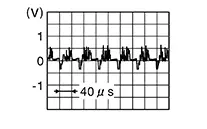
-
Is inspection result normal?
YES >>Replace around view monitor control unit. Refer to Removal and Installation.
NO >>Replace rear camera. Refer to Removal and Installation.
-
Other materials:
C1623-87 Ecm System
Dtc Description
DTC Description
DTC DETECTION LOGIC
DTC No.
CONSULT screen terms
(Trouble diagnosis content)
DTC detection condition
...
C106b-64 Stop Lamp Switch
Dtc Description
DTC Description
DTC DETECTION LOGIC
DTC No.
CONSULT screen item
(Trouble diagnosis
content)
DTC detection condition
...
Seat. Precaution. Precautions
Precautions
Precaution for Supplemental Restraint System (srs) "air Bag" and "seat Belt Pre-Tensioner"
Precaution for Supplemental Restraint System (SRS) "AIR BAG" and "SEAT BELT PRE-TENSIONER"
The Supplemental Restraint System such as
“AIR BAG� and “SEAT BELT PRE-T ...