
Nissan Sentra B18 (2020-2025) Service Manual: Accessory Relay-1
Diagnosis Procedure
-
CHECK ACCESSORY RELAY-1 POWER
-
-
Disconnect accessory relay-1 connector.
-
Check voltage between accessory relay-1 harness connector and ground.
Accessory relay-1
—
Voltage
(Approx.)
Connector
Terminal
J-5
2
Ground
Battery voltage
5
-
Is the inspection result normal?
YES >>GO TO 2.
NO >>Repair or replace harness or connectors.
-
-
CHECK ACCESSORY RELAY-1 CONTROL SIGNAL VOLTAGE
-
-
Connect accessory relay-1 connector.
-
Check voltage between BCM harness connector and ground.
+
—
Condition
Voltage
(Approx.)
BCM
Connector
Terminal
M84
34
Ground
Ignition switch
OFF
Battery voltage
ON
0 V
-
Is the inspection result normal?
YES >>GO TO 4
NO >>GO TO 3.
-
-
CHECK ACCESSORY RELAY-1 CONTROL SIGNAL CIRCUIT
-
-
Ignition switch OFF.
-
Disconnect BCM connector and accessory relay-1 connector.
-
Check continuity between BCM harness connector and accessory relay-1 harness connector.
BCM
Accessory relay-1
Continuity
Connector
Terminal
Connector
Terminal
M84
34
J-5
1
Yes
-
Check continuity between BCM harness connector and ground.
BCM
Ground
Continuity
Connector
Terminal
M84
34
No
-
Is the inspection result normal?
YES >>Replace BCM. Refer to Removal and Installation.
NO >>Repair or replace harness or connectors.
-
-
CHECK ACCESSORY RELAY-1
-
Check accessory relay-1. Refer to Component Inspection.
Is the inspection result normal?
YES >>Refer to Intermittent Incident.
NO >>Replace accessory relay-1.
-
Component Inspection
-
CHECK ACCESSORY RELAY-1
-
-
Ignition switch OFF.
-
Disconnect accessory relay-1 connector.
-
Check continuity between accessory relay-1 terminals.
Accessory relay-1
Condition
Continuity
Terminals


12 V direct current supply between terminals
 and
and  .
.Yes
No current supply
No
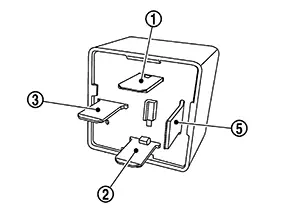
-
Is the inspection result normal?
YES >>Inspection End.
NO >>Replace accessory relay-1.
-
 Push-Button Ignition Switch Circuit
Component Function Check
Component Function
Check
CHECK FUNCTION
CONSULT
Ignition switch ON
...
Other materials:
Diagnosis Procedure
Diagnosis Procedure
CHECK INTELLIGENT KEY SYSTEM SYMPTOM
TABLE
Check Intelligent Key system symptom table.
Refer to Diagnosis Procedure.
>>
GO TO
2.
CHECK INTELLIGENT KEY BATTER ...
Removal and Installation
Removal and Installation
REMOVAL
CAUTION:
Be sure to perform “ADDITIONAL
SERVICE WHEN REPLACING INTELLIGENT KEY UNIT� when replacing
Intelligent Key unit. Refer to Work Procedure.
Remove
instrument panel assembly. Refer to Removal and Installation.
Disconn ...
Diagnosis system (BCM)
Common item
Common item : consult function (bcm - common item)
Application item
Consult performs the following functions via can communication with bcm.
System application
Bcm can perform the following functions.
Intelligent key
Intelligent key : consult function (bcm - intelligent ke ...
