Nissan Sentra B18 (2020-2025) Service Manual: System
Power Distribution System
System Description
System Description
SYSTEM DIAGRAM
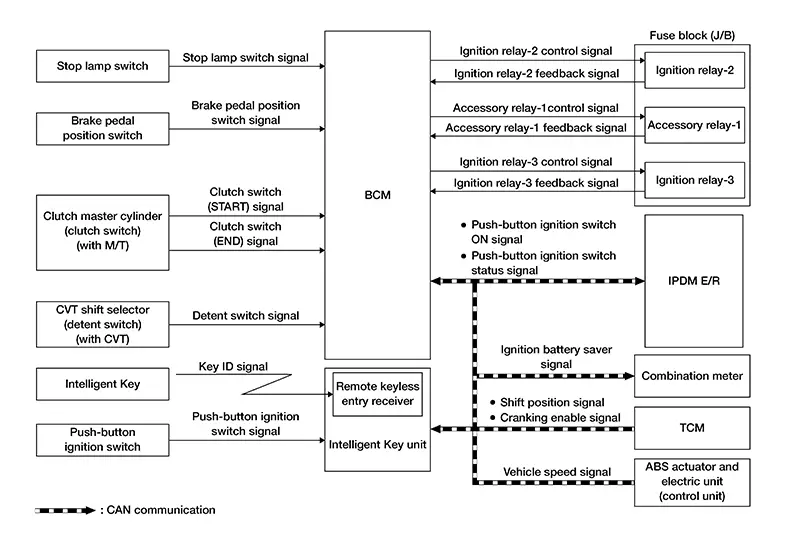
Signal transmission function list
|
Signal name |
Input |
Output |
Description |
|---|---|---|---|
|
Stop lamp switch signal |
Stop lamp switch |
BCM |
Transmits the stop lamp switch signal to the BCM. |
|
Brake pedal position switch signal |
Brake pedal position switch |
BCM |
Transmits the brake pedal position switch signal to the BCM. |
|
Clutch switch (START) signal2 |
Clutch master cylinder switch (clutch switch) |
BCM |
Transmits the clutch switch (START) signal to the BCM. |
|
Clutch switch (END) signal2 |
Clutch master cylinder switch (clutch switch) |
BCM |
Transmits the clutch switch (END) signal to the BCM. |
|
Detent switch signal1 |
CVT shift selector (detent switch) |
BCM |
Transmits the detent switch signal to the BCM. |
|
Push-button ignition switch signal |
Push-button ignition switch |
Intelligent Key unit |
Transmits the push-button ignition switch signal to the Intelligent Key unit. |
|
Push-button ignition switch ON signal |
Intelligent Key unit |
|
Transmits the push-button ignition switch ON signal via CAN communication. |
|
Push-button ignition switch status signal |
IPDM E/R |
BCM (CAN) |
Transmits the push-button ignition switch status signal via CAN communication. |
|
Ignition battery saver signal |
BCM |
Combination meter (CAN) |
Transmits the ignition battery saver signal via CAN communication. |
|
Shift position signal1 |
TCM |
BCM (CAN) |
Transmits the shift position signal via CAN communication. |
|
Cranking enable signal1 |
TCM |
BCM (CAN) |
Transmits the cranking enable signal via CAN communication. |
|
Nissan Sentra Vehicle speed signal |
ABS actuator and electric unit (control unit) |
BCM (CAN) |
Transmits the Nissan Sentra vehicle speed signal via CAN communication. |
1: With CVT
2: With M/T
SYSTEM DESCRIPTION
-
The POWER DISTRIBUTION SYSTEM (PDS) is the system that the BCM controls with the operation of the push-button ignition switch and performs the power distribution to each power circuit. This system is used instead of the mechanical power supply changing mechanism with the operation of the conventional key cylinder.
Allocation to the accessory power supply, refer to the auto ACC function. Refer to System Description.
-
The push-button ignition switch can be operated when the Intelligent Key is in the following conditions:
-
Intelligent Key is in the detection area of the inside key antenna.
-
Intelligent Key backside is contacted to push-button ignition switch.
-
-
Push-button ignition switch operation is an input to the Intelligent Key unit as a signal. The Intelligent Key unit transmits the push-button ignition switch status and remote engine start signal to the BCM via CAN communication. The BCM changes the ignition switch mode according to the status and operates the following relays to supply power to each power circuit:
-
Ignition relay-1 (IPDM E/R)
-
Ignition relay-2 [fuse block (J/B)]
-
Ignition relay-3 [fuse block (J/B)]
-
Accessory relay -1 [fuse block (J/B)]
-
IGNITION BATTERY SAVER SYSTEM
The ignition battery saver system is a system in which the BCM automatically shuts off the power supply (push-button ignition switch ON -> OFF) to protect the battery.
The BCM activates the ignition battery saver system 10 minutes after the ignition battery saver timer function operating conditions are met. Also, the meter display signal is transmitted to the combination meter via CAN communication as operation notice and operation confirmation, and the information display is operated.
Operating Condition of Ignition Battery Saver Timer Function
When all the following conditions are met for 10 minutes, the battery saver system will cut off the power supply (push-button ignition switch ON -> OFF) to prevent battery discharge:
-
Push-button ignition switch is ON
-
Engine stopped
Cancel Condition of Ignition Battery Saver Timer Function
If any of the following conditions are met the battery saver timer function is canceled:
 CONSULT
-
Push-button ignition switch is not ON.
-
Engine running
-
Select "Diagnosis (ALL system)" of "BCM"
Note:
Ignition battery saver timer function will return 1 minute or more, after closing CONSULT or removing VI from the Nissan Sentra vehicle.
Operation Notice Function (7 Minutes have Passed Since the Timer was Activated)
7 minutes after ignition battery saver timer is activated, information display (message display) is activated as and operation notice.
|
Combination meter (Information display) |
|
|---|---|
|
Operation |
"Power will turn off to save the battery" |
|
Operating time |
Approx. 3 minutes |
Operation Confirmation Function (10 Minutes have Passed Since the Timer was Activated)
10 minutes after ignition battery saver timer is activated, information display (message display) is activated as and operation confirmation.
|
Combination meter (Information display) |
|
|---|---|
|
Operation |
"Power turned off to save the battery" |
|
Operating time |
Approx. 1 minutes |
Temporarily Disabling the Ignition Battery Saver System
The ignition battery saver system can be temporarily disabled, without using CONSULT, to prevent it from functioning when performing trouble diagnosis. Refer to Work Procedure (with CVT) or Work Procedure (with M/T).
POWER SUPPLY POSITION CHANGE TABLE BY PUSH-BUTTON IGNITION SWITCH OPERATION
The power supply position changing operation can be performed with the following operations:
Note:
-
When an Intelligent Key is within the detection area of inside key antenna and when Intelligent Key backside is contacted to push-button ignition switch, it is equivalent to the operations below.
-
When starting the engine, the BCM monitors under the engine start conditions:
-
Brake pedal operating condition
-
Shift selector position
-
Nissan Sentra Vehicle speed
-
Vehicle speed: less than 2.5 MPH (4 km/h)
|
Power supply position |
Engine start/stop condition |
Push-button ignition switch operation frequency |
|
|---|---|---|---|
|
Shift selector position |
Brake pedal operation condition |
||
|
OFF → ACC |
— |
Not depressed |
1 |
|
OFF → ACC → ON |
— |
Not depressed |
2 |
|
OFF → ACC → ON → OFF |
— |
Not depressed |
3 |
|
OFF → START ACC → START ON → START |
P or N position |
Depressed |
1 |
|
Engine is running → OFF |
— |
— |
1 |
Nissan Sentra Vehicle speed: 2.5 MPH (4 km/h) or more
|
Power supply position |
Engine start/stop condition |
Push-button ignition switch operation frequency |
|
|---|---|---|---|
|
Shift selector position |
Brake pedal operation condition |
||
|
Engine is running → ACC |
— |
— |
Emergency stop operation |
|
Engine stall return operation while driving |
N position |
Not depressed |
1 |
Emergency stop operation
-
Press and hold the push-button ignition switch for 2 seconds or more.
-
Press the push-button ignition switch 3 times or more within 1.5 seconds.
Auto Acc Function
System Description
System Description
SYSTEM DIAGRAM
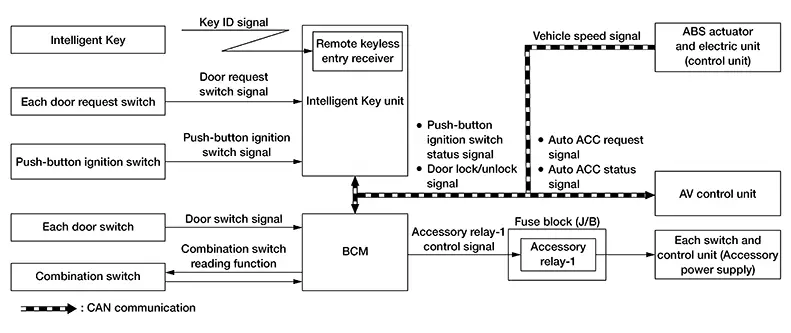
|
Component |
Function |
|---|---|
|
Intelligent Key |
Operates based on the results of electronic ID verification using two-way communication between the Intelligent Key and the Nissan Sentra vehicle (Intelligent Key unit). |
|
Each door request switch |
Detects door lock/unlock operation. |
|
Push-button ignition switch |
Refer to Push-Button Ignition Switch. |
|
Each door switch |
Detects door open/close condition. |
|
Combination switch |
Transmits each switch condition signal to the BCM. |
|
Intelligent Key unit |
Transmits the push-button ignition switch status signal and door lock and unlock signal to the BCM via CAN communication. |
|
ABS actuator and electric unit (control unit) |
Transmits the Nissan Sentra vehicle speed signal to the BCM via CAN communication. |
|
BCM |
The BCM operates the auto ACC function based on each signal state. |
|
Accessory relay-1 |
Controlled by the BCM and turns ON/OFF the battery power supply to each component. |
|
Audio/Navigation |
|
Signal transmission function list
|
Signal name |
Input |
Output |
Description |
|---|---|---|---|
|
Combination switch signal |
Combination switch |
BCM |
Transmits the combination switch signal to the BCM. |
|
Door request switch signal |
Each door request switch |
Intelligent Key unit |
Transmits the door request switch signal to the Intelligent Key unit. |
|
Push-button ignition switch signal |
Push-button ignition switch |
Intelligent Key unit |
Transmits the push-button ignition switch signal to the Intelligent Key unit. |
|
Door switch signal |
Each door switch |
BCM |
Transmits the door switch signal to the BCM. |
|
Push-button ignition switch status signal |
Intelligent Key unit |
BCM (CAN) |
Transmits the push-button ignition switch status signal via CAN communication. |
|
Door lock/unlock signal |
Intelligent Key unit |
BCM (CAN) |
Transmits the door lock/unlock signal via CAN communication. |
|
Nissan Sentra Vehicle speed signal |
ABS actuator and electric unit (control unit) |
BCM (CAN) |
Transmits the Nissan Sentra vehicle speed signal via CAN communication. |
|
Auto ACC request signal |
BCM |
AV control unit (CAN) |
Transmits the auto ACC request signal via CAN communication. |
|
Auto ACC status signal |
AV control unit |
BCM (CAN) |
Transmits the auto ACC status signal via CAN communication. |
SYSTEM DESCRIPTION
In conventional Nissan Sentra vehicles, power is supplied to the accessories of the vehicle after the push-button ignition switch is placed to ACC.
The AUTO ACC function is a function that bypasses the push-button ignition switch ACC mode and automatically distributes accessory power supply to each switch and unit based on door unlock operation, etc. using the Intelligent Key.
OPERATION FLOW
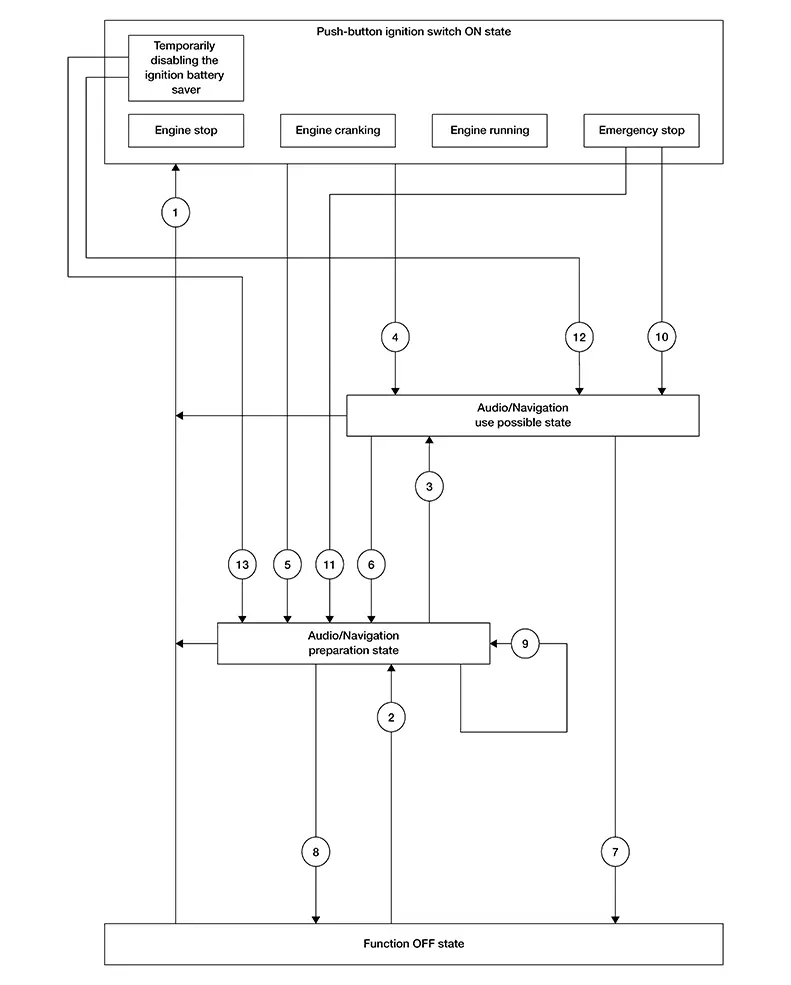
Ignition switch ON state
In this status the push-button ignition switch is operated and pressed to ON.
Audio/Navigation use possible state
-
In this status the audio/navigation, and each switch and unit that is activated by the accessory power supply can be operated.
-
When 10 minutes pass after conditions are satisfied while audio/navigation are not operated, audio/navigation turns OFF.
Audio/Navigation preparation state
-
In this status audio/navigation are stopped, but the switches and units other than those for audio/navigation that can operate by using the accessory power supply are available until the accessory power supply turns OFF.
-
When audio/navigation is operated within 1 minutes after conditions are satisfied, operation time is extended for 10 minutes. Audio/navigation can be operated for a maximum of 30 minutes after the status is satisfied.
Function OFF state
In this status the AUTO ACC function stops and power to the accessories is not supplied.
|
No. |
Function status |
Shifting condition |
Accessory power supply |
|---|---|---|---|
|
|
Shifting from “Function OFF state” to "Push-button ignition switch ON state" |
Any of the following conditions are satisfied:
|
OFF –> ON |
|
Shifting from “Audio/Navigation preparation state” to “Push-button ignition switch ON state” |
ON |
||
|
Shifting from “Audio/Navigation use possible state” to “Push-button ignition switch ON state” |
ON |
||
|
|
Shifting from “Function OFF state” to “Audio/Navigation preparation state” |
Any of the following conditions are satisfied:
|
OFF –> ON |
|
|
Shifting from “Audio/Navigation preparation state” to “Audio/Navigation use possible state” |
Operate audio/navigation. |
ON |
|
|
Shifting from “Push-button ignition switch ON state” to “Audio/Navigation use possible state” |
Push-button ignition switch OFF from ON while the front door LH is closed with Nissan Sentra vehicle speed less than 2 MPH (3 km/h). |
ON |
|
|
Shifting from “Push-button ignition switch ON state” to “Audio/Navigation preparation state” |
Push-button ignition switch OFF from ON while the front door LH is opened with Nissan Sentra vehicle speed less than 2 MPH (3 km/h). |
ON |
|
|
Shifting from “Audio/Navigation use possible state” to “Audio/Navigation preparation state” |
Any of the following conditions are satisfied:
|
ON |
|
|
Shifting from “Audio/Navigation use possible state” to “Function OFF state” |
30 minutes pass from “Audio/Navigation use possible state”. |
ON –> OFF |
|
|
Shifting from “Audio/Navigation preparation state” to “Function OFF state” |
1 minutes or 3 minutes pass from “Audio/Navigation preparation state”. |
ON –> OFF |
|
|
Shifting from “Audio/Navigation use possible state” time extension (1 minute) |
Any of the following conditions are satisfied:
|
ON |
|
|
Shifting from “Push-button ignition switch ON state” (in status of emergency stop) to “Audio/Navigation use possible state” |
Nissan Sentra Vehicle speed is less than 2 MPH (3 km/h) and except front door LH is opened. |
ON |
|
|
Shifting from “Push-button ignition switch ON state” (in status of emergency stop) to “Audio/Navigation preparation state” |
Nissan Sentra Vehicle speed is less than 2 MPH (3 km/h) and front door LH is opened. |
ON |
|
|
Shifting from “Push-button ignition switch ON state” (in status of temporarily disabling the ignition battery saver) to “Audio/Navigation use possible state” |
Press and hold the push-button ignition switch continuously for 3 seconds or more when all of the following conditions are satisfied:
|
ON |
|
|
Shifting from “Push-button ignition switch ON state” (in status of temporarily disabling the ignition battery save) to “Audio/Navigation preparation state” |
Press and hold the push-button ignition switch continuously for 3 seconds or more when all of the following conditions are satisfied:
|
ON |


Other materials:
Horn. Precaution. Precautions. Precaution for Supplemental Restraint System (srs) "air Bag" and "seat Belt Pre-Tensioner"
Precautions. Precaution for Supplemental Restraint System (srs) "air Bag" and "seat Belt Pre-Tensioner"
Precaution for Supplemental Restraint System (srs) "air Bag" and "seat Belt Pre-Tensioner"
Precaution for Supplemental Restraint System (SRS) "AIR BAG" an ...
Automatic Emergency Braking (AEB) with Pedestrian Detection
WARNING
Failure to carefully follow all warnings and instructions for proper use of
the Automatic Emergency Braking (AEB) with Pedestrian Detection system could result
in serious injury or death.
The AEB with Pedestrian Detection system on the Nissan Sentra is a supplemental
driver assis ...
Clutch. Precaution. Precautions
Precautions
Precaution for Supplemental Restraint System (srs) "air Bag" and "seat Belt Pre-Tensioner"
Precaution for Supplemental Restraint System (SRS) "AIR BAG" and "SEAT BELT PRE-TENSIONER"
The Supplemental Restraint System such as
“AIR BAG” and “SEAT BELT PRE-T ...