
Nissan Sentra B18 (2020-2025) Service Manual: Satellite Antenna
Exploded View
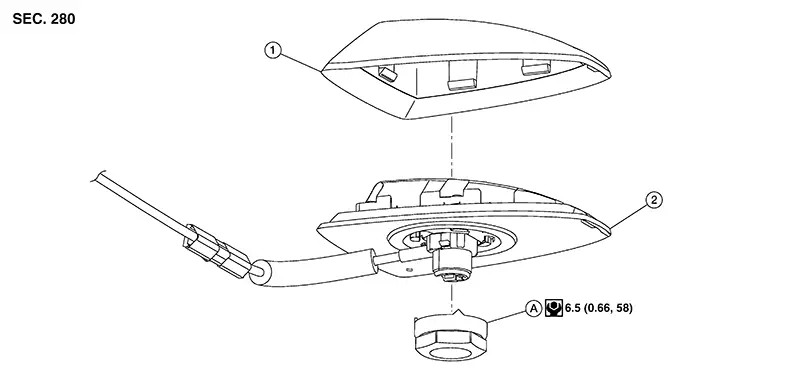
|
1. |
Outer cover |
2. |
Satellite antenna |
A. |
Satellite antenna nut |
Removal and Installation
REMOVAL
Remove headlining. Refer to Removal and Installation.
Disconnect harness connectors from satellite antenna.
Remove satellite antenna nut from satellite antenna and remove.
INSTALLATION
Installation is in the reverse order of removal.
CAUTION:
If the satellite antenna nut is not properly tightened, lower sensitivity of the antenna may be experienced. If the nut is over tightened, this will deform the roof panel.
Disassembly and Assembly
Disassembly
Remove satellite antenna. Refer to Removal and Installation.
Using a
suitable tool, release pawls and remove outer cover (1) from
satellite antenna (2). 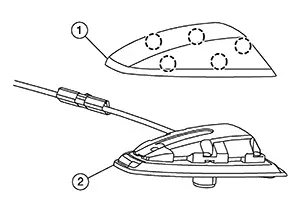
Assembly
Assembly is in the reverse order of disassembly.
 Antenna Amp
Removal and Installation
Removal and Installation
Removal
Remove
passenger side rear pillar finisher. Refer to Removal and Installation — Rear Pillar
Upper Finisher.
Remove
s ...

Other materials:
Precaution for work
When removing or disassembling each component, be careful not to damage
or deform it. If a component
may be subject to interference, be sure to protect it with a shop cloth.
When removing (disengaging) components with a screwdriver or similar
tool, be sure to wrap the component
with a ...
Dtc Description
DTC Description
DTC DETECTION LOGIC
DTC No.
CONSULT screen terms
(Trouble diagnosis content)
DTC detection condition
...
Cylinder Head
Exploded View
Exploded View
REMOVAL
1.
Cylinder head assembly
2.
Cylinder head bolt
3.
...
