
Nissan Sentra B18 (2020-2025) Service Manual: Removal and Installation
Warning:
Clean dust on the brake caliper and the brake pads using a vacuum dust collector to minimize the hazards of airborne particles or other material.
CAUTION:
-
Do not depress the brake pedal while removing the brake pads because the piston may pop out.
-
Do not spill or splash brake fluid on painted surfaces. Brake fluid may seriously damage paint. Wipe it off immediately and wash with water if it gets on a painted surface.
-
Do not bend, twist, or pull the brake hoses and piping.
-
Do not reuse drained brake fluid.

When removing components such as hoses, tubes/lines, etc., cap or plug openings to prevent fluid from spilling.
REMOVAL
Loosen the parking brake adjuster nut using the following steps: For Nissan Sentra vehicles equipped with hand lever with rear disc brakes, perform the following procedure.
-
Remove the cup holder finisher. Refer to Exploded View.
-
Pull the parking brake lever.
-
Insert a suitable tool onto the adjusting nut (A) and rotate the adjusting nut to fully loosen the cable, then release the parking brake lever.
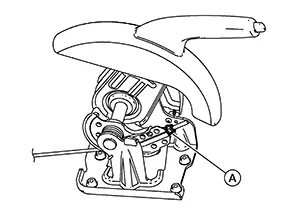
CAUTION:
Do not reuse the adjusting nut if the nut is removed.
Note:
It is not necessary to remove the adjusting nut.
-
Depress the parking brake pedal.
-
Insert a suitable tool onto the adjusting nut (A) and rotate the adjusting nut to fully loosen the cable, then release the parking brake pedal.
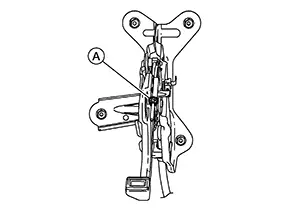
CAUTION:
Do not reuse the adjusting nut if the nut is removed.
Note:
It is not necessary to remove the adjusting nut.
Observe the brake fluid level in the master cylinder reservoir tank. Partially drain brake fluid if necessary. Refer to Draining.
Remove the rear wheel and tire using power tool. Refer to Removal and Installation.
Remove the bolts from the parking brake bracket on the rear knuckle. Refer to Exploded View (HAND LEVER WITH REAR DISC BRAKES) or to Exploded View (FOOT PEDAL WITH REAR DISC BRAKES).
Remove the return spring from the rear brake caliper. Refer to Exploded View.
Move the parking brake lever in the rearward direction and pull the rear parking brake cable in the forward direction. Separate the rear parking brake cable from the lever.
Secure the disc brake rotor using wheel nuts.
Remove the union bolt, the copper sealing washers, and disconnect the brake hose from the brake caliper. Discard the copper sealing washers. Refer to Exploded View.
CAUTION:
Do not reuse copper sealing washers.
Remove the slide pin bolts.
Remove the brake caliper from the torque member.
CAUTION:
Do not drop the brake pads, the shims, or the brake caliper.
Remove the brake pads, shims, pad springs, and pad retainers from the torque member. Refer to Exploded View.
CAUTION:
-
Do not damage the pad retainers or the piston boot.
-
Do not drop the brake pads, shims, or pad retainers.
-
Note the position of components during removal to aid with installation.
Remove the torque member bolts and the torque member.
INSTALLATION
Install the torque member and the torque member bolts. Tighten the torque member bolts to the specified torque. Refer to Exploded View.
Install the brake pads, shims, pad springs, and pad retainers to the torque member. Refer to Exploded View.
CAUTION:
Do not drop the brake pads, shims, or pad retainers.
Install the brake caliper to the torque member.
Install the slide pin bolts.
Assemble
the union bolt (A) and the copper sealing washers (1) to the brake
hose and install it as an assembly to the brake caliper. Align the
brake hose L-pin by aligning it with the brake caliper hole, and
tighten the union bolt to the specified torque. Refer to Exploded View. 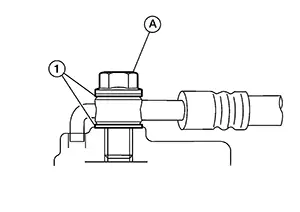
CAUTION:
Do not reuse copper sealing washers.
Install the rear parking brake cable to the lever. Refer to Exploded View (HAND LEVER WITH REAR DISC BRAKES) or to Exploded View (FOOT PEDAL WITH REAR DISC BRAKES).
Install the return spring to the rear brake caliper.
Install the parking brake bracket with the bolts to the rear knuckle.
Refill with new brake fluid and bleed air from the brake system. Refer to Bleeding Brake System.
CAUTION:
-
Do not reuse drained brake fluid.
-
Do not spill or splash brake fluid on the disc brake rotor.
Depress the brake pedal several times and perform the inspection after installation.
Install the rear wheel and tire. Refer to Removal and Installation.
INSPECTION AFTER INSTALLATION
Check the drag of the rear disc brake. If any drag is found, perform the following procedure: Remove the brake pads. Refer to Removal and Installation. Using a suitable tool, turn the piston into the brake caliper body.
CAUTION:
Do not damage the piston boot.
Install the brake pads. Depress the brake pedal several times. Check the drag of the rear disc brake again. If any drag is found, disassemble the brake caliper body. Refer to Disassembly and Assembly.Burnish contact surfaces after replacing the brake caliper or if a soft pedal occurs at very low mileage. Refer to Periodic Maintenance Operation.
 Exploded View
Exploded View
1.
Brake caliper body
2.
...
 Disassembly and Assembly
Disassembly and Assembly
Warning:
Clean dust on the brake caliper using a vacuum
dust collector to minimize the hazards of airborne particles or
other material.
CAUTION:
...
Other materials:
Head Lamp
Consult Function (bcm - Head Lamp)
CONSULT Function
(BCM - HEAD LAMP)
DATA MONITOR
Note:
The following table includes information (items)
inapplicable to this Nissan Sentra vehicle. For information (items) applicable to
this vehicle, refer to CONSULT display items.
...
Trip computer
1. Home
This display represents the main home screen of the trip computer in the Nissan
Sentra, providing quick access to commonly used driving information and system statuses.
2. Vehicle speed
The vehicle speed mode displays the current driving speed as well as the average
vehicle speed ...
System
Power Distribution System
System Description
System Description
SYSTEM DIAGRAM
Signal transmission function list
Signal name
Input
Output
...
